Loading...
Skip to Content

Our Products · Ontological DB
Ontological DB OL logo

Ontological DB

An ontology database for agentic AI. Your PostgreSQL becomes a graph database as it is.
Ask in Cypher, and link data from other systems into the graph without copying it.

PostgreSQL 16 extension · Rust (pgrx) · Apache-2.0 open source · GitHub · Docs · Tutorials

No separate graph database to build, no data to copy

Purchasing lives in the ERP, logistics in the WMS, customers in the CRM. A question like “Which shipments from suppliers affected by East Asia risks have not arrived yet?” can only be answered by following the relationships between systems. The usual fix is to stand up a separate graph database and move the data over with ETL, which means managing servers and permissions twice — and the copy is always behind the source.

Ontological DB adds a graph to the PostgreSQL you already run, with a single extension. You query the data in Cypher, and tables in other databases are declared as graph nodes without copying them, read from the source at query time. Permissions, auditing and point-in-time queries are handled by the database itself, so the same rules apply whether a person or an AI agent is asking.

Demo ① Scattered supply-chain data, one Cypher query, no copies — data sources · virtual nodes · virtual relationships (2:23)

Three declarations, one query

Register external databases as data sources, then declare tables as nodes and the key mappings between systems as relationships — once. From then on, a single Cypher pattern queries several databases together, with no join conditions to write.

CREATE DATASOURCE wms WITH ENGINE = 'mysql',
  PARAMETERS = {host: '…', database: 'wms', password: $pw}
CREATE VIRTUAL NODE Shipment FROM wms.shipment KEY shipment_no
CREATE VIRTUAL RELATIONSHIP SHIPPED_BY
  FROM Shipment(vendor_code) TO Supplier(supplier_id)
// risks in the graph, suppliers in the ERP, shipments in the WMS
MATCH (:Region {name: 'East Asia'})<-[:IN_REGION]-(e:RiskEvent)
      -[:AFFECTS]->(s:Supplier)<-[:SHIPPED_BY]-(sh:Shipment)
WHERE sh.ship_status <> 'DELIVERED'
RETURN e.title, s.name, sh.shipment_no

Knowledge stored in the graph (risks) and rows in the source systems (suppliers, shipments) come back from a single query. Not a single row of data is copied.

Demo videos, about two minutes each

Each one starts from an empty database and shows what was actually typed and run in the portal editor. The explanations appear as on-screen captions, in Korean.

Demo ② Three languages, one graph — Cypher and TypeQL read and write an ontology imported from OWL (2:55)

Demo ③ Time travel — the same query five times, changing only the point in time (2:16)

Demo ④ Built-in security — the same query returns different paths depending on the role (2:38)

Demo ⑤ Schema evolution — fixing a wrong type in a live graph (2:08)

Demo ⑥ Agent interface — reading the schema, getting it wrong, fixing it (2:02)

Demo ⑦ Vector search — relationship search finds the answer document search missed (2:16)

Key Features

The database does what applications used to build themselves — and every feature has a tutorial that was actually run to verify it
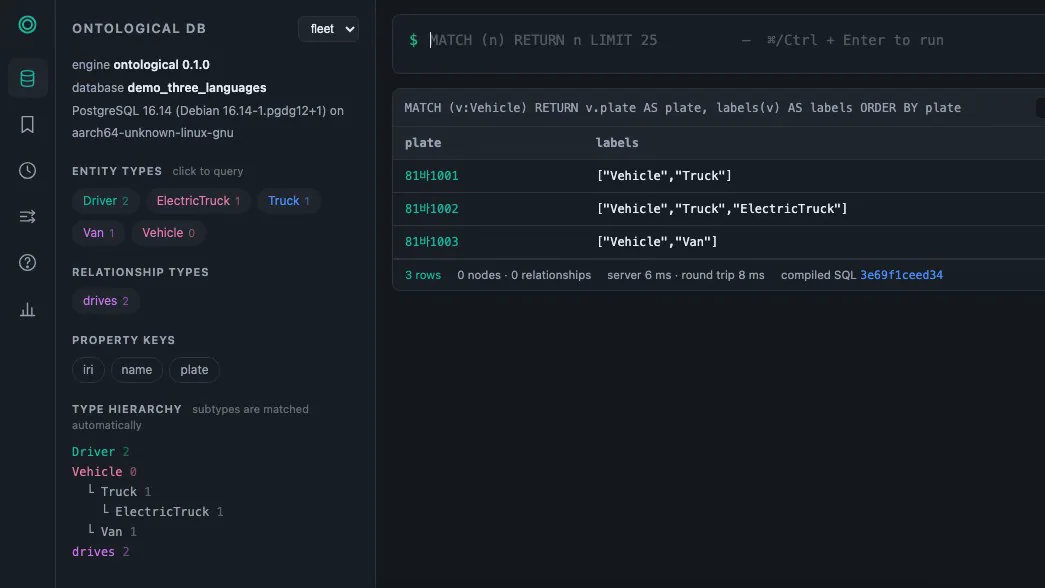
Cypher results querying trucks, electric trucks and vans together through a single Vehicle label, with the type hierarchy on the left

PostgreSQL that speaks Cypher

Cypher queries compile into ordinary SQL that the PostgreSQL planner optimizes. Properties are real columns generated for each type, not JSON blobs, so indexes, statistics and constraints apply as usual. Query a parent label and its subtypes come back too. Neo4j drivers connect over Bolt — just change the connection address.

Bolt 4.4 gateway — authentication uses PostgreSQL roles as they are, and the Neo4j MCP server works unmodified
All 24 guide queries from the official Neo4j Movies example return the same results as Neo4j
Imports OWL ontologies as a type hierarchy, and reads and writes the same graph in TypeQL too
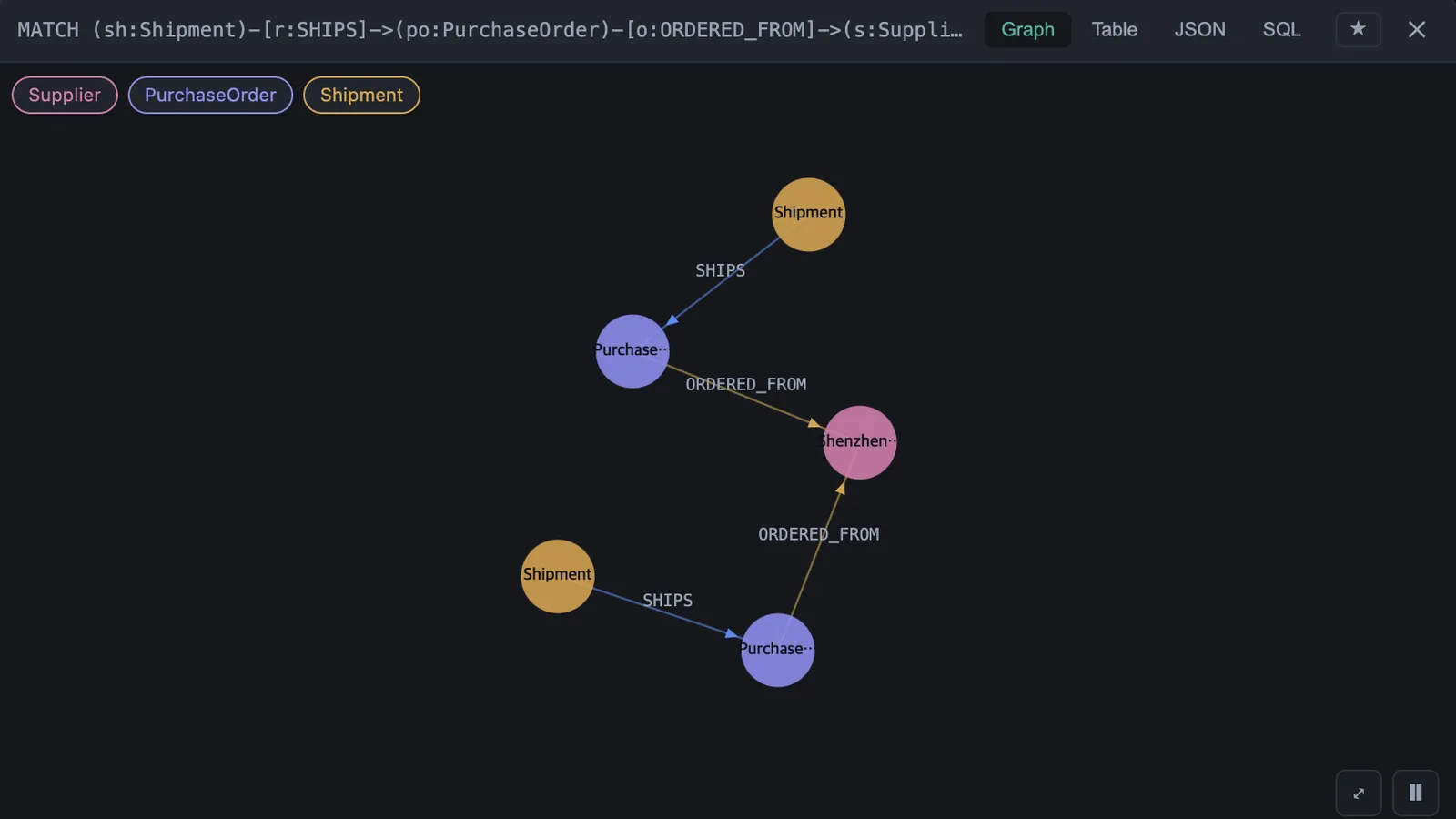
Rows from separate source systems joined in one graph result — two late shipments, each through its own purchase order, meet at the same supplier

A data fabric without copies

Register an external database with CREATE DATASOURCE … WITH ENGINE and declare a table as a node with CREATE VIRTUAL NODE … FROM … KEY …. Filters and joins within the same database run at the source, and only the rows needed come back. Joins and aggregations that span several sources go into the node definition (AS SELECT) just once.

Sources: PostgreSQL · MySQL/MariaDB · Oracle · SQL Server (TDS 7.2)
A Cypher query joining PostgreSQL, Oracle and SQL Server virtual nodes measured at about 140 ms, with Korean (Hangul) text intact
Sources are read-only. Even if the source account has write access, the engine refuses first.
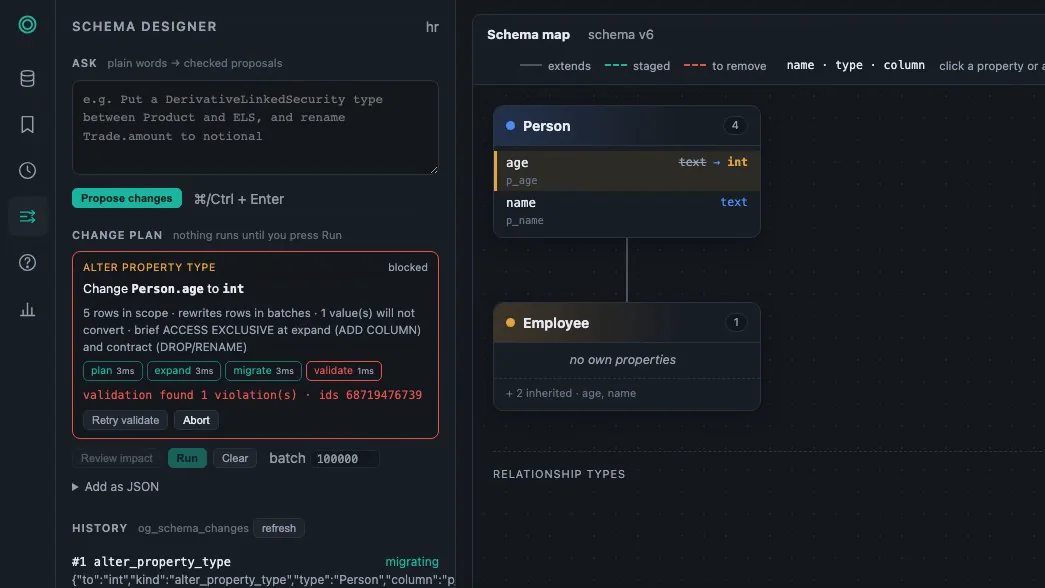
Schema designer — changing an age property to an integer halts on one validation violation and shows the id of the offending node

Change the schema while in service

A schema change goes through plan → expand → migrate → validate → contract, and every step is logged. The plan step changes nothing: it first tells you how many values cannot be converted and which nodes hold them. Reads keep being served during the change, and writes that do not fit the new type are rejected from that moment on.

Existing rows move in batches and resume from where they stopped.
Renaming or adding a parent type rewrites not a single row.
Each schema version keeps a catalog snapshot and its change history.
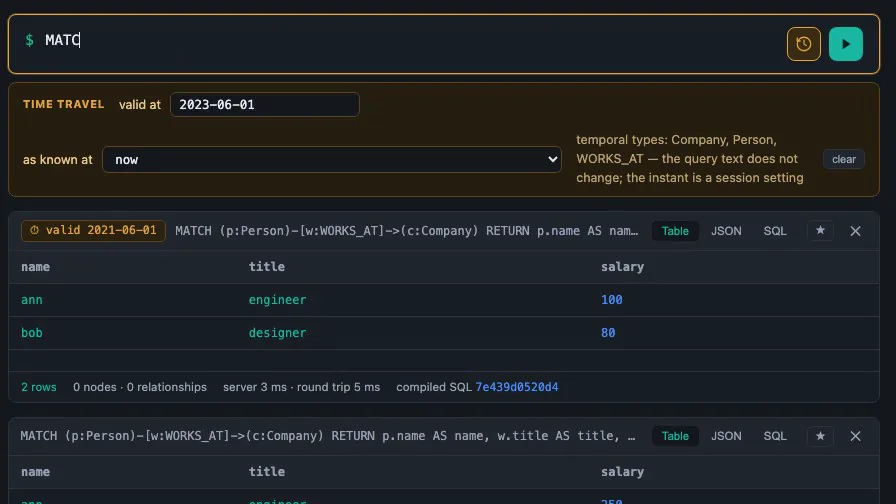
Entering a point in time in the time-travel bar and rerunning the same query: the salary comes out different for 2021 and today

Time travel — yesterday’s answer, from the same query

Each type records both valid time and system time. Because it tells apart a real-world change (an update) from fixing a value that was recorded wrong (a correction), “the actual salary in June 2023” and “the June 2023 salary as we knew it when we filed the audit report” come back as different answers.

Leave the query as it is and change only the session’s point in time. The compiled SQL is identical too.
A change dated in the future does not affect current results until that date arrives.
A query that cannot be answered as of that point in time is rejected with an error instead of returning current data.
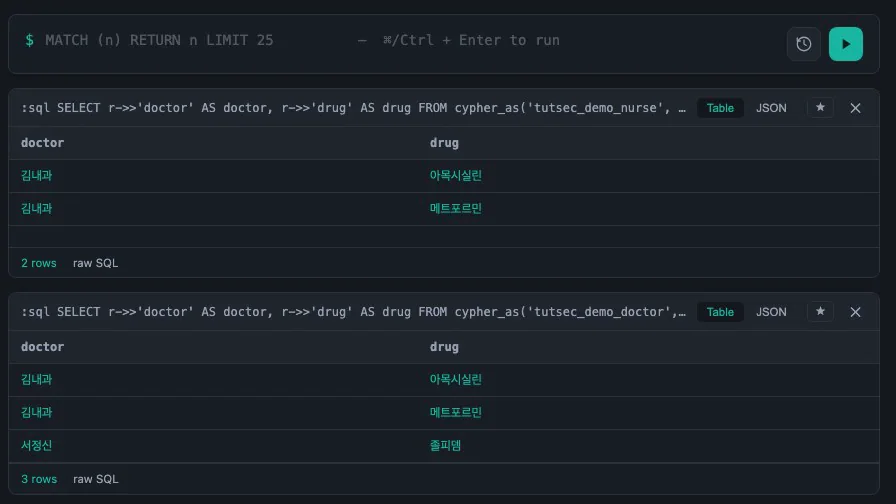
The same query run as a nurse and as a doctor: the nurse gets two paths, the doctor three

The database enforces permissions

Users are PostgreSQL roles, and connecting over Bolt authenticates as that same role. With row-level security on a type, nodes you are not allowed to read drop out of the join, and every path that passes through them disappears from the result. Permissions are enforced during traversal, even when the node itself is not part of the result.

Write permissions apply per type, operation and property, and Cypher, SQL and Bolt all refuse by the same rules.
AI agents are allowed only Actions that carry a parameter contract and preconditions
The audit log records who did it, on whose behalf, and why — and not even a writer role can modify it.
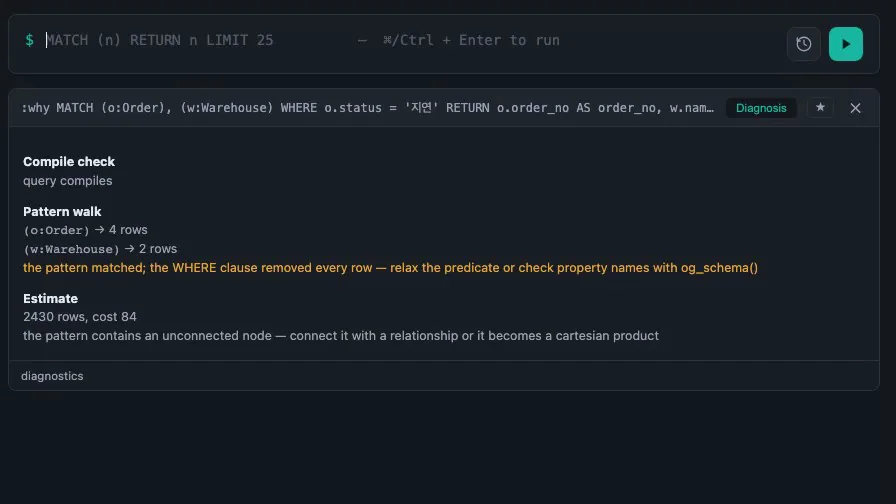
Diagnosis before running a query — row counts at each step of the pattern and a Cartesian-product warning for unconnected nodes

An interface agents can correct themselves against

When an agent meets a graph for the first time, the database itself hands it what it needs: a schema trimmed to fit in a prompt, error codes and suggested fixes without running the query, the reason a query with no errors returned zero rows, and a cost estimate before execution.

A schema summary that includes relationship directions
When a result has zero rows, it tells you where in the pattern the match broke off.
Cartesian products are flagged before execution, and executed queries are written to the audit log.
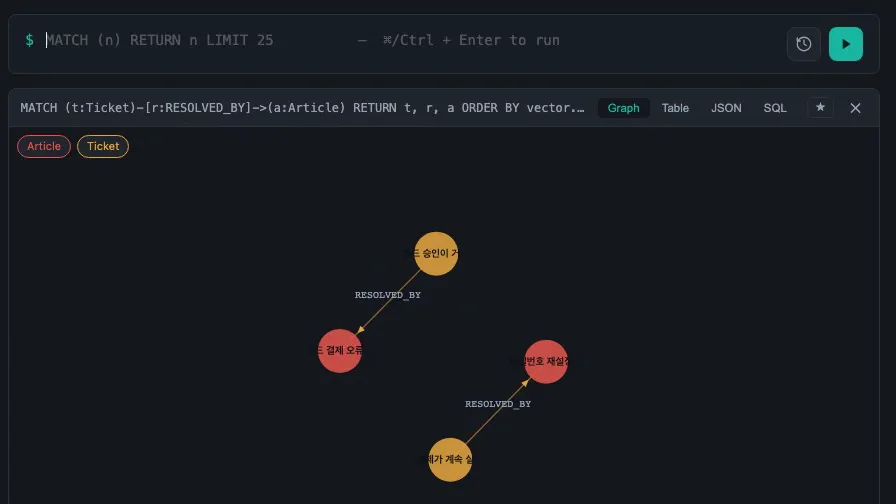
Result graph: embeddings on relationships find customer inquiries and documents with a similar resolution reason

Embeddings on relationships, too

Embeddings are properties, not a separate vector store, so they can be declared on relationships as well as nodes. Search relationship context by meaning — “why was this inquiry resolved by this document?” — and run similarity ranking together with graph patterns and filters in a single SQL statement.

The same CREATE VECTOR INDEX statement as Neo4j
Filters apply before the top k are picked.
Hybrid search (RRF) that combines vector rank with graph distance
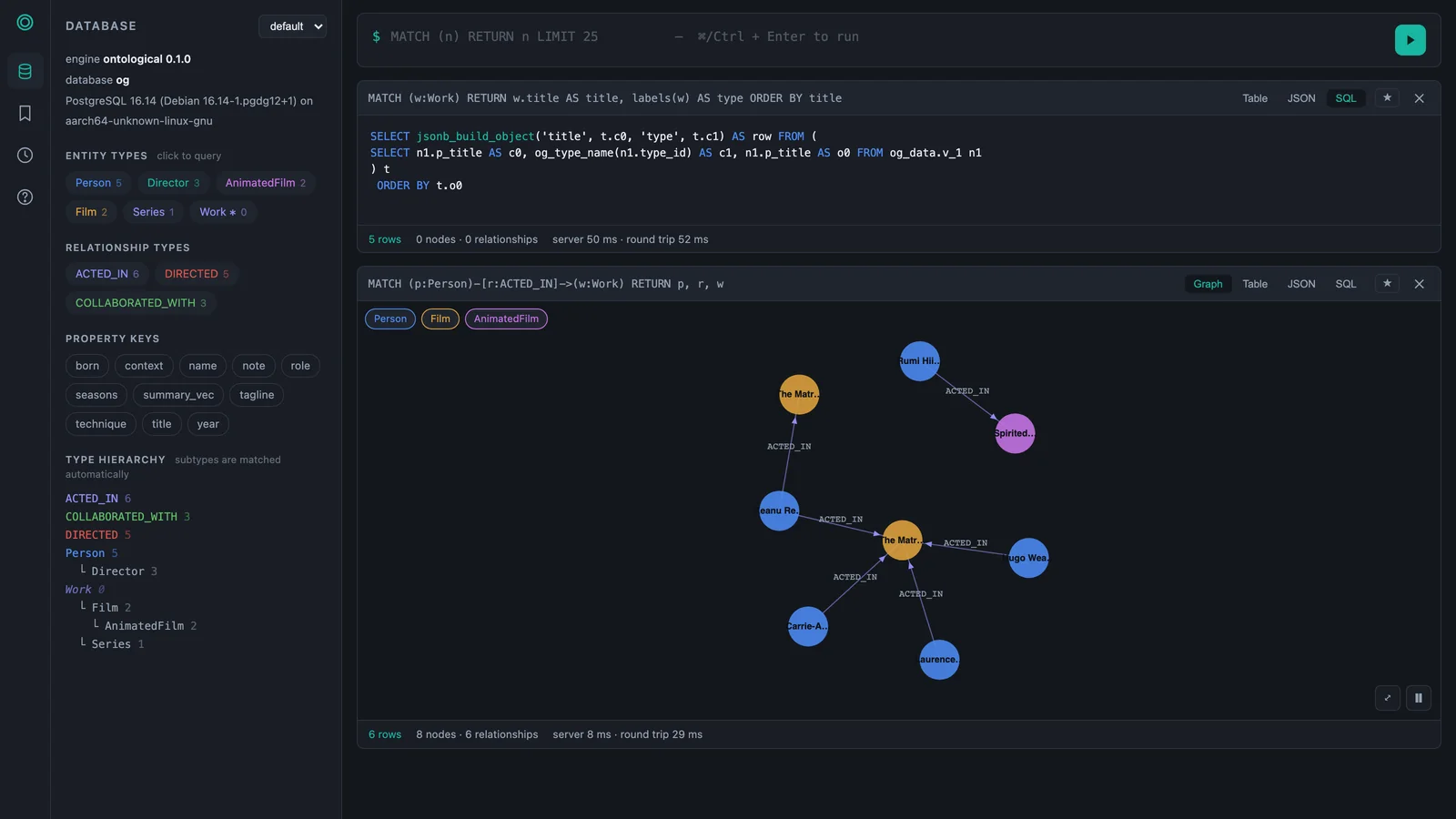
Ontological Portal — types, relationships and the inheritance hierarchy on the left; the SQL compiled from Cypher and the graph result on the right

Ontological Portal

A web console for working with the graph directly. Type Cypher and fabric statements into the editor and the results come back as a graph, a table or JSON; the SQL tab shows the exact SQL the Cypher compiled to. Types, relationships and the inheritance hierarchy are laid out on the left.

Graph · Table · JSON · SQL tabs
Schema map (designer) · time-travel bar · query history
:schema · :why · :explain commands; pass passwords with :param (never stored in the history)
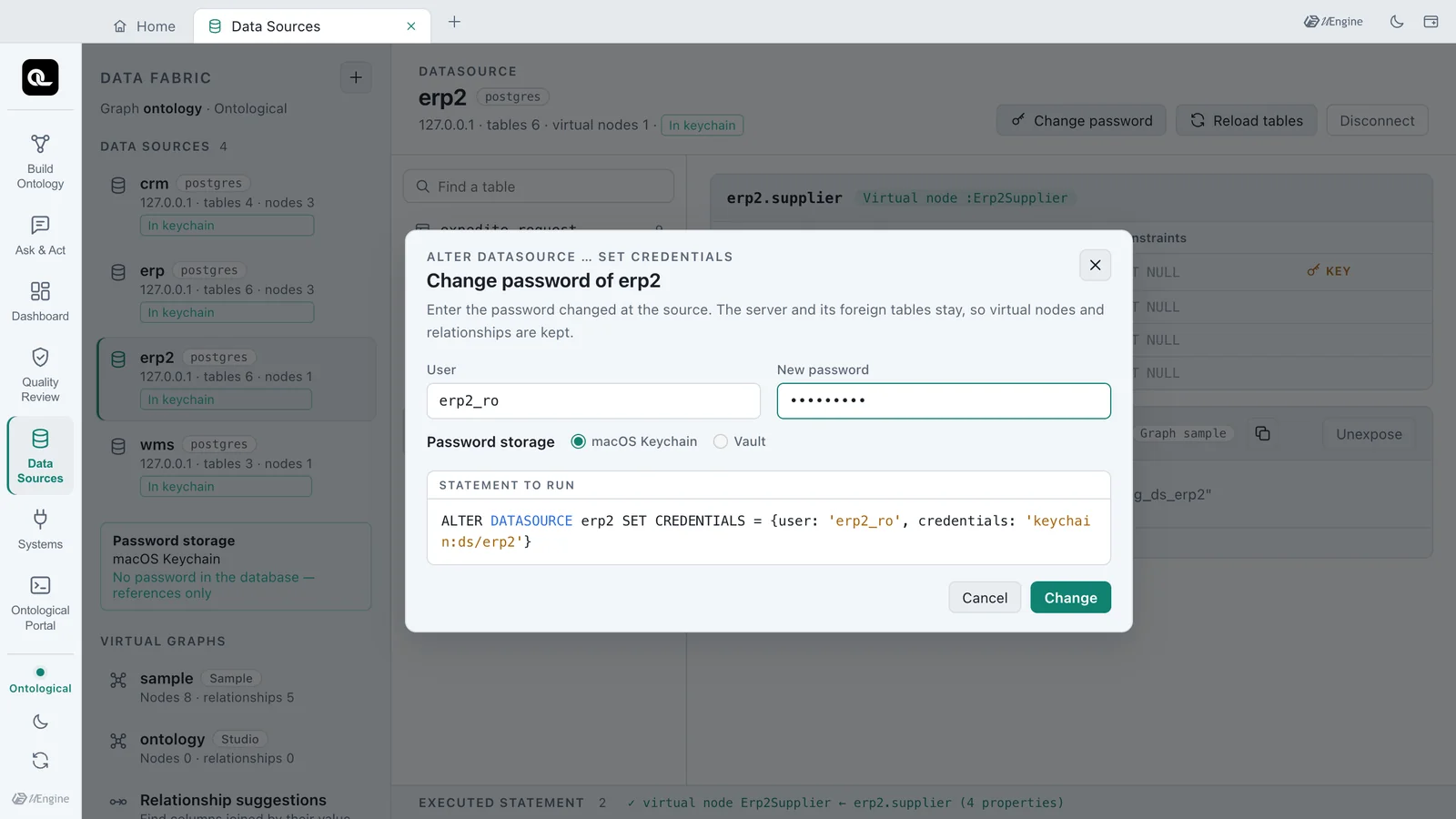
Change password — the ALTER DATASOURCE erp2 SET CREDENTIALS statement carries a keychain reference instead of the password

Datasources without passwords

A datasource stores a reference instead of a password (credentials: 'keychain:erp', 'vault:…'). No password is left in the user mapping, the catalog, the audit trail or the server log. The connector that reaches the source reads the password from a file outside the database.

ALTER DATASOURCE … SET CREDENTIALS — foreign tables and virtual nodes stay
SHOW CREDENTIALS — what to write to which file (no secrets)
The parameters of a create statement run as bind values, never pasted into the SQL

Tutorial chapter 22

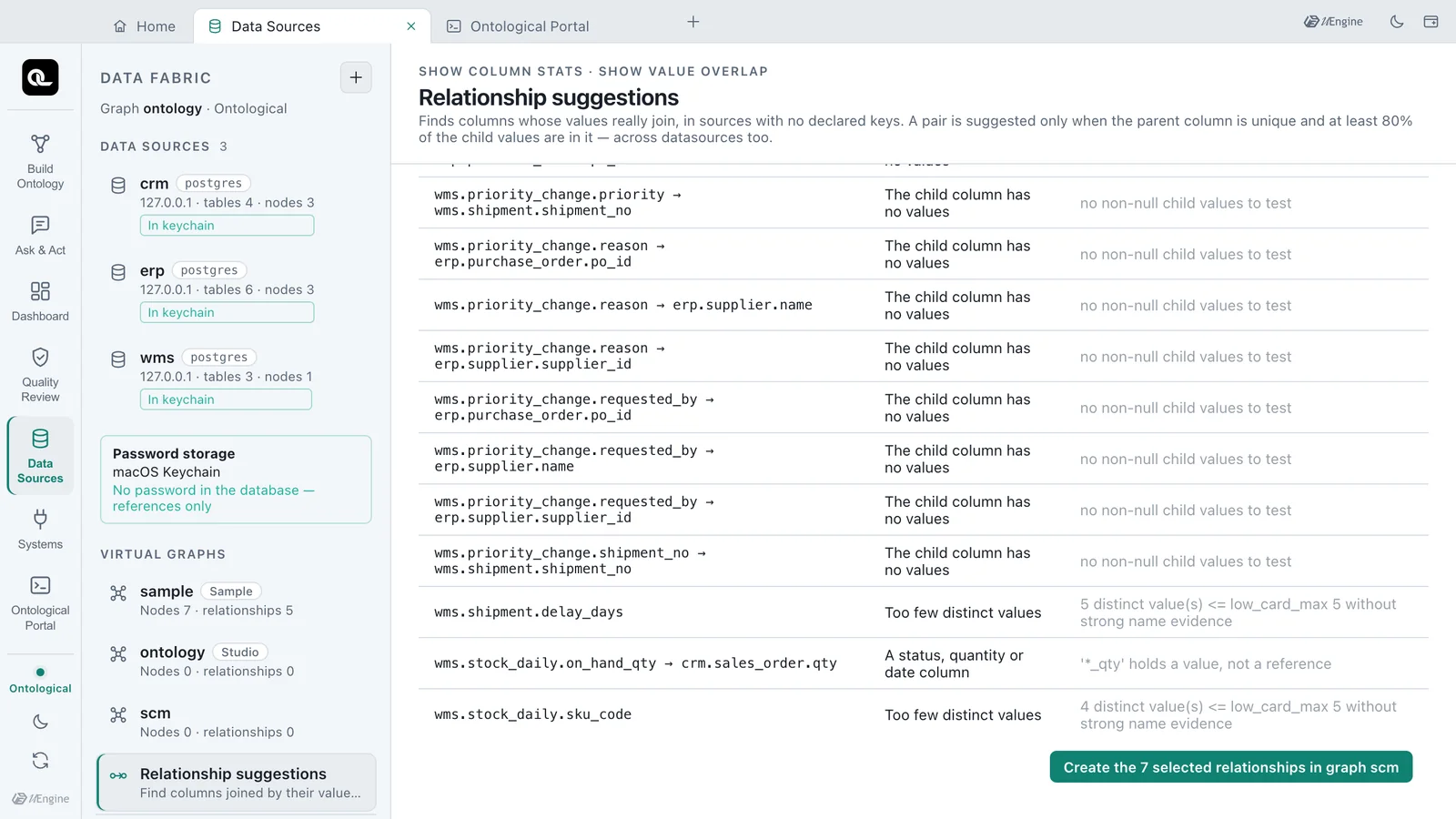
Candidates left out — why status and date columns were rejected, by value overlap and duplicates

Statements that measure the source

SHOW COLUMN STATS measures each column: NULLs, distinct values, whether values repeat, and the most frequent values. SHOW VALUE OVERLAP checks how many of one column's values appear in another. Neither copies the source. The database only measures; Studio judges the relationships and shows the evidence.

Measures with the same statements across datasources.
With the same type, the comparison runs at the source (push down).
Reads the source only — never writes to it.

Tutorial chapter 23


Compared with NVIDIA Auto Ontology

Auto Ontology keeps a glossary and catalog in PostgreSQL and pgvector and writes SQL from them. Ontological DB is a graph database inside PostgreSQL: the ontology itself is what you query, and it joins several sources without copying them.

ItemNVIDIA Auto OntologyOntological DB
Where the ontology livesCatalog tables for writing SQL.A graph you query directly — Cypher · TypeQL, and Bolt that Neo4j drivers connect to.
Joining several databasesQueries each connection separately.Reads source tables as virtual nodes and joins them in one Cypher query.
Source passwordsWithout Vault, stored in the database unencrypted.Keeps only a reference; the connector reads the password from a file outside the database.
Measuring for relationshipsThe app reads 1,000 rows of each table and computes.Measured with SHOW COLUMN STATS · SHOW VALUE OVERLAP, without copying the source.

The NVIDIA column was confirmed in the published source code and official documentation.


How It Works

It is a PostgreSQL extension, not a new server. Source databases are reached through PostgreSQL foreign tables (FDW), and Cypher is translated into SQL whose cost the planner estimates.

1. Install

Run CREATE EXTENSION ontological on PostgreSQL 16. The graph is just tables and indexes inside this database.

2. Connect

CREATE DATASOURCE registers a source database. Registering is enough to see its tables, and not a single row of data moves.

3. Declare

Declare tables as virtual nodes, and the key mappings between systems as virtual relationships, once. Every hop after that applies the join.

4. Ask

Cypher compiles to SQL. Filters and joins within the same database run at the source; joins across different databases are handled by PostgreSQL.

5. Inspect

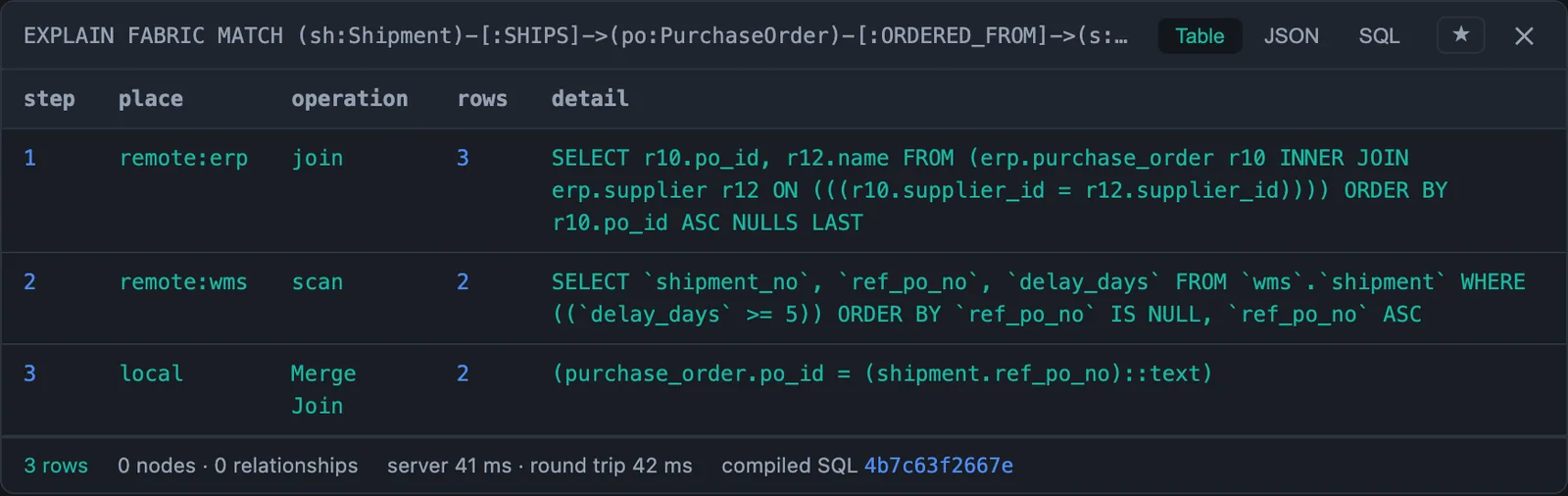
Prefix a query with EXPLAIN FABRIC to see, step by step, the SQL actually sent to each source and the number of rows that came back.

6. Govern

Roles, row-level security, auditing and point-in-time queries use PostgreSQL’s own features. Nothing is ever written to the sources.
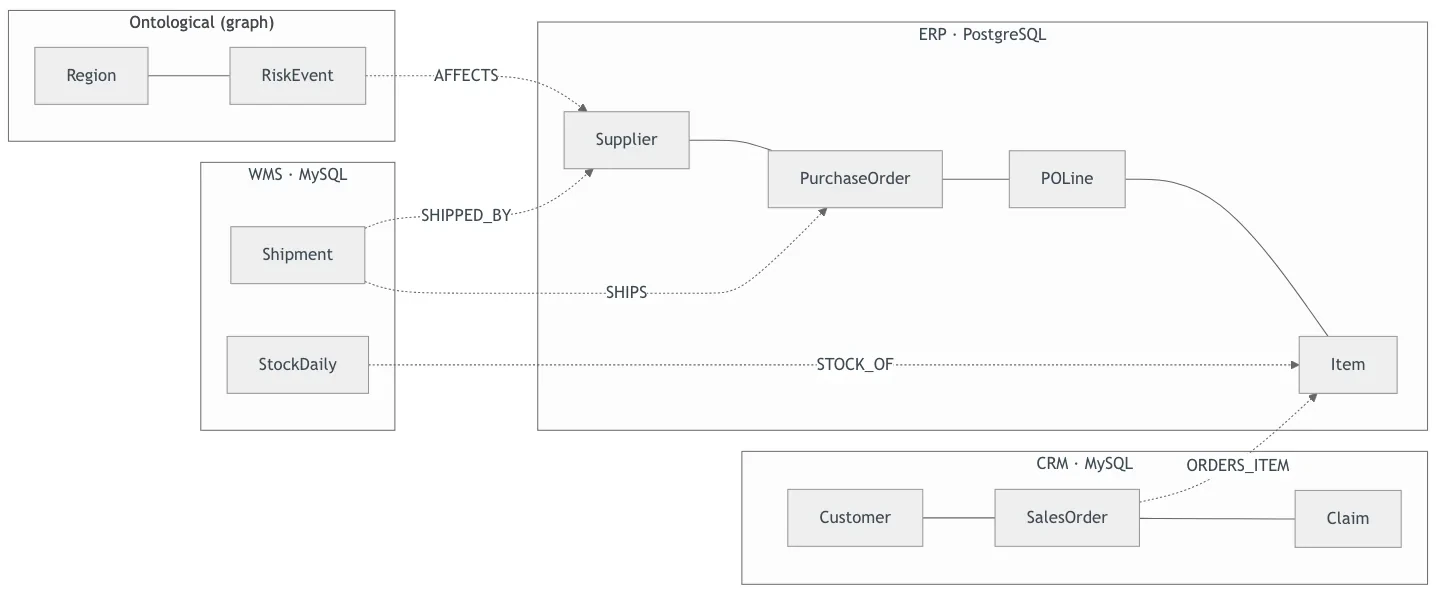
Data fabric example — regions and risks in the graph, suppliers, purchase orders and items in a PostgreSQL ERP, shipments and inventory in a MySQL WMS, and customers, orders and claims in a MySQL CRM, linked by dashed virtual relationships
Dashed lines are virtual relationships that cross databases. Solid lines are relationships within one database.
EXPLAIN FABRIC result — a step-by-step table: in the ERP the join runs at the source, and the WMS receives only SQL carrying the delay condition and returns 2 rows
EXPLAIN FABRIC — the ERP joined purchase orders and suppliers internally, and the WMS sent back only the 2 rows matching the delay condition.

Two time axes — bitemporal

Every fact records both valid time (when it applies) and system time (when it was recorded that way). Even after a later correction, you can reproduce exactly what a decision was based on at the time. Follow along in the tutorial
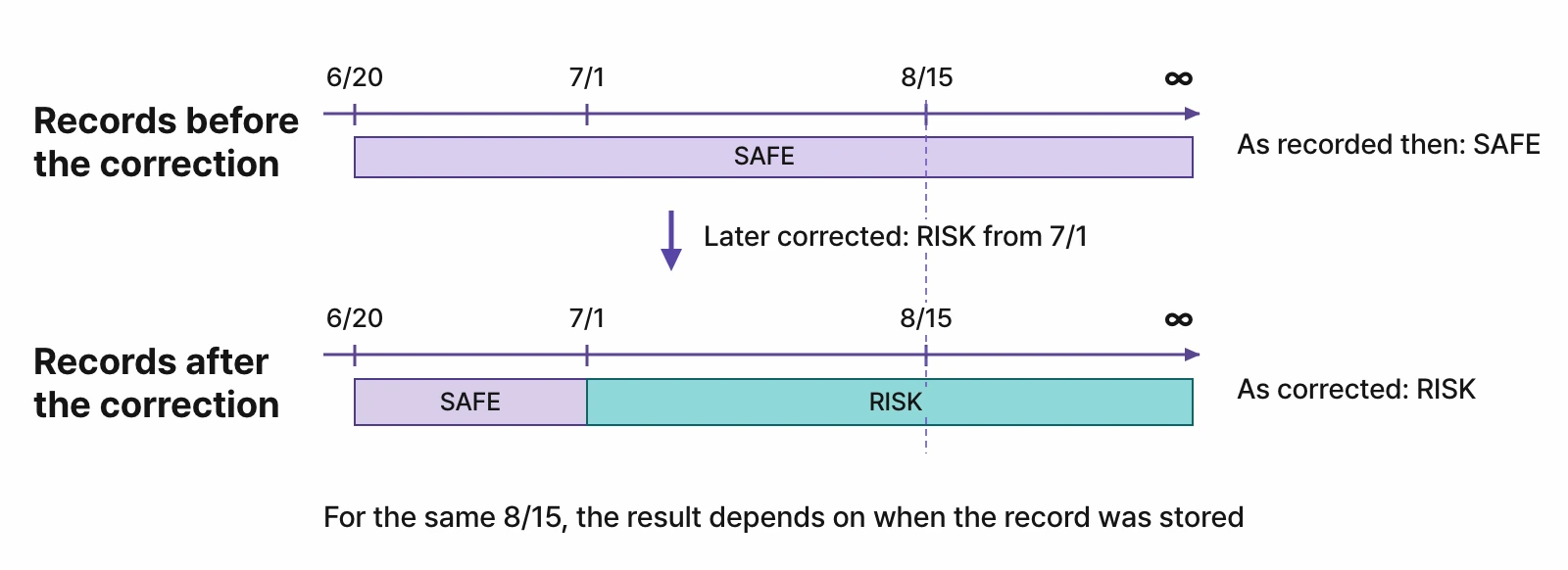
Valid period and recorded period for the same product — by the records stored before the correction, August 15 was SAFE; by the later correction saying it was RISK from July 1, it is RISK
Before and after a correction — ask about the same August 15 and the answer is SAFE or RISK, depending on which point in the record you read from.
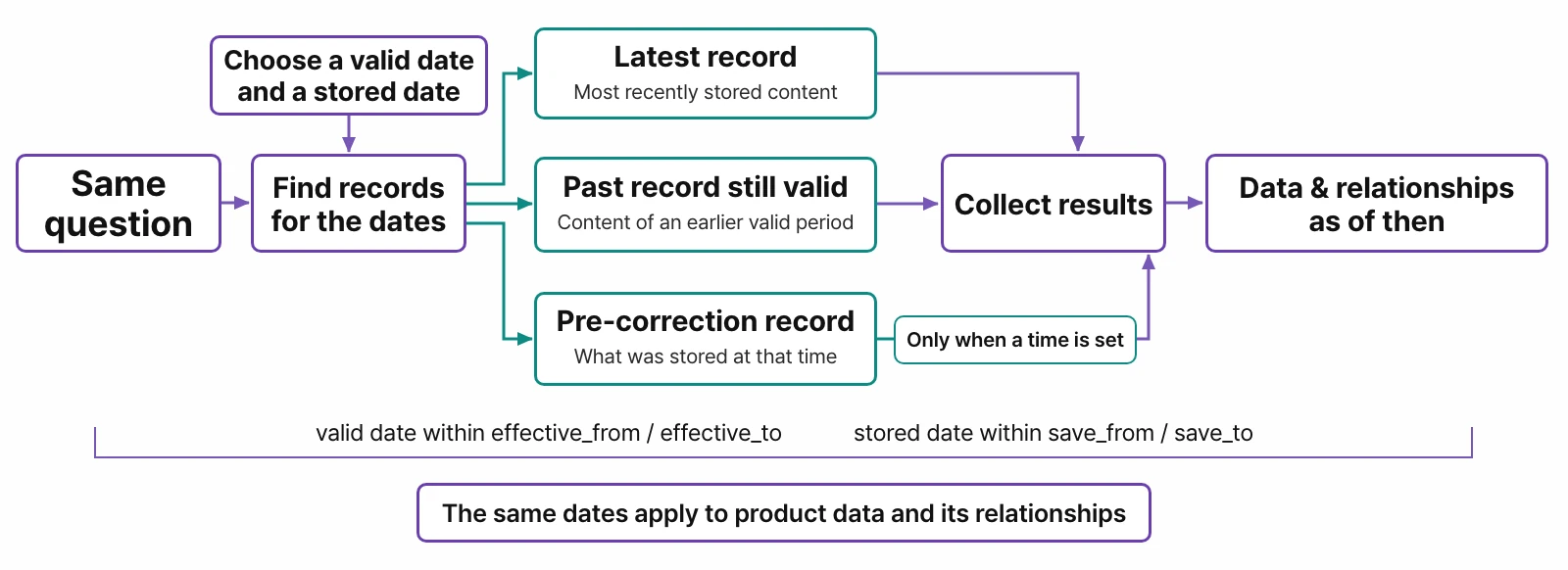
Point-in-time query flow — for the same question, choosing a valid date and a recorded date finds the matching record among the latest records, past records still recognized, and records from before a correction, and answers with the information and relationships as of then
Point-in-time queries — leave the query as it is and pick only the valid date and the recorded-as-of date. Relationships are chosen and joined as of the same point in time.
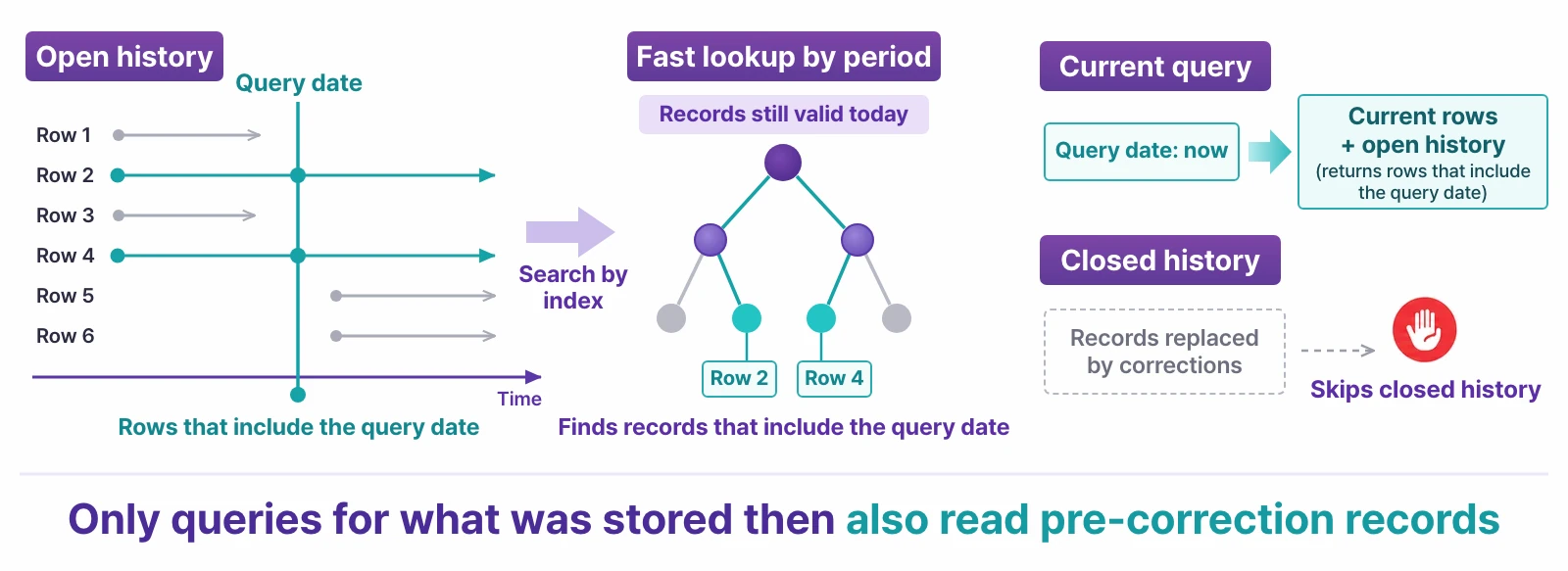
Fast lookup by period — an index finds the rows whose period contains the query date; a current query scans only current rows and open history, and closed history superseded by corrections is searched only by queries that specify a point in time
Fast point-in-time search — current queries read only current rows; records from before a correction are searched only when you specify a point in time.
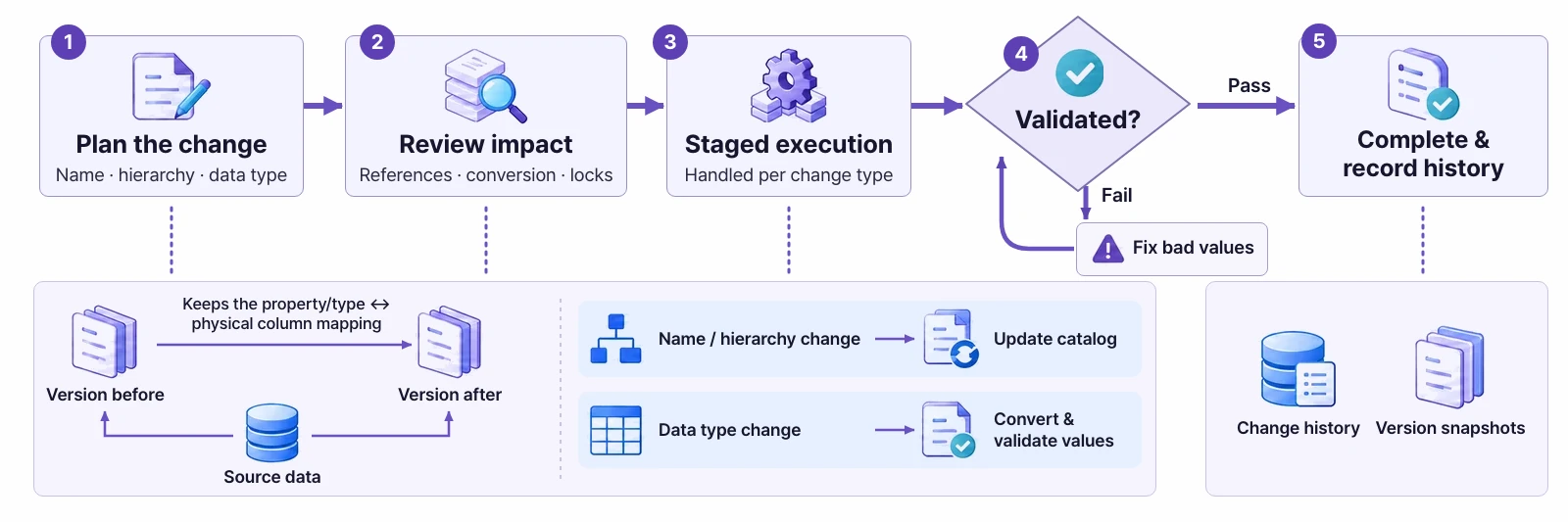
Schema change steps — change plan, impact review, step-by-step execution, validation check, completion and history record. If validation fails, correct the bad values and validate again
Schema change steps — plan → impact review → step-by-step execution → validation → completion. The change does not complete while any value cannot be converted.

How it differs from running a separate graph database

Compared with standing up a separate graph database and moving business data into it with ETL so you can query along relationships.

Category Separate graph DB + ETL replication Ontological DB
Installation · operations Stand up and operate a separate graph DB server One extension on the PostgreSQL you already run
Business data Copied by ETL — the copy always lags the source Read from the source at query time through virtual nodes; no copies
Joins across systems Join conditions rewritten for every query Declared once as a virtual relationship; every hop after that applies the join
Permissions · auditing Configured separately in the graph DB and in each source One set of PostgreSQL roles, row-level security and auditing, enforced even during traversal
Point-in-time queries Snapshots or history tables designed separately Change only the session’s point in time and the same Cypher returns the results as of then
Schema changes Migration scripts written separately Plan → expand → migrate → validate → contract, while the service runs
How to connect Graph DB–specific drivers Both Neo4j drivers (Bolt) and PostgreSQL clients

Current scope — source databases are read-only, and variable-length traversal over virtual relationships (*1..n) is not supported yet. Cypher UNION and SPARQL are not supported yet either. Unsupported items for each feature are listed in the product documentation.


Ontological Studio

It comes inside Ontological Studio

Ontological DB is the engine of the desktop app Ontological Studio. One installer bundles PostgreSQL 16, the Ontological extension, the Bolt gateway and the portal, so you can try it right away with nothing else to install.

Connect source databases in the Data Sources tab and expose them as virtual nodes; on top of them, agents build the ontology and answer with evidence. To install it on a server yourself, get the source from GitHub and build the extension.
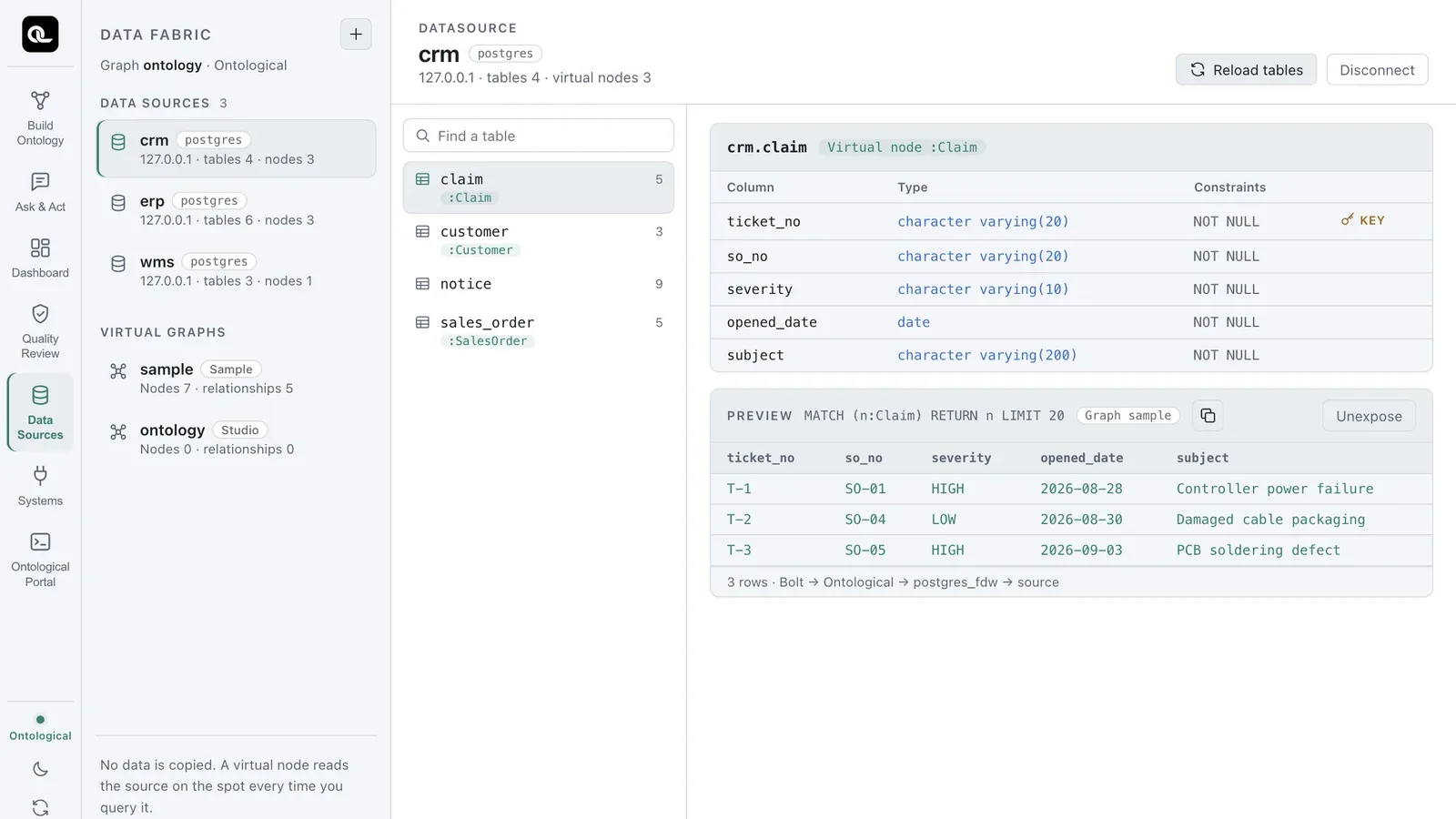
Ontological Studio Data Sources tab — connecting source databases and exposing them as virtual nodes

Related Solutions

Build ontologies, run them, put them to work

Ontological Studio

A desktop app that connects documents and source databases without replication, so agents can build an ontology, answer with evidence, and — after approval — run actions in business systems.

Learn more

Ontologic Platform

An execution platform for natural-language queries, root-cause analysis, what-if simulation and monitoring automation on top of the ontology.

Learn more

Process GPT

An agentic process platform that connects people, AI agents and existing systems in a single business process.

Learn more

Run it yourself

Ontological DB is Apache-2.0 open source. There are seven tutorials, one per feature, each actually run from an empty database.
The fastest way to get started is to install Ontological Studio.


Have more questions?

Want to learn more about Ontological DB, or have a question? Get in touch anytime.