Industry AI Solutions
Records that let you undo work also guide your next decision
Records kept to undo AI work help us learn from the past, simulate the future, and give people and agents the same evidence for decisions. All figures in the examples below come from virtual companies.
1 · Undo work
When AI does the work, some of it will need undoing
Starting with 1,000 units in stock, an agent misreads demand and reserves 200 at 9 a.m. on Monday. An employee ships 30 at 11 a.m. on Tuesday, and approval is rejected at 2 p.m. that day. Undoing only the agent’s reservation must leave 970 units, with the employee’s shipment intact.
2 · Learn from the past
Records kept for undo also reveal insights
Records kept for undo also explain why sales were low last summer. Inventory history distinguishes weak demand from stockouts. Sales records alone suggest Q3 air circulator demand of 3,972 units, but accounting for 146 stockout days over the past year raises the estimate to 6,545.
3 · Simulate the future
Use the past to simulate the future before acting
With past records available, ask, “What happens if we increase that product’s order quantity to 1.5 times the current amount?” It estimates about KRW 46.64 million more revenue and KRW 7.72 million more inventory value over the next year. This question adds 0 new ledger records.
4 · Share the evidence
People and agents decide from the same evidence
People and agents can review the same simulation results. The numbers people see on the ERP screen and agents receive through the AI connection standard (MCP) come from the same ledger, models, and permissions.
Test first, act, and undo mistakes.
It all comes from one ledger that keeps its records
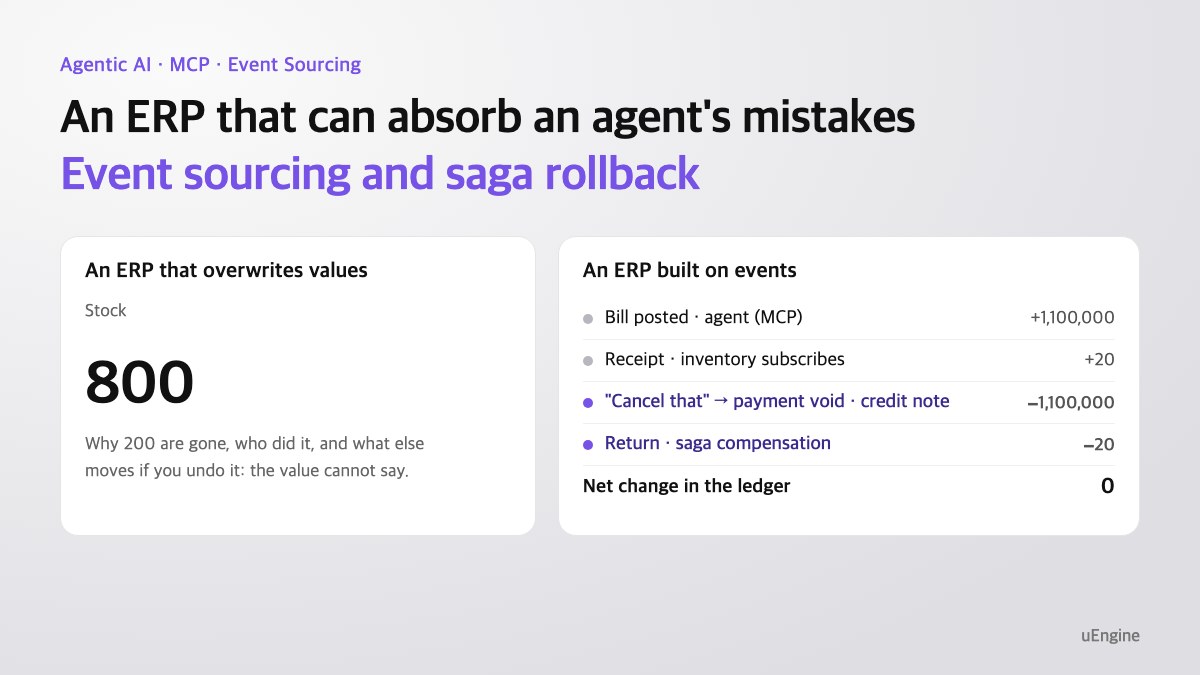
State-based data keeps only the latest value. Event-based data (event sourcing) adds a row for each event and calculates current values from those records.
| Time | Item | Stock |
|---|---|---|
| Mon 08:00 | Part A | 1,000 |
| Mon 09:00 | Part A | 800 |
| Tue 11:00 | Part A | 770 |
| Only the last row remains | ||
Approval was rejected at Tue 14:00. The table does not show why stock fell by 200. Restoring 1,000 would also erase the 30 units shipped by an employee.
| No. | Time | What happened | Who | Quantity |
|---|---|---|---|---|
| 1 | Mon 08:00 | Goods received | Warehouse staff | +1,000 |
| 2 | Mon 09:00 | Materials reserved (saga 41) | Agent | -200 |
| 3 | Tue 11:00 | Goods shipped | Warehouse staff | -30 |
| 4 | Tue 14:00 | Approval rejected (saga 41) | Manager | 0 |
| 5 | Tue 14:00 | Reservation cancelled (saga 41) | Server | +200 |
| Add all rows to get current stock | 970 | |||
The rejection is handled by adding row 5. Earlier rows remain, including the 30 units shipped by the employee.
A simplified example.
State-based systems can also add history to fill the gaps, but those records are an addition.
We tested it
We connected uEngine ERP and Process GPT Lite through MCP and ran voucher processing, cancellation in chat, and question-and-answer conversations 5 times each with a virtual company locally; all passed. These are not production results, and the Lite integration will be released soon.
Upload a tax invoice, then cancel in chat (Korean UI and narration)
- Upload, and it asksUpload a tax invoice file, and it reads the supplier and amount of KRW 1,100,000, then asks, “Shall I process this in ERP?”
- Accept, and it processes the invoiceIt finds the supplier and product, posts the voucher, and makes the payment, while inventory, accounting, and tax modules use the records to create goods receipts, journal entries, and VAT totals.
- Cancel in chatSay, “I'll cancel what we just did,” and the server checks the scope, cancels the payment, and posts a credit note in reverse order; the LLM does not control cancellation.
- Check the numbersBoth the original work and cancellation remain, and this task’s net changes—bank deposits -KRW 1,100,000, input VAT +KRW 100,000, merchandise +KRW 1,000,000, and air circulator motors +20 units—are all 0 after cancellation, which does not mean the company’s total balances are zero.
- Stop when cancellation is blockedIf goods have shipped, the accounting period is locked, or someone else has continued the work, it explains why and changes nothing.
Just ask in chat
- What will sell the most in each quarter next year?In the virtual company, air circulators have a probability of over 99% of ranking first in Q3 2027; humidifiers have a 39% probability in Q4.
- Can I trust this forecast?Using the ledger from a year earlier, revenue in all 3 completed quarters fell within the predicted ranges, and the top product was right in 2 quarters.
- What happens if we increase that product's order quantity to 1.5 times the current amount?For the virtual company, it estimates about KRW 46.64 million more revenue and KRW 7.72 million more inventory value over the next year, while this conversation adds 0 new ledger records.
Where do the three products stand?
We compare features using the same four questions and add access details; all figures and screens come from virtual companies and synthetic data.
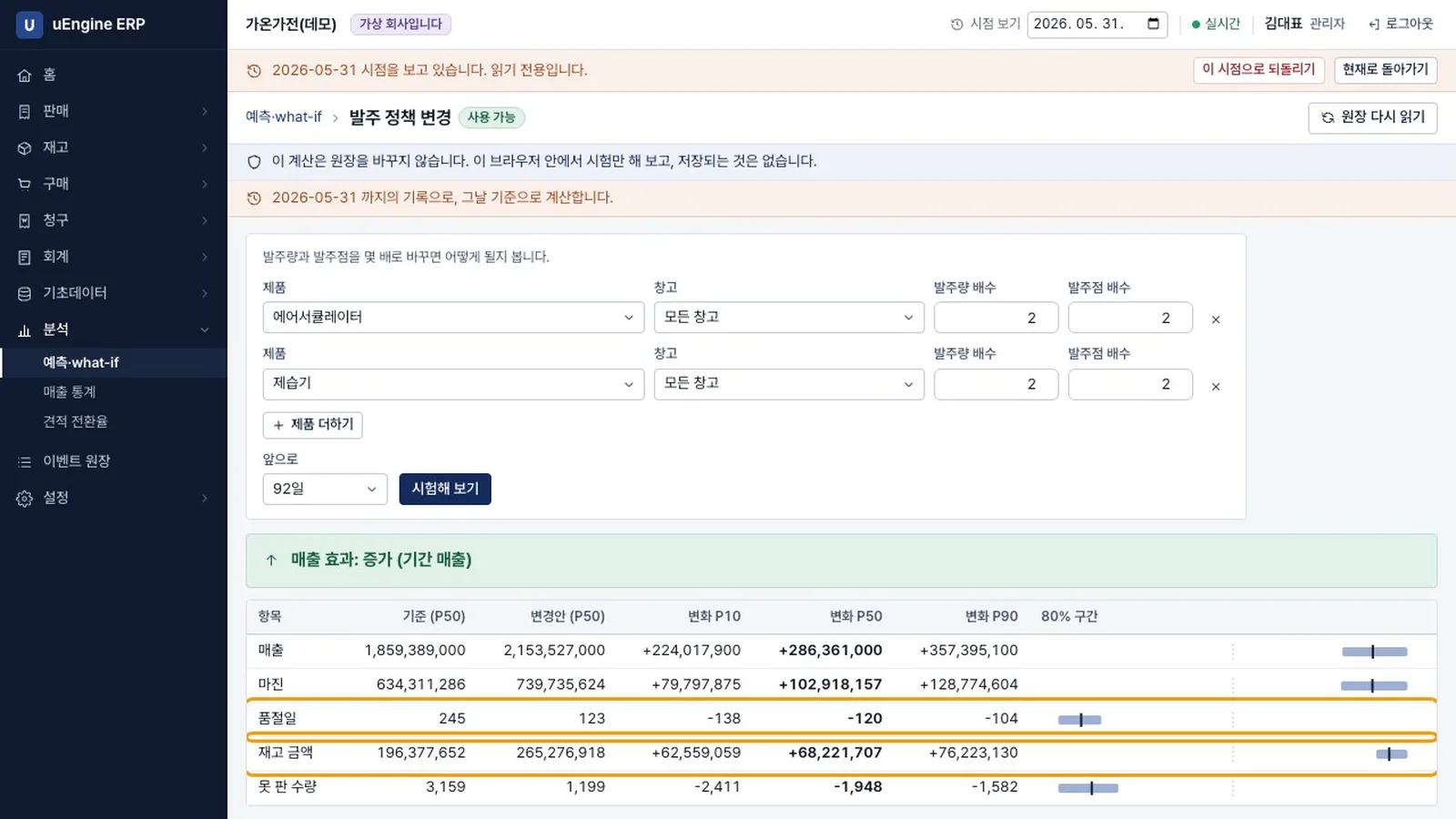
uEngine ERP
Event sourcing supports undo and testing before acting. The Process GPT Lite connection has been tested and will be released soon, but tax screens await expert review, and the app does not directly issue electronic tax invoices or submit electronic tax filings.
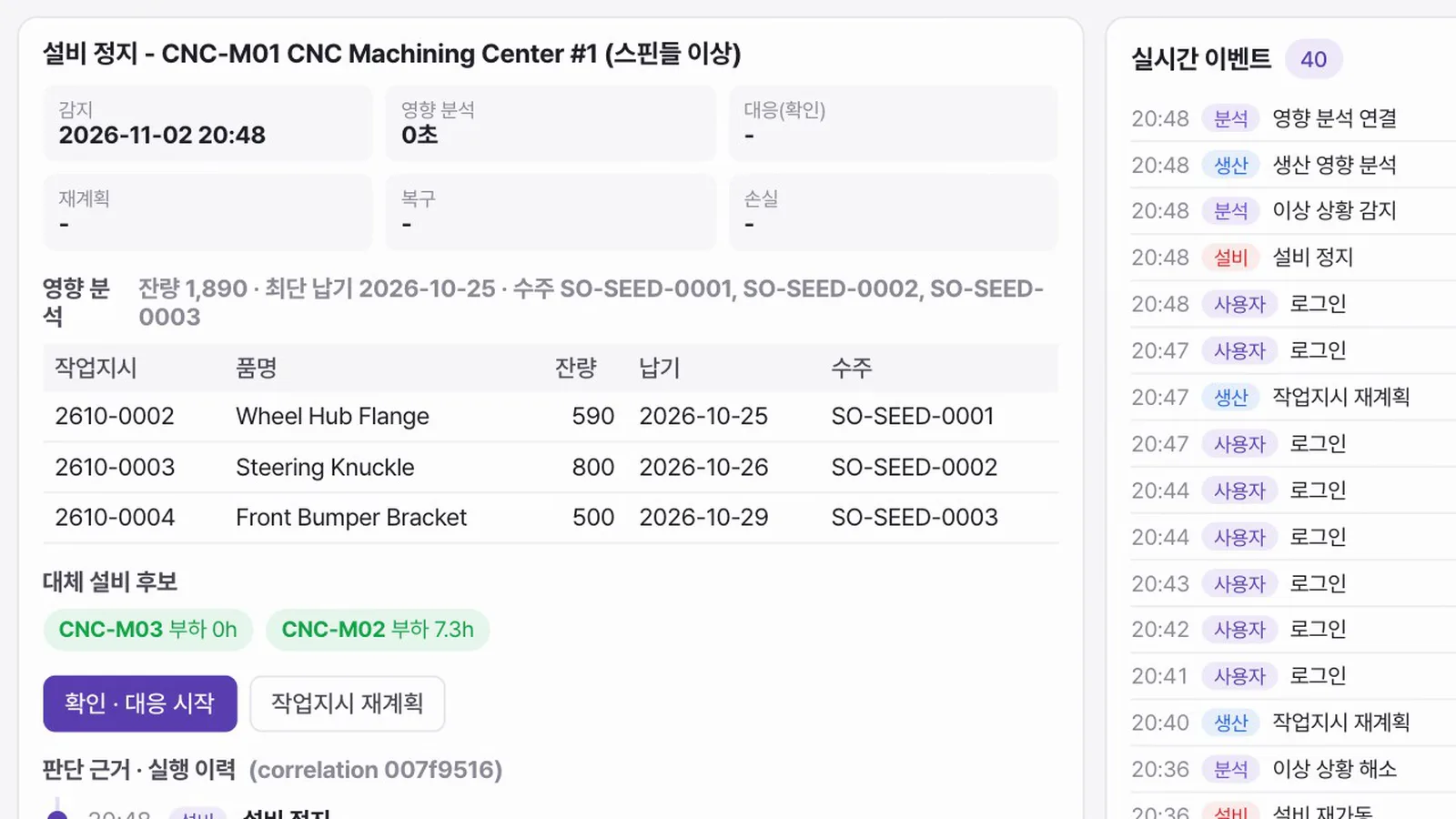
uEngine MES
A demonstration reference implementation of an event-sourced manufacturing execution system. Each action has a matching cancelling action, but there is no undo screen for people to use; source code is private, so contact us for a demo.
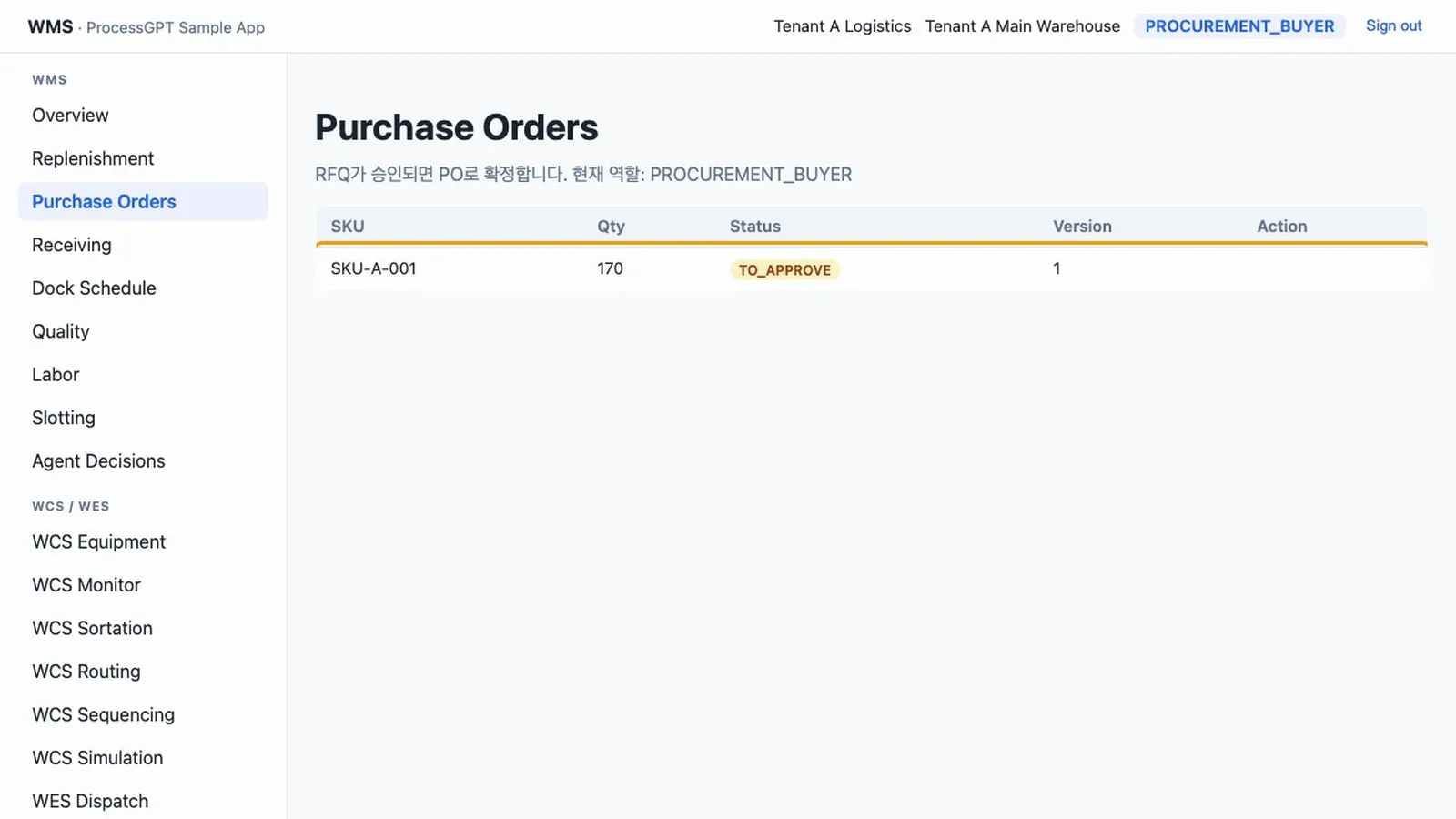
uEngine WMS
A Process GPT sample app that logs every write; it is not event sourced and has no undo feature. It provides 83 MCP tools and public source code.
| Question | uEngine ERP | uEngine MES | uEngine WMS |
|---|---|---|---|
| Are records the source? | Event sourcing | Event sourcing | Stored values + audit log of all writes. Not event sourced |
| Can it undo work? | Preview the scope, then undo; also through MCP | Each action has a matching cancelling action. No undo screen for people | No rollback feature |
| Can it test outcomes first? | 33 analytical models, including 9 what-if models. Available on screen and to agents | Alternative simulations. Source unchanged | Equipment simulations and hypothetical scenarios |
| How do agents connect? | 4 MCP tools, no separate server. Process GPT Lite connection tested; release coming soon | List of read, plan, and action functions. Process GPT connection demonstrated | 83 MCP tools; MCP server required. Process GPT connection demonstrated |
| How can I use it? | Free (MIT), with your own Supabase. Public app and source. Cloud installation not yet tested | Private source. Contact us for a demo environment | Free. Public source; self-installed |
Use free ERP with your own Supabase
uEngine ERP is free (MIT), connects to your own Supabase, and has a public app and source code. Installation on real Supabase cloud has not yet been tested.
Have more questions?
Want to know more about Industry Solutions or have a question? Get in touch anytime.