Loading...
Skip to Content

Our Products

Ontology Studio

Your organization's knowledge is scattered across documents and databases alike

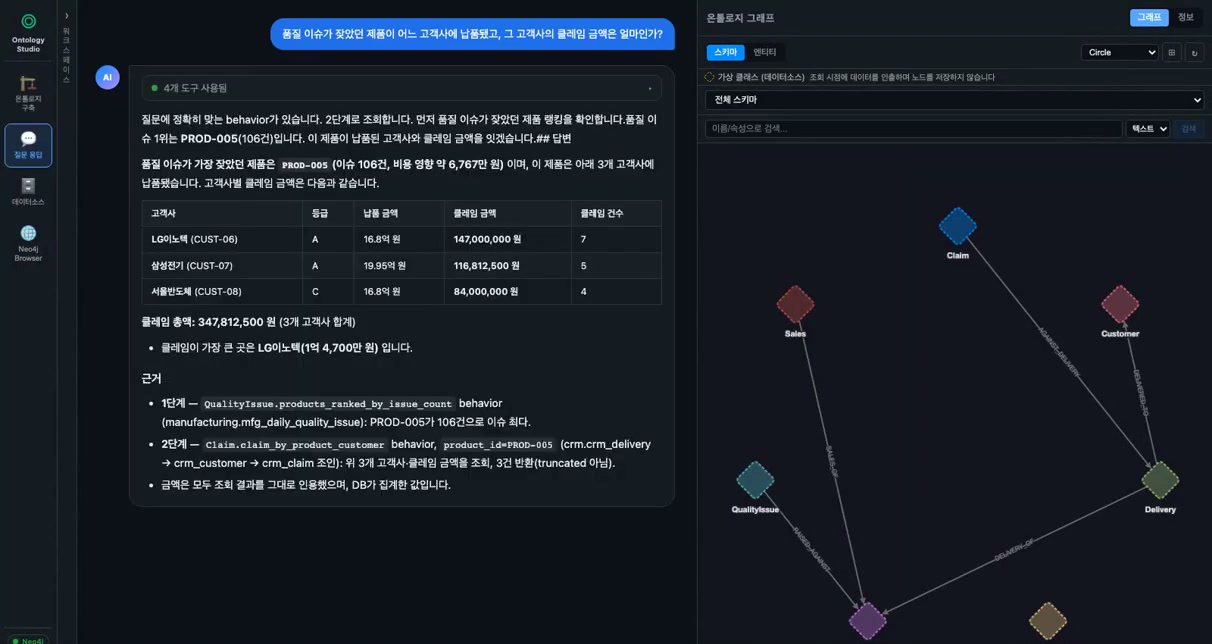
“Which customers received the product that kept having quality issues, and how much did those customers claim?” — The hardest questions are usually the ones whose answer lives in no single place. Regulations sit in PDFs, manufacturing execution records in PostgreSQL, customers, deliveries, and claims in MySQL, and none of them know about each other.

Ontology Studio solves this with an ontology, without moving anything. Documents and operational databases stay where they are and are simply connected, and the tool designs domain-entity-level classes and relationships complete with join keys on its own, guided by your build intent and Golden Questions. What moves is not the data but only names and relationships; values are fetched from the source at query time. The finished graph is exposed as an MCP server and works with any AI agent, including Claude and Process GPT.

Demo 1 Upload documents, auto-design the ontology schema, and answer with Graph RAG

Demo 2 Two databases on different engines, unified into one ontology with zero replication

Key Features

Connect → recover meaning → design entities → load and bind → relate → query: the same flow, regardless of source type
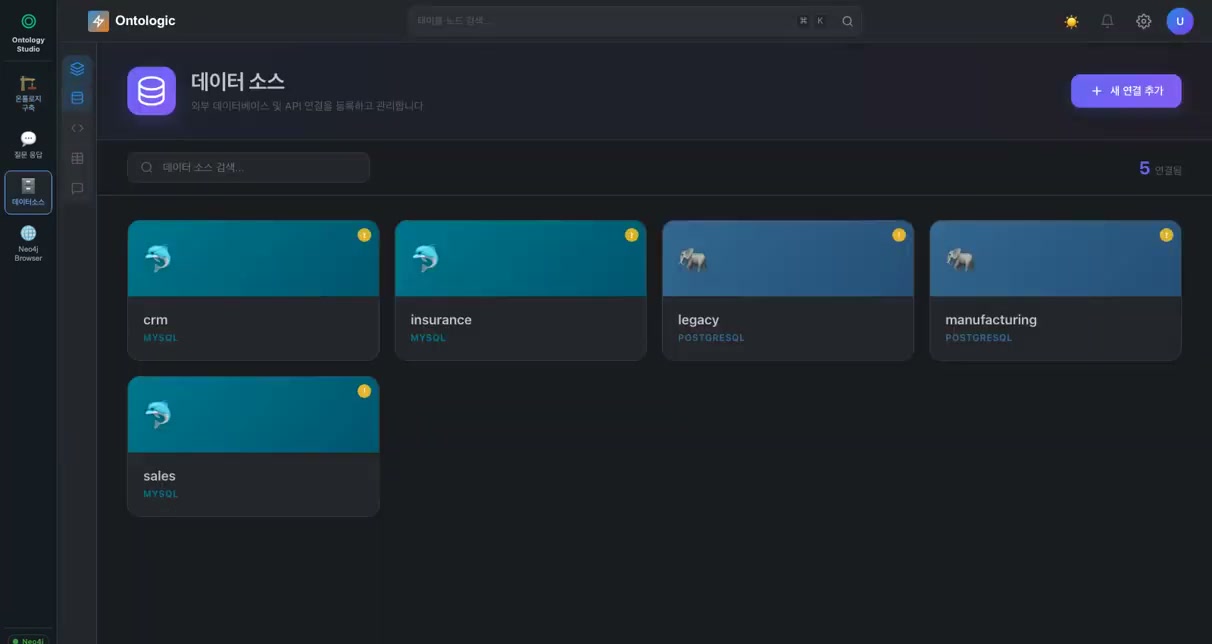
Data source screen connecting documents and heterogeneous databases together

Connect any source

Drag and drop documents such as laws, regulations, and manuals, and connect seven types of live databases including MySQL and PostgreSQL with nothing more than connection details. The moment a source is connected, its tables and columns are read into the catalog. Data is not replicated; only its structure is remembered.

Drag-and-drop document upload & OCR
Seven data source types, including MySQL and PostgreSQL
Table and column catalog collected instantly on connect
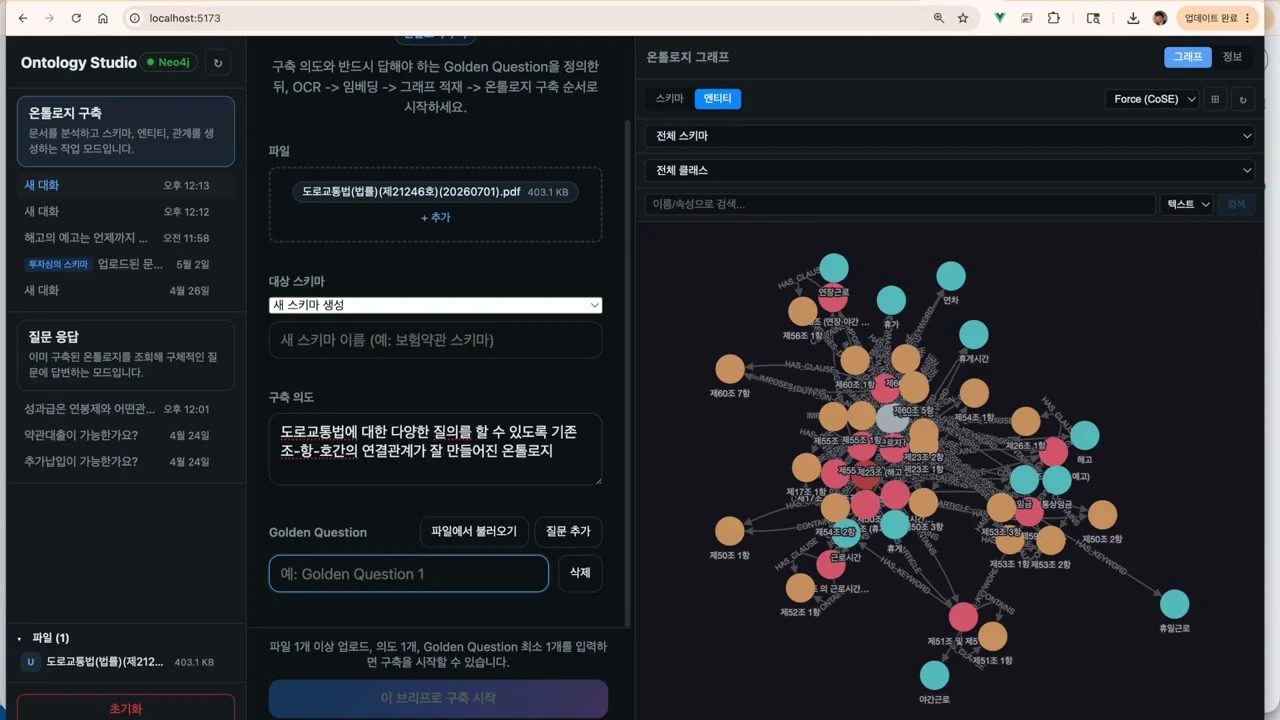
Build intent and Golden Question input screen

Build Intent & Golden Questions

Start by writing down what the ontology must be able to answer. Choose the sources that will serve as evidence, whether documents or databases, and define your build intent and Golden Questions; these become the yardstick for the ontology design.

Schema design driven by build intent
Must-answer questions stated explicitly as goals
Documents and DBs selected as one evidence set
Metadata augmentation that recovers the meaning left in code and data

Recover lost meaning

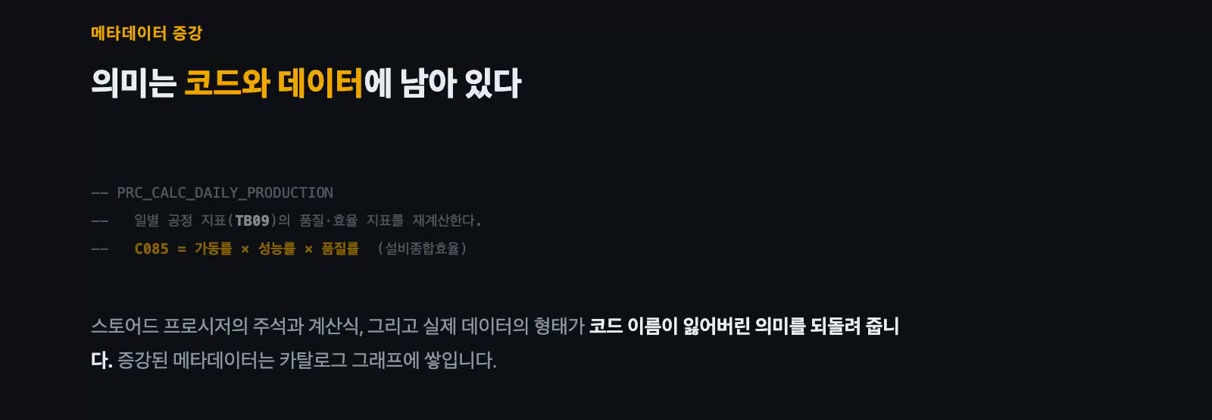
Real-world metadata arrives stripped of meaning. Tables are codes like TB09, columns like C085, and there are no foreign key declarations. For documents, the tool writes a parser suited to each structure; for databases, it recovers meaning from stored procedure comments and formulas and from the shape of the actual data, and accumulates it in the catalog graph.

Automatic per-document parser generation
Interpretation of stored procedure comments and formulas
Cross-validation of meaning against live data samples
Screen auto-designing entity-level classes and relationships

Automatic entity-level schema design

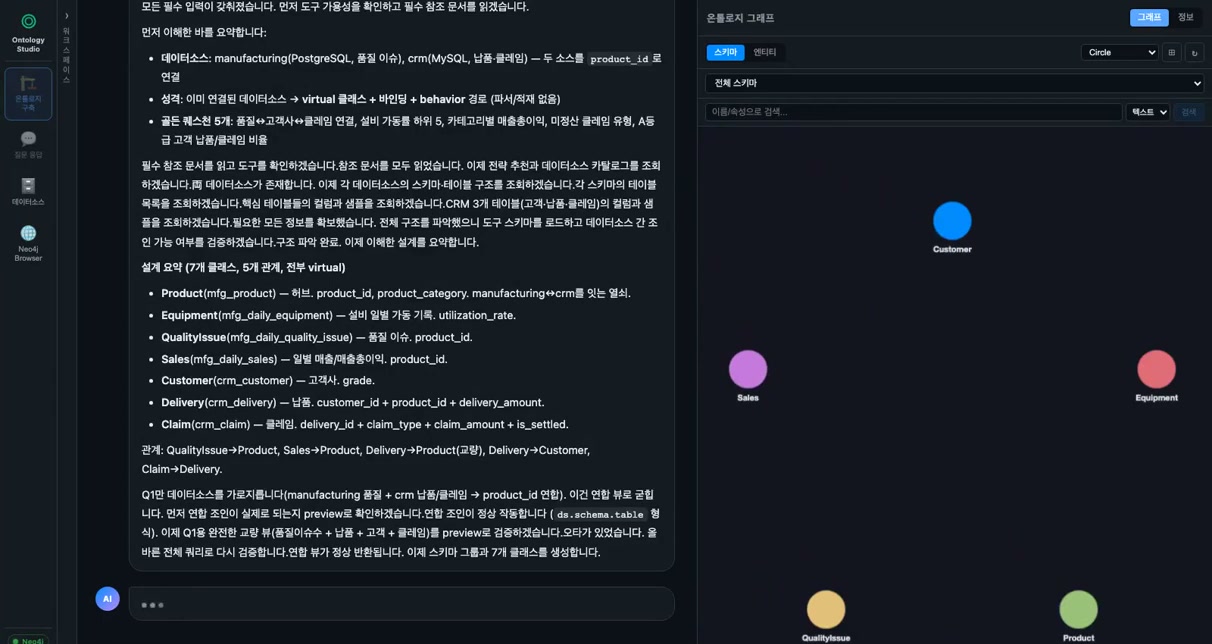
An agent sweeps the catalogs of every source and establishes classes such as Product, Customer, Delivery, and Claim. These are not tables holding raw query results or document chunks, but the things that actually exist in the domain. Each class carries lookups (behaviors) validated against live data at build time.

Classes derived at the domain-entity level
Automatic definition of class and relationship types
Lookups (behaviors) validated against live data at build time
Relationship list declared together with join keys

Relationships that carry their join keys

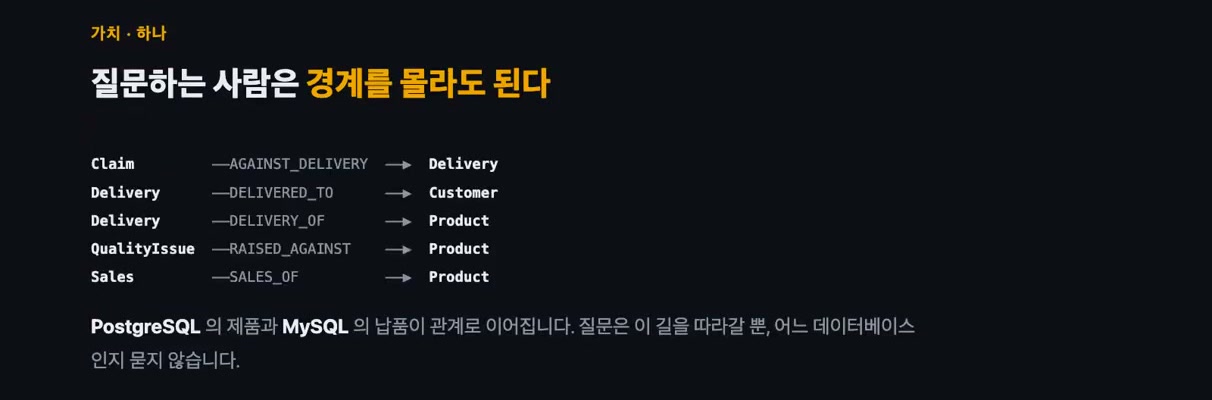
Each relationship records not just a name but its join key. Without the key, the query stage would have to guess anew every time how to connect two classes. Federated joins that cross system boundaries are also validated with a preview at build time.

Meaningful relationship names such as AGAINST_DELIVERY and CONTAINS
Explicit join keys on every relationship eliminate guesswork
Validation of federated joins across sources
Ontology completed through graph loading and zero-replication virtual binding

Load it, or bind it with zero replication

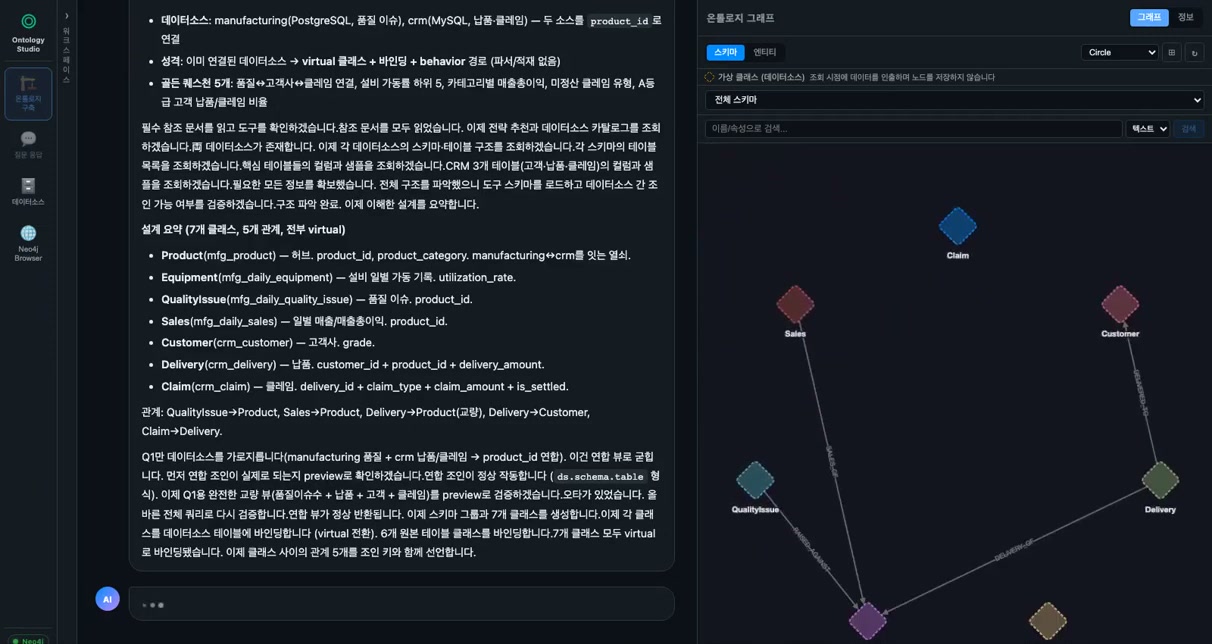
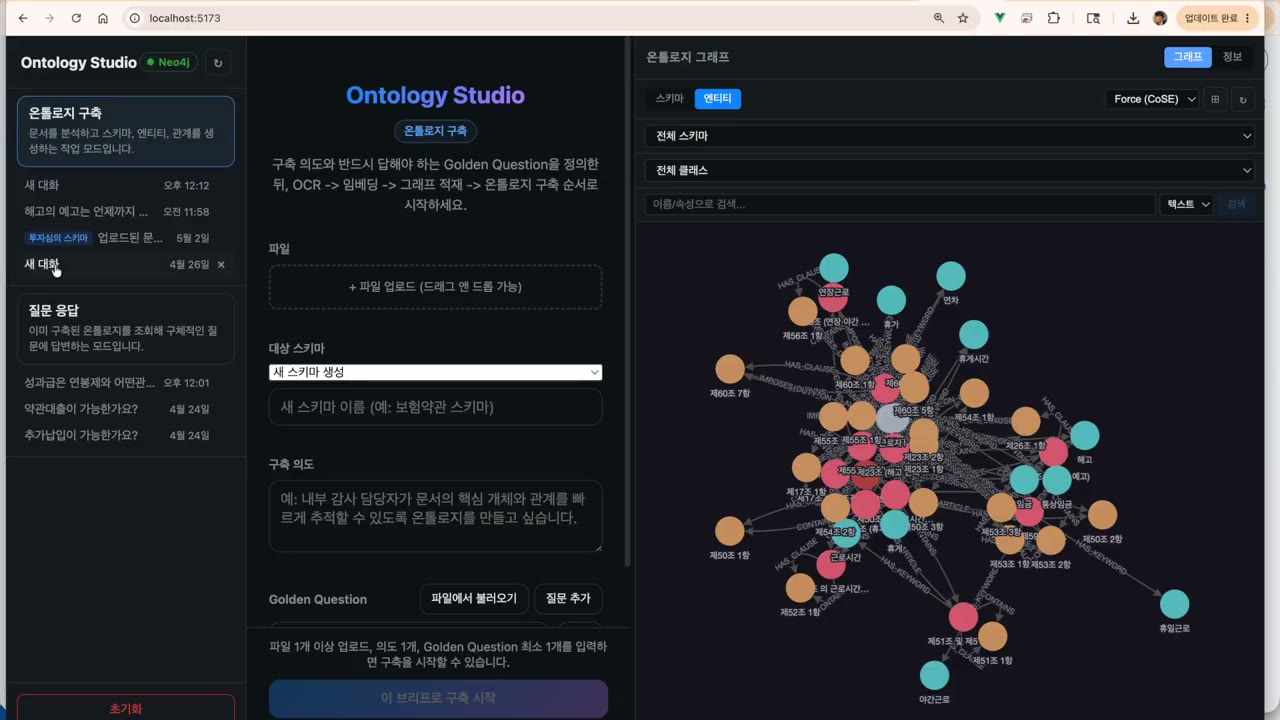
Entities and relationships extracted from documents are loaded directly into the Neo4j graph. Database sources are bound as virtual: no nodes are stored, and values are fetched from the source at query time. Choose the approach that fits each source; the result is still one graph.

Documents → batch ingestion into the Neo4j graph
Databases → virtual binding with zero replicated records
No separate ETL or data warehouse required
Question-answering screen that answers across source boundaries with supporting evidence

Accurate answers across boundaries

The nodes relevant to a question are located in the graph, and every connected clause and record is explored without gaps. The agent follows relationships from one source to the next, and the person asking never needs to know whether the answer came from a document or from which database.

Relevant node highlighting & path exploration
Behaviors and join paths used are presented as evidence
Values computed jointly across multiple sources are quoted as-is
Golden Question validation and self-improvement loop

Golden Question Validation & Self-Improvement Loop

Right after a build, the tool verifies that the Golden Questions are answered correctly, then reinforces the schema based on feedback and rebuilds, raising ontology quality on its own through an agentic loop.

Answer review (correct/incorrect) & feedback
Rebuild after schema reinforcement
Agentic quality-improvement loop
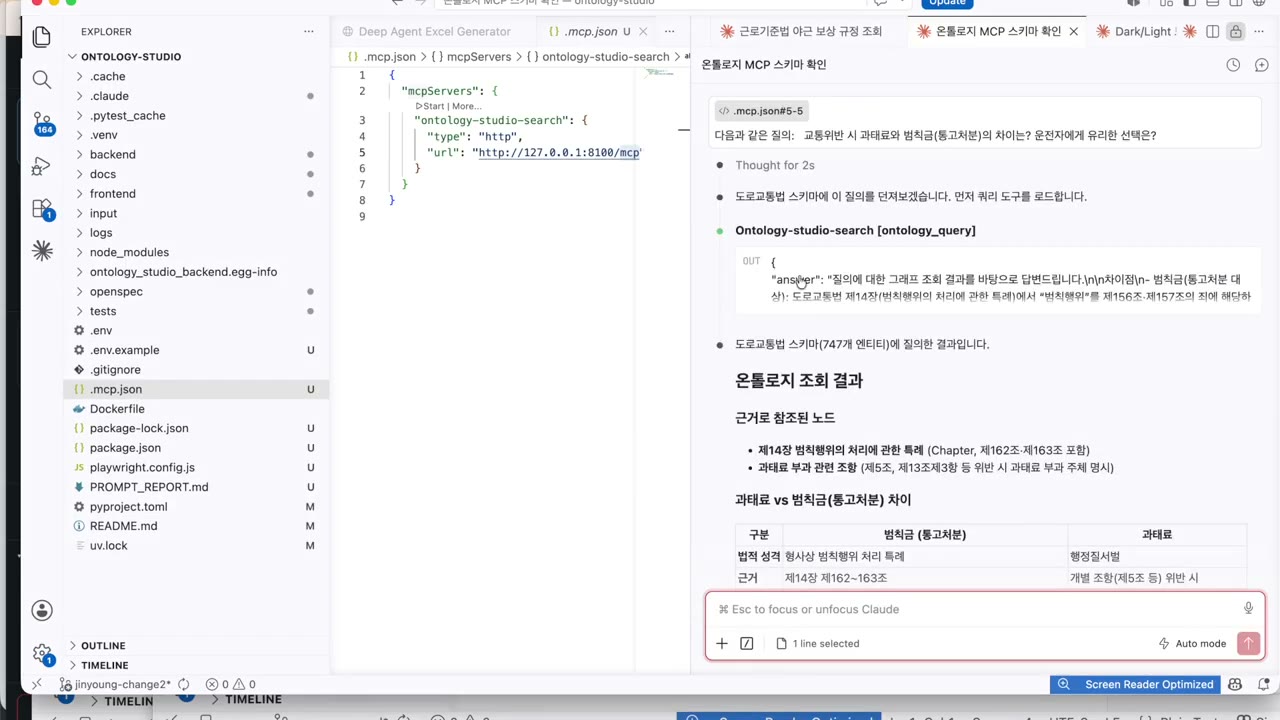
Ontology integrated with AI agents through an MCP server

AI Agent Integration via MCP Server

The built ontology is exposed as a Streamable MCP server. Any AI agent, including Claude Code and Claude Desktop, can inspect the schema and query the graph.

Built-in Streamable MCP server
Claude Code / Desktop integration
Schema inspection & graph query tools

The value of an ontology lies in the ‘next question’

If you build a table per query or chunk and index documents, every new question calls for a new design, and the maintenance burden grows with the number of questions. Model with entities, and a new question simply follows the relationships that already exist. The value of an ontology is not that it answered one question, but that it can answer the next one.

More questions do not mean more to maintain
Documents and databases explored together on one graph
Exposed via MCP so AI agents can use it directly

How It Works

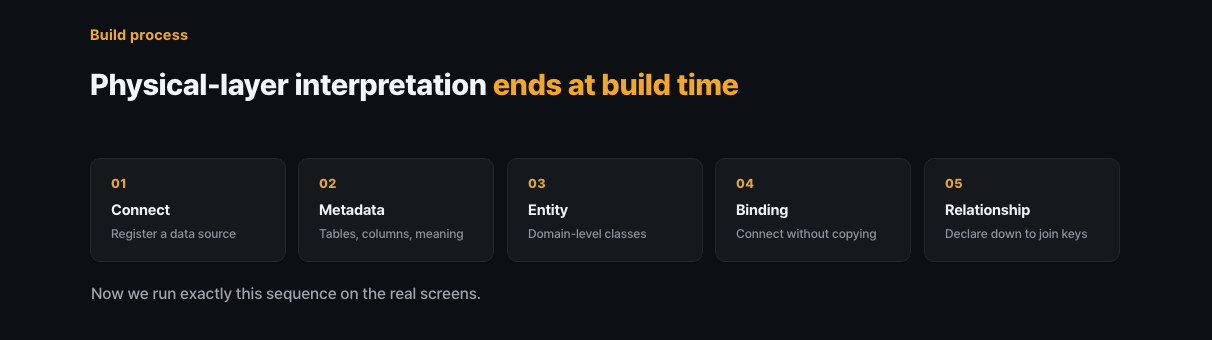
All interpretation of the physical layer (document structure, tables, columns, joins) is finished at build time. At query time, only the ontology is consulted.

1. Connect sources

Upload documents or connect to live databases. Their structure enters the catalog the moment they connect.

2. Recover meaning

Parsers are built for documents; for legacy DBs, the meaning of code names is recovered from procedures and live data.

3. Design entities

Classes are established for the things that actually exist in the domain, and relationships are declared complete with join keys.

4. Load · Bind

Documents are loaded into the Neo4j graph; databases are bound virtually with zero replication.

5. Validate & query

Quality is validated with Golden Questions, and accurate graph question answering runs through the web UI or MCP.
Five steps of ontology construction: connect → metadata → entities → binding → relationships

Graph RAG vs. Vector Search

Attribute Ontology Studio (Graph RAG) Typical vector search RAG
Retrieval method Graph traversal follows connected clauses and records Only top chunks by similarity, retrieved individually
Context connectivity Every relationship between clauses and entities is captured Relationships between chunks are hard to discern
Evidence Referenced nodes and sources provided explicitly Limited source traceability
Accuracy High accuracy grounded in structured knowledge Relatively higher risk of omissions and hallucinations
Schema construction Auto-designed from documents and DBs & self-improving No concept of a schema
Agent integration Standard integration via MCP (Claude, etc.) Separate integration required

Related Solutions

A Knowledge Graph Never Works Alone

Ontology Studio is the design tool that makes an organization's knowledge explicit as a graph. Its output runs on the execution server of Ontologic Platform for analysis and automation, becomes, via MCP, the knowledge graph that Process GPT agents consult while doing their work, and gives the design and implementation agents of Robo Architect their grounding in the domain.

① Ontologic Platform

Design in Studio, execute on the Ontologic server

Ontology Studio plugs in as the ontology design module of Ontologic Platform. The schema Studio creates (classes, relationships, join keys) and its data source mappings connect directly to the Ontologic execution server, where natural-language queries, root-cause analysis, What-if simulation, and watch automation run on top of them.

Because design and execution share the same ontology, fixing the schema is immediately reflected in execution results, and the zero-replication binding carries straight through, so analysis runs on operational data with no separate ETL (Zero-ETL).
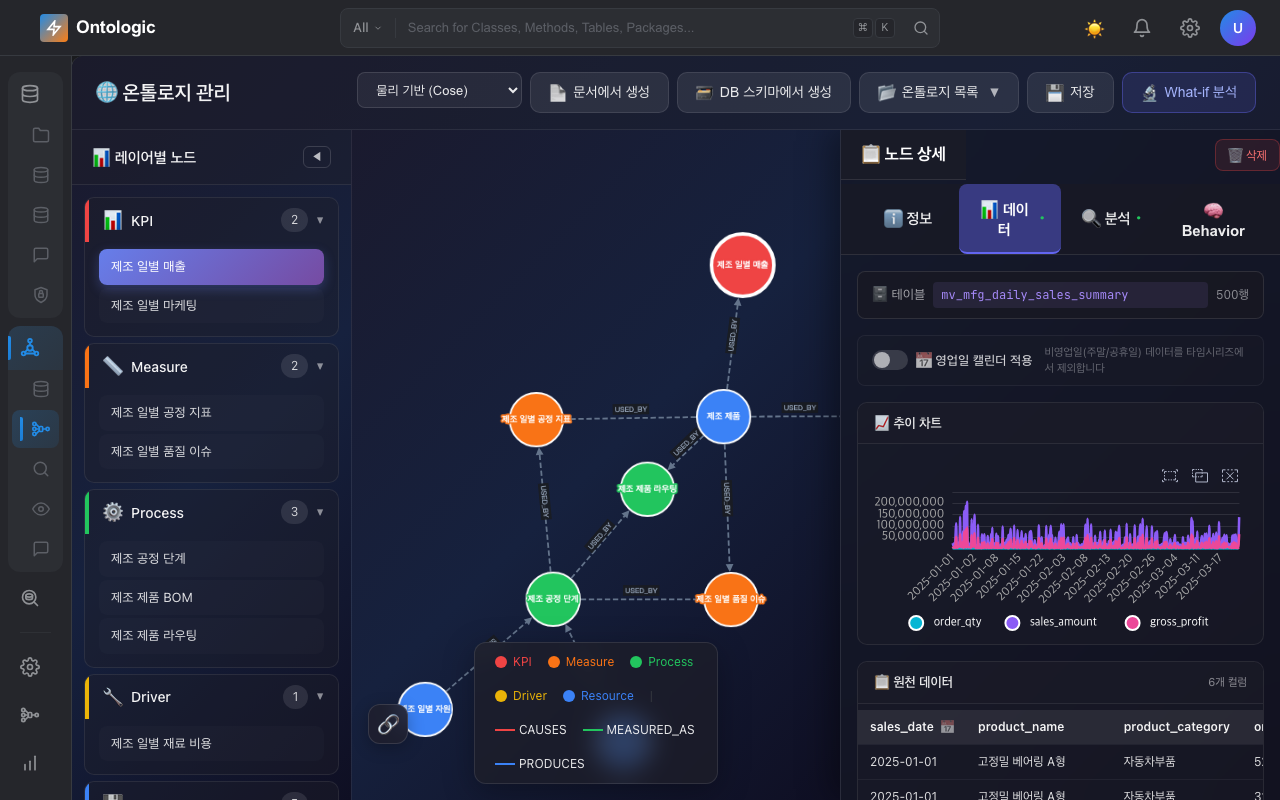
Studio schema design → reflected directly on the Ontologic execution server
Shared data source mappings (virtual binding) keep it Zero-ETL
Natural-language queries, root-cause analysis, What-if, and watch automation on the execution server
Ontologic Platform data mapping screen: Ontology Studio schema connected to data source mappings

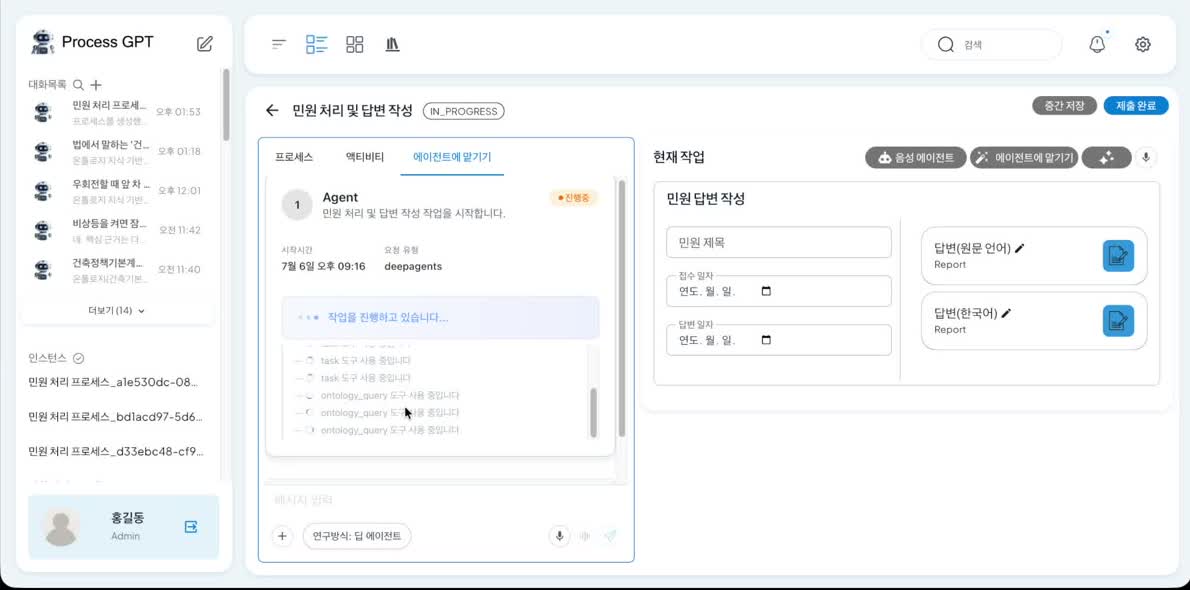
Screen of a Process GPT deep agent exploring the ontology via MCP
The most powerful combination

② Process GPT

The knowledge graph that agentic AI consults

The built ontology is exposed as an MCP server, and Process GPT deep agents, while carrying out their work, use ontology_query to explore this knowledge graph in real time. They cite regulatory clauses and operational data together, and decide only on the basis of knowledge made explicit in the ontology, completing hallucination-free business automation.

In an AI-Native Enterprise where AI agents decide and act on their own, what is most lacking is not model performance but “what to base decisions on.” The ontology states that grounding in the organization's own language, and Process GPT executes real work on top of it. This combination, where designed knowledge is executed directly, is the most powerful scenario.

Real-time knowledge exploration via MCP (ontology_query) during process execution
Hallucination-free decisions citing regulatory clauses and operational data together
A virtuous knowledge cycle: sources → knowledge graph → agent execution

③ Robo Architect

A knowledge graph that carries through to design and implementation

The domain knowledge graph built by Ontology Studio becomes the knowledge graph consulted by the design and implementation agents of Robo Architect. Concepts and relationships extracted from documents and operational data ground the design of Aggregates and domain events, so the AI generates code with an accurate understanding of the domain.

The two products move freely back and forth — Ontology Studio's knowledge flows into Robo Architect's specifications, and the models Robo Architect designs accumulate back into the graph. Knowledge and specifications circulate on one track.
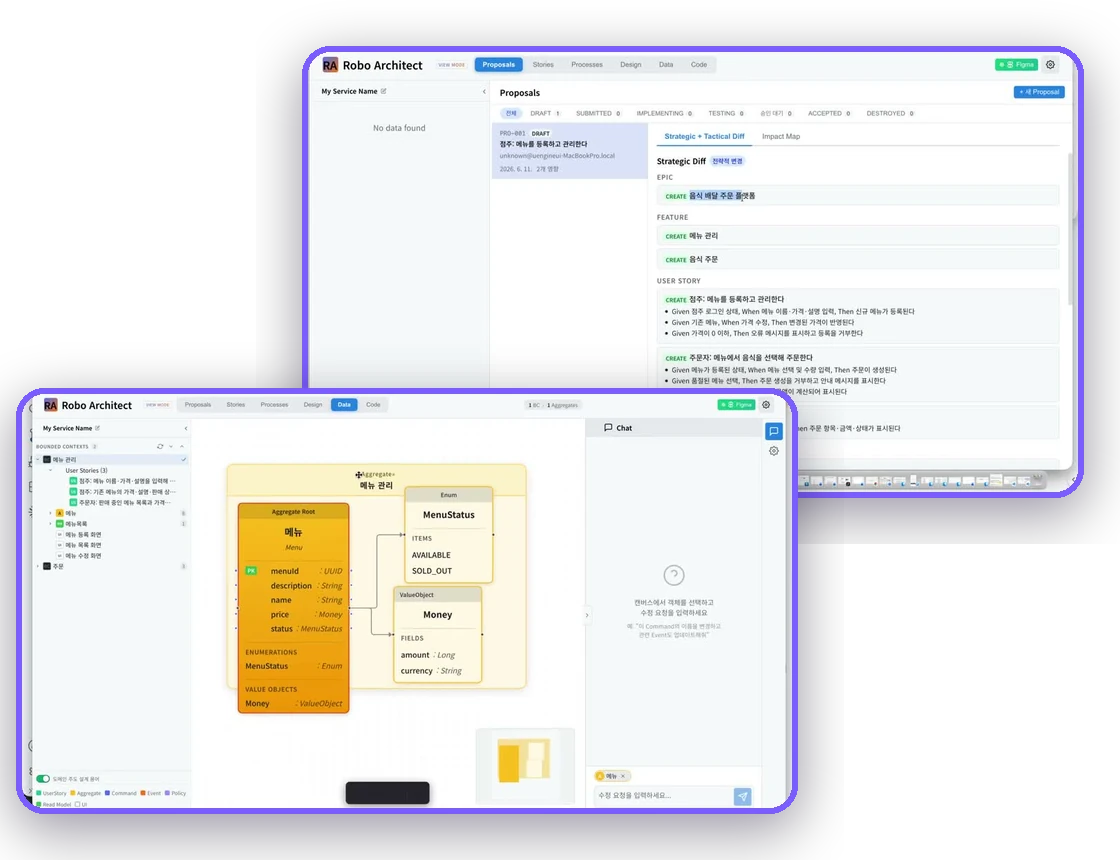
Knowledge graph → the knowledge graph of the design and implementation agents
Concepts and relationships from documents and DBs serve as grounding for domain design
Two-way cycle that accumulates design models back into the ontology
Robo Architect design and implementation

Get started today!

Ontology Studio is available as open source. With just a few documents or database connection details, you can easily build your own knowledge graph.
Runs in Docker or locally.


Have more questions?

Want to learn more about Ontology Studio or have a question? Get in touch anytime.