Industry Solutions · Logistics
uEngine WMS
From stock shortage to receiving, inspection, putaway and warehouse equipment control — a warehouse management sample built for Process GPT agents to use as tools
This is a Process GPT sample app. The source is public and it is built at demo scale. The tutorial follows commit fc82ea2, where a fresh install is confirmed to work.
A Warehouse System Agents Can Actually Use
A stock shortage leads to a purchase request, approval, order, receiving, quality inspection and putaway. uEngine WMS is a Process GPT sample app that shows this flow and warehouse equipment control in one app. Each role can do different things, and every write goes into the audit log.
Its functions are offered as MCP tools, so Process GPT agents use them under the same permission checks. When the replenishment process runs with a real LLM agent, the agent reads stock and creates the purchase request, while approval and quality judgment stay with people.
From Receiving to Equipment and Agents
Screens captured by actually running the app from the public repository. Click a screen to play that chapter's video (Korean narration).
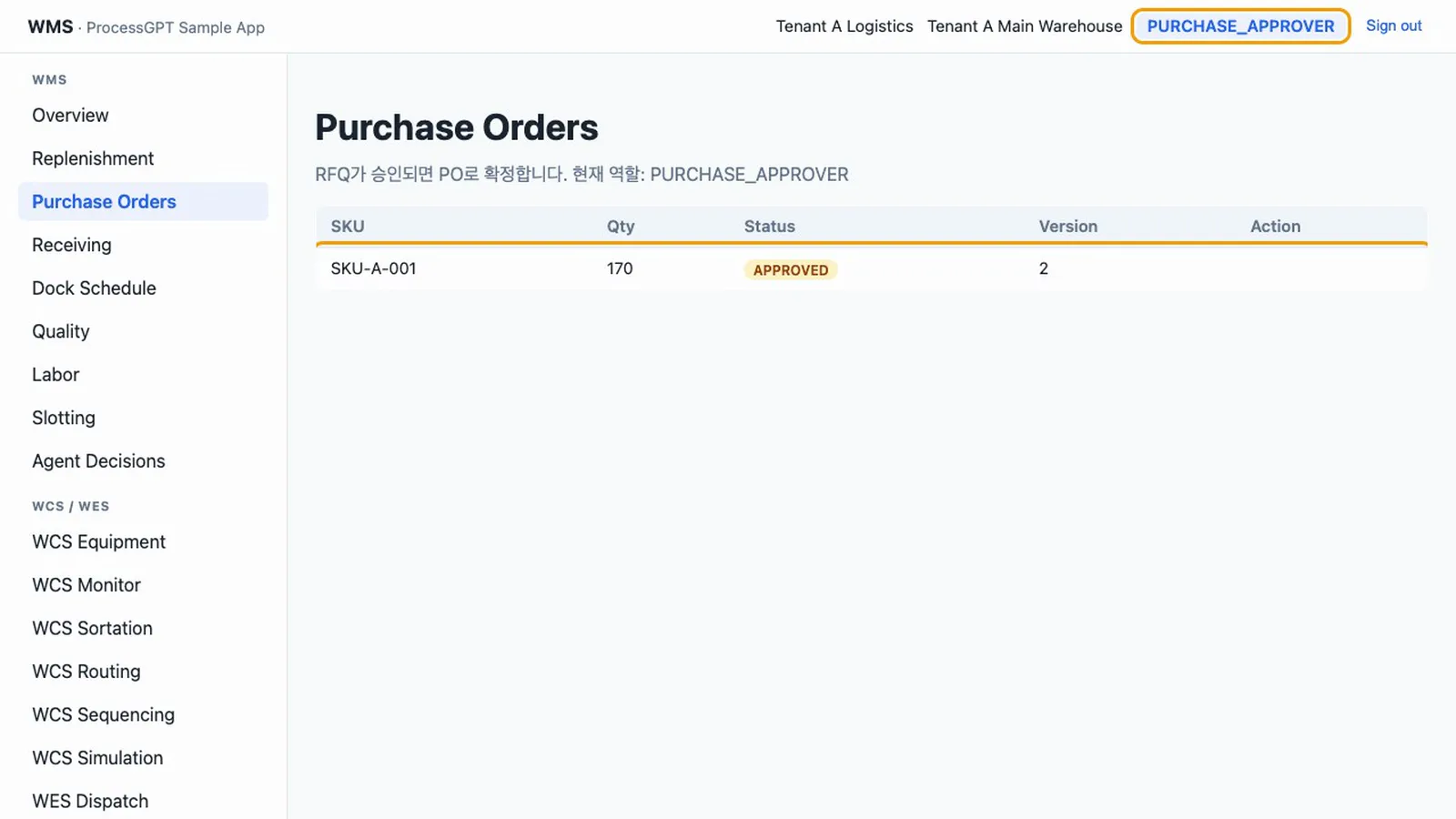
RECEIVING AND STOCK
Follow One Short Item All the Way to Putaway
Work passes between roles, and each step leaves a document state and an audit entry.
- Purchasing flowFrom a stock shortage to RFQ, approval and PO confirmation.
- Receiving and qualityRegister arrival and receipt, then put away on pass or scrap on fail.
- Roles and isolationThe same document shows different buttons by role, and tenants are separated by row-level security.
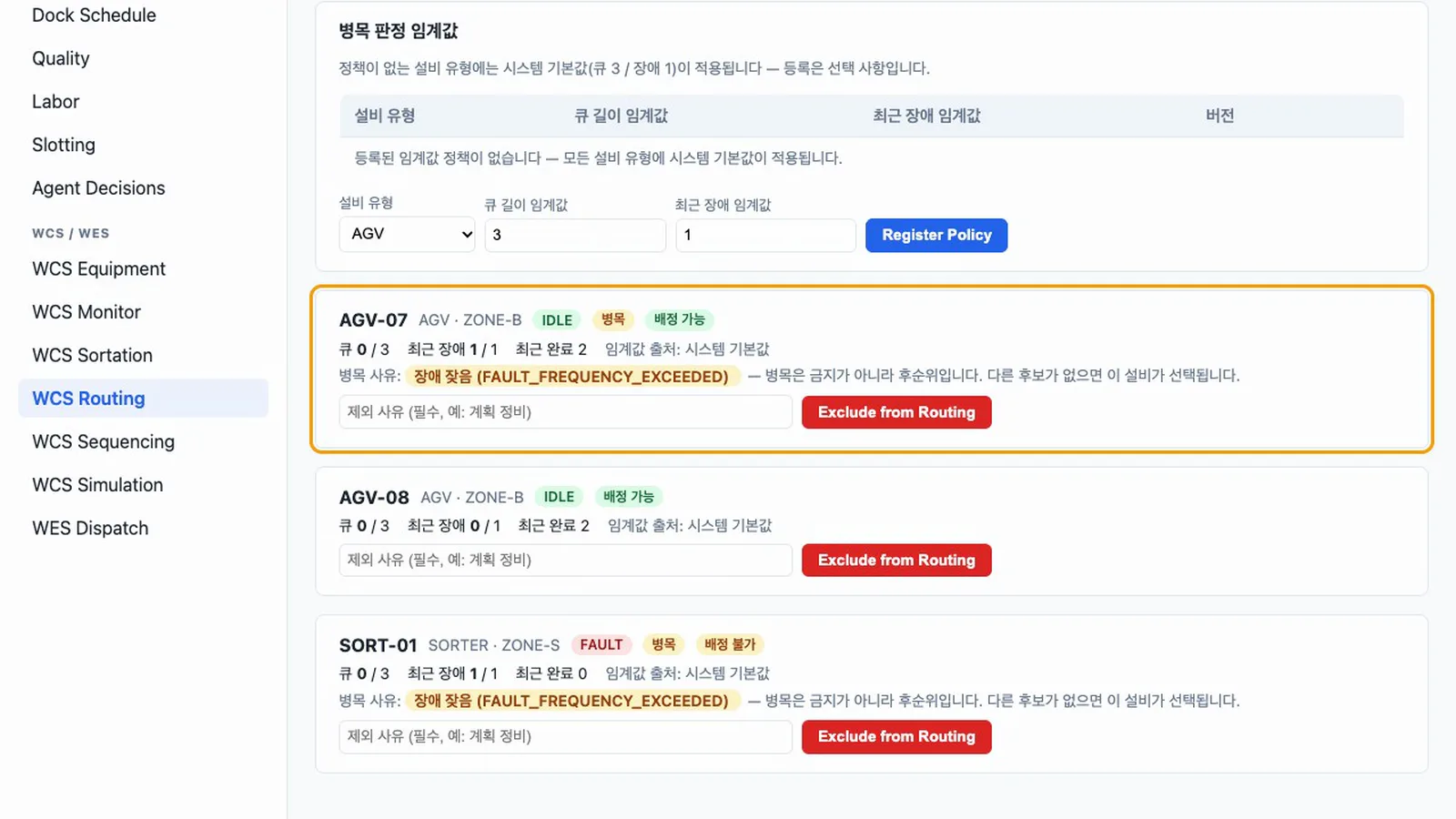
WAREHOUSE AUTOMATION
Turn Work Orders into Equipment Commands
Release a wave and commands go to idle equipment. A gateway account and a simulator respond in place of real equipment.
- Work ordersReceipts become work orders, sent by wave or immediate dispatch.
- Equipment controlCovers equipment registration, commands and status reports. Only a person can resolve a fault.
- Sortation and bottlenecksSorter profiles, jam faults, and threshold-based bottleneck detection and avoidance.
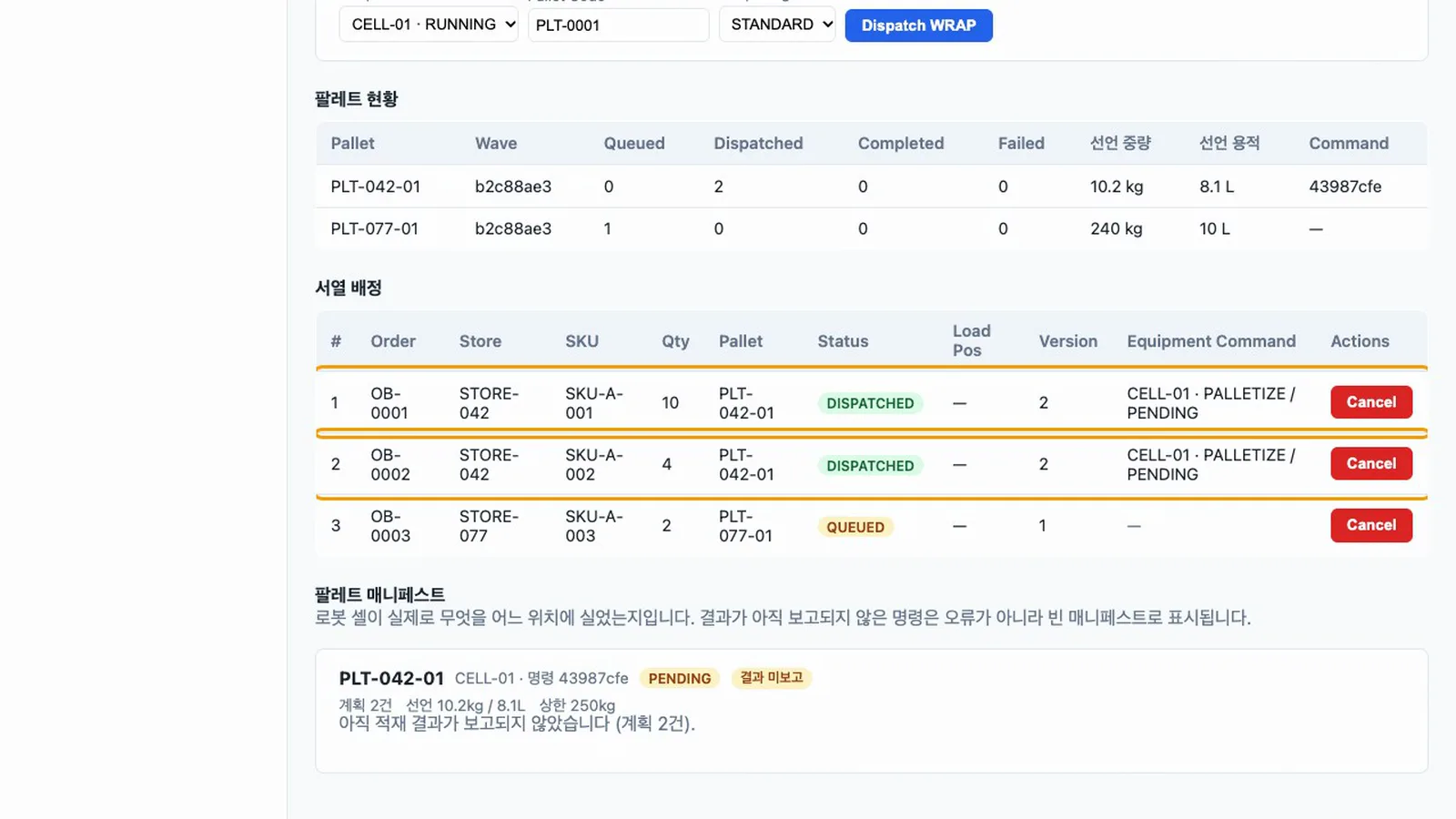
WAREHOUSE AUTOMATION
Group in Sequence and Send to the Robot Cell
Store outbound units are grouped onto pallets in sequence, and you check the simulator worker's responses and the failure path.
- Sequence assignmentPosition and weight are validated against declared values and grouped into pallets.
- SimulationWith no real equipment, a worker reports acknowledgement, progress, completion and failure.
- What-if scenariosChange equipment and command counts to see an optimistic estimate, shown along with its limits.
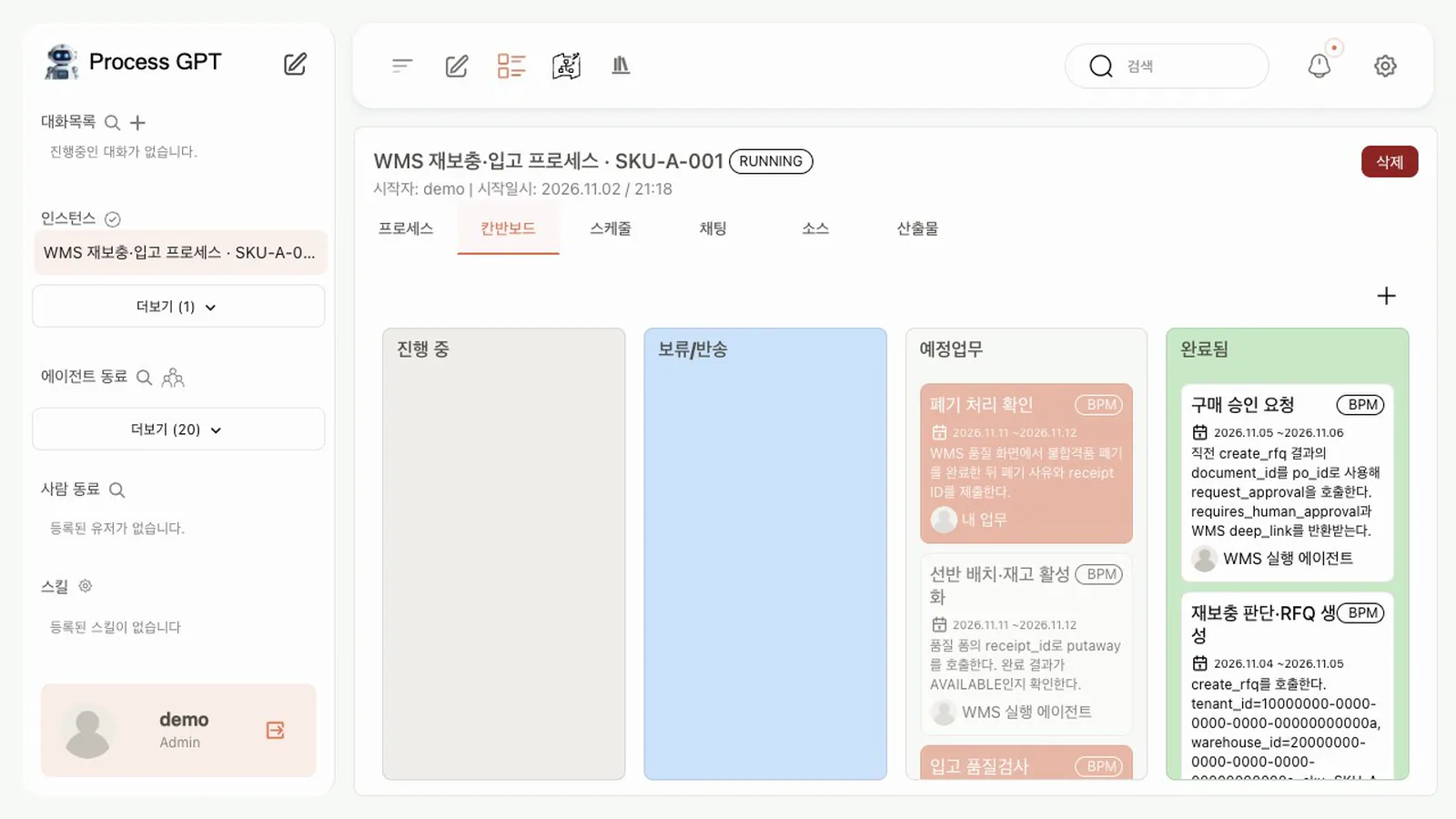
AI
Agents Use the Tools, People Approve
The replenishment process ran to the end with a real LLM agent. People handle the start, purchase approval and quality judgment.
- 83 MCP toolsThe app's database functions are offered as tools, and the agent account goes through role checks too.
- Proposal reviewA warehouse manager approves or rejects agent proposals. An agent cannot approve its own.
- Audit logWrites by people and agents read as sentences in the same history.
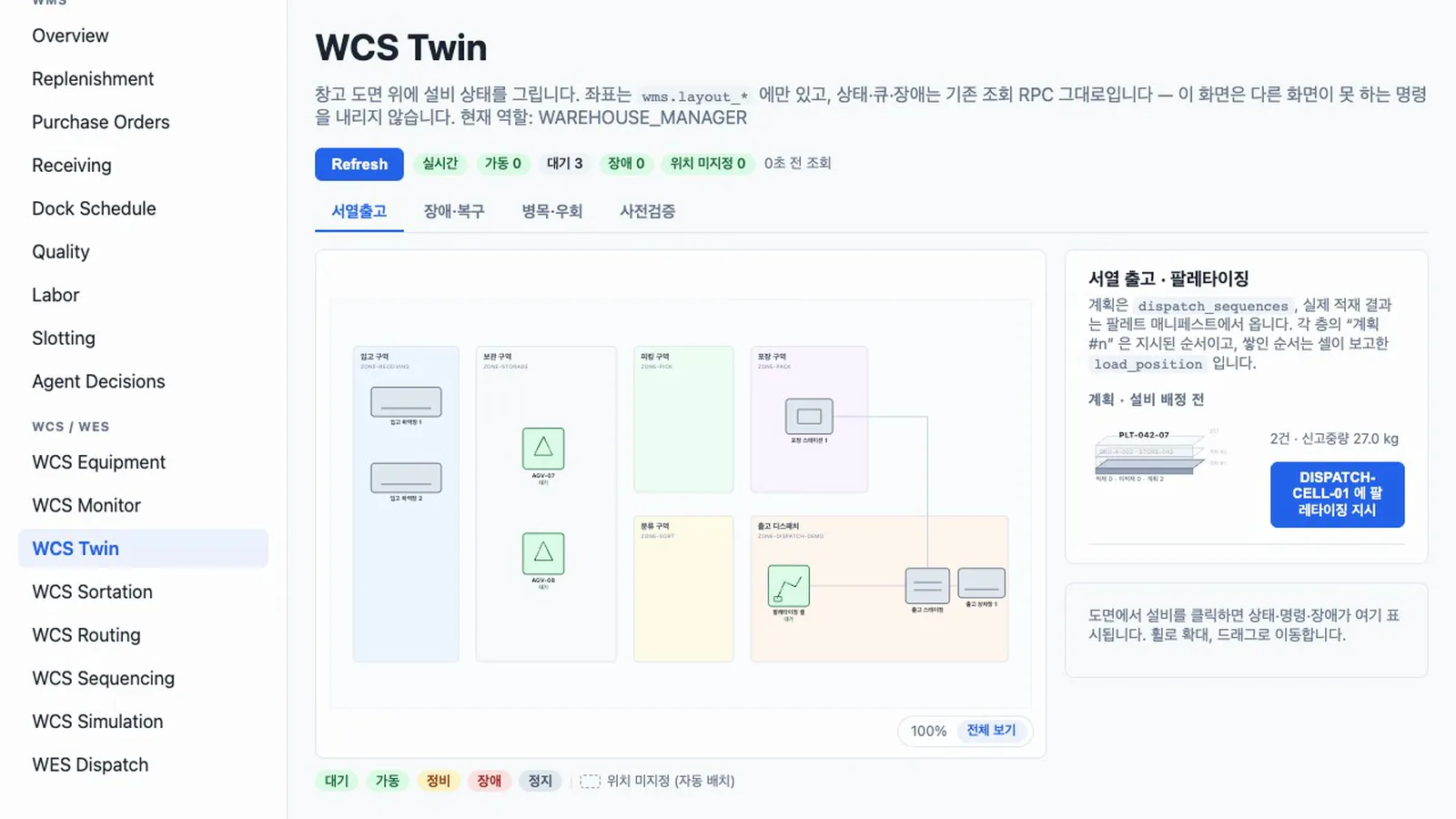
IN DEVELOPMENT
Digital Twin: Equipment Status on the Floor Plan
A screen still in development that is not yet in the public repository. The tutorial does not cover it; the product demo video shows it.
- Live floor planEquipment and docks are drawn over zones in the color of their current state.
- Fault responseA reported fault raises an alarm without a refresh and can be resolved from this screen.
- Bottleneck and what-if lensesQueues and thresholds per machine, with estimates and their limits.
What It Is and Where It Stands
What is done and what is not, stated plainly.
| Category | Details (as of commit fc82ea2) |
|---|---|
| UI | 17 business screens. Buttons and table headers are in English; descriptions are in Korean |
| Data | Supabase (Postgres, auth, row-level security). 37 tables, 115 functions, 35 RLS policies, 10 roles |
| Agent connection | FastMCP server with 83 MCP tools and a Process GPT install script |
| Verification | 12 Playwright E2E tests |
| Not yet | It demonstrates with a simulator rather than real equipment. Outbound does not reduce stock. The replenishment process runs to the end, but the instance still shows as running. The install script needs a patch script to run to the end. A fresh install of the latest main currently fails, so the tutorial pins commit fc82ea2 |
Watch the Videos
Recorded while actually running the app from the public repository, with Korean narration and subtitles. Click a thumbnail to play.
Product Demo
Product Demo
A stock shortage, agent collaboration, equipment control, the digital twin and the audit log in one video.
Tutorial (Korean)
Chapter 0: Install, Sign-in and Roles
Install from the public repository and check roles and tenant isolation.
Chapter 1: From Replenishment to Putaway
Follow the RFQ, approval, PO, receiving, quality, putaway and scrap on failure.
Chapter 2: Work Orders and Equipment Control
Equipment commands, faults, waves, sorters and bottleneck avoidance.
Chapter 3: Sequenced Dispatch and Simulation
Palletizing, the simulator worker and what-if scenarios.
Chapter 4: Connecting Process GPT Agents
A real run of MCP tools, the replenishment process, proposal review and the audit log.
Install It and Follow Along
Chapter 0 of the tutorial covers installation. For a demo fitted to your warehouse, or to find which work should go to agents, continue with an Agent Storming Workshop.
Have more questions?
Want to know more about uEngine WMS or have a question? Get in touch anytime.