AI Work Assistant
Process GPT Lite
An AI work assistant that starts with a single message — the Process GPT engine, ready for individuals and teams to use today
From a chat to your team’s workflow
Process GPT Lite is a chat-first AI work assistant. Talk to it and it keeps the conversation in context, creating documents and apps as it goes. Hand repeat work to skills and scheduled missions. When a decision is needed, an action card lands on the Home screen of the person responsible.
It’s simple to use, and under the hood it runs the Process GPT engine itself: the agent runtime, process engine, IeumOffice and MCP hub. Processes you create in chat are saved as Process GPT BPMN processes, so when your organization grows, they carry straight over to Process GPT.
Features
No special training or modeling: work with AI the way you already work.
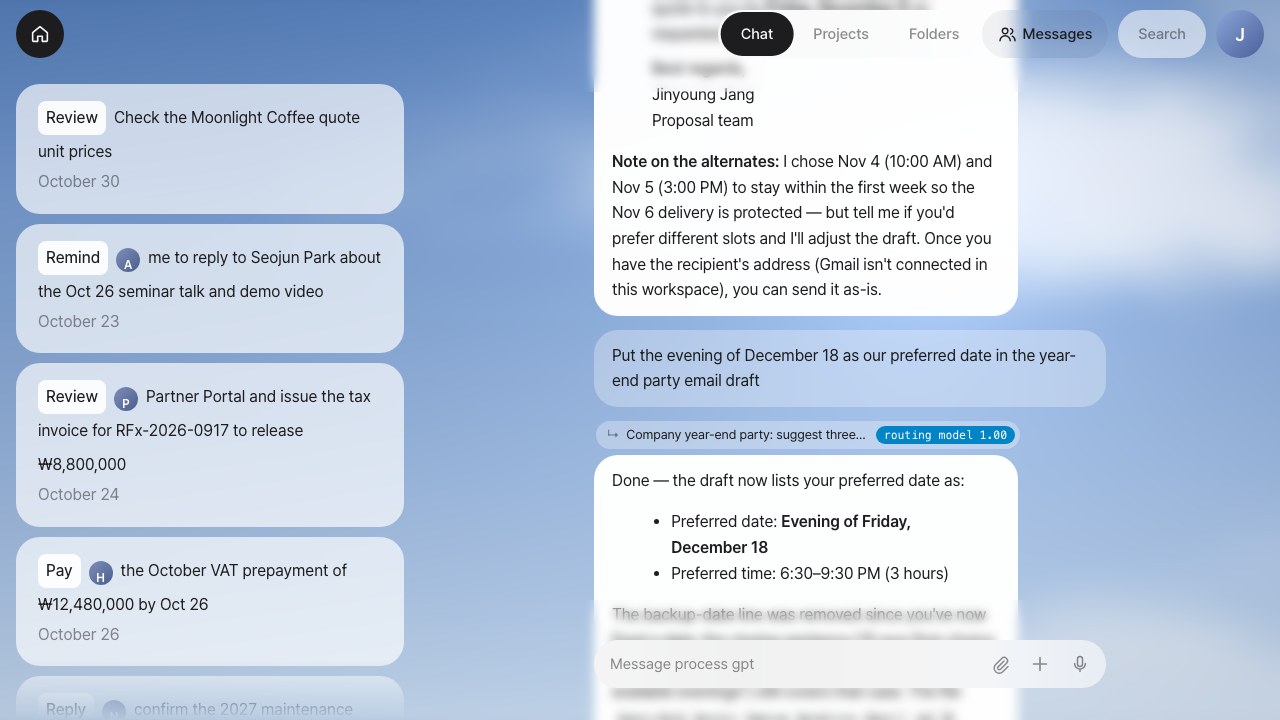
Every task starts in one chat
No need to pick a project or open a new conversation. Type into one box and the context router works out which conversation the message belongs to and routes it there, or opens a new one for a new topic.
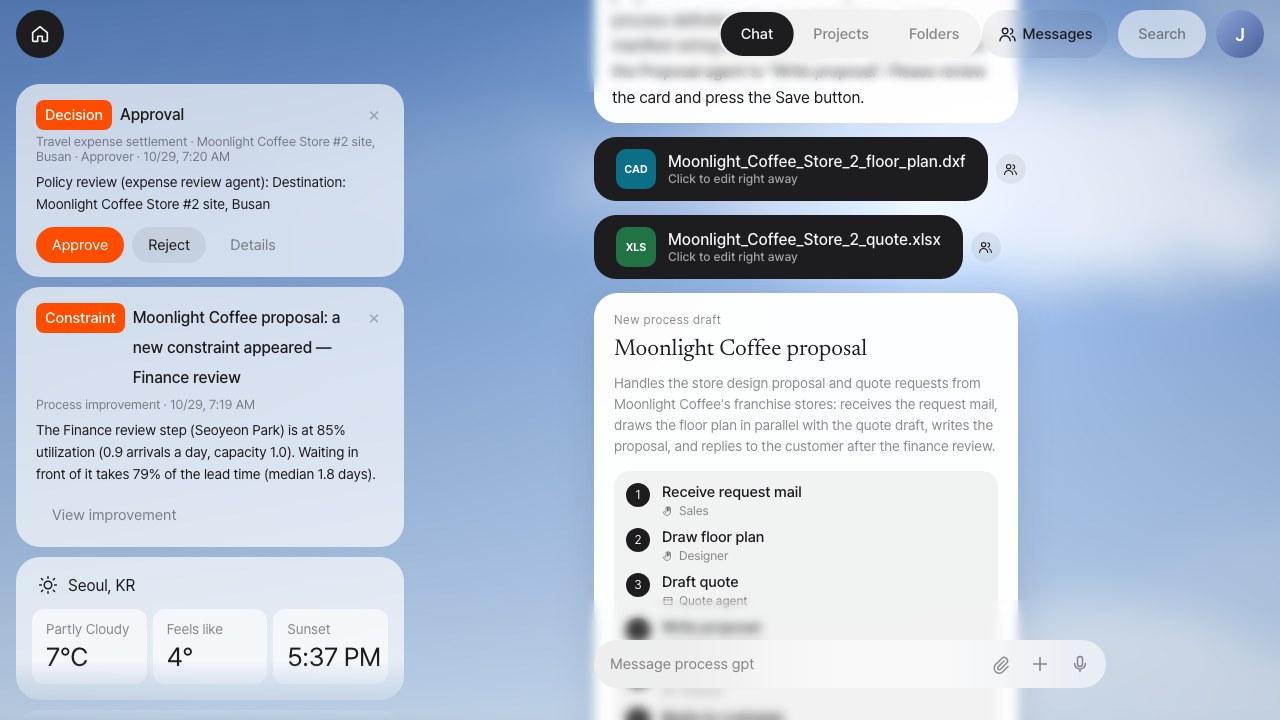
A Home screen that puts your to-dos first
Home shows what needs your attention right now, as cards. Steps that need human judgment, such as approvals, reviews and replies, go only to the person who holds that role, and the button on the card handles it in one click.
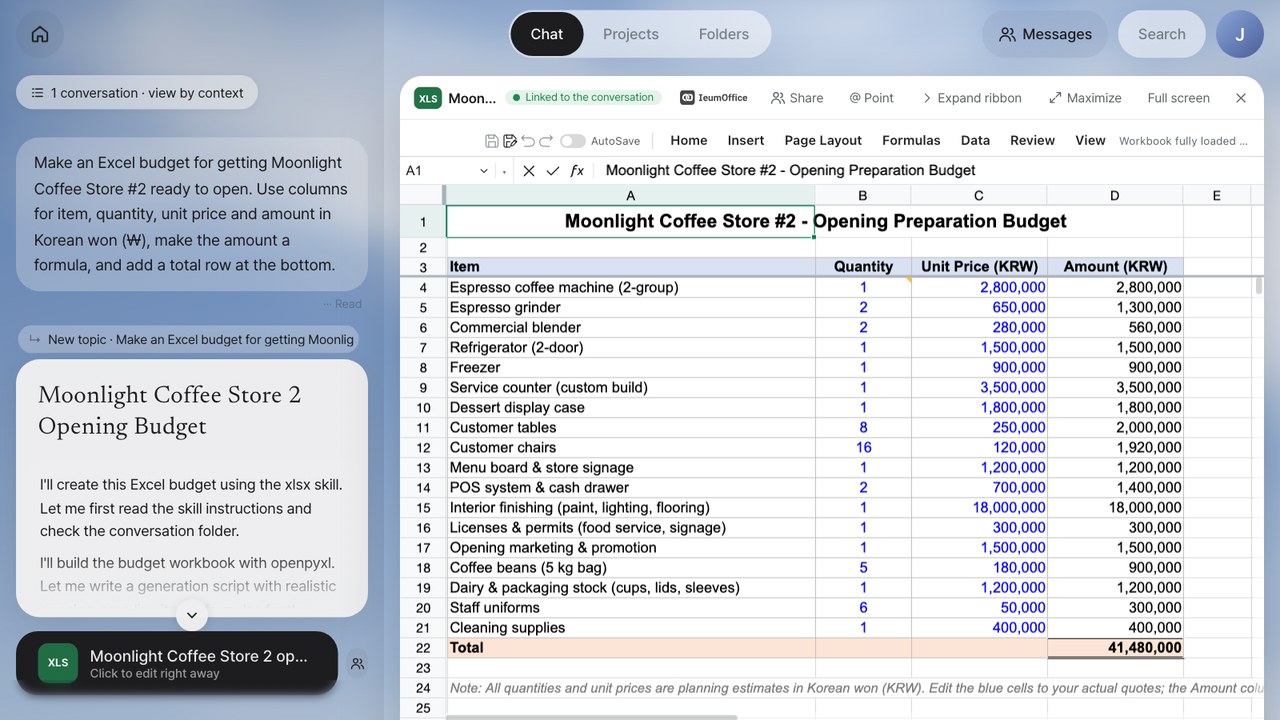
Agents create it, people fix it on the spot
Word, Excel, PowerPoint and HWPX (the Korean Hangul word-processor format) documents an agent creates open right in the IeumOffice editor, with no download. Save your edits and the chat’s document card switches to the edited copy.
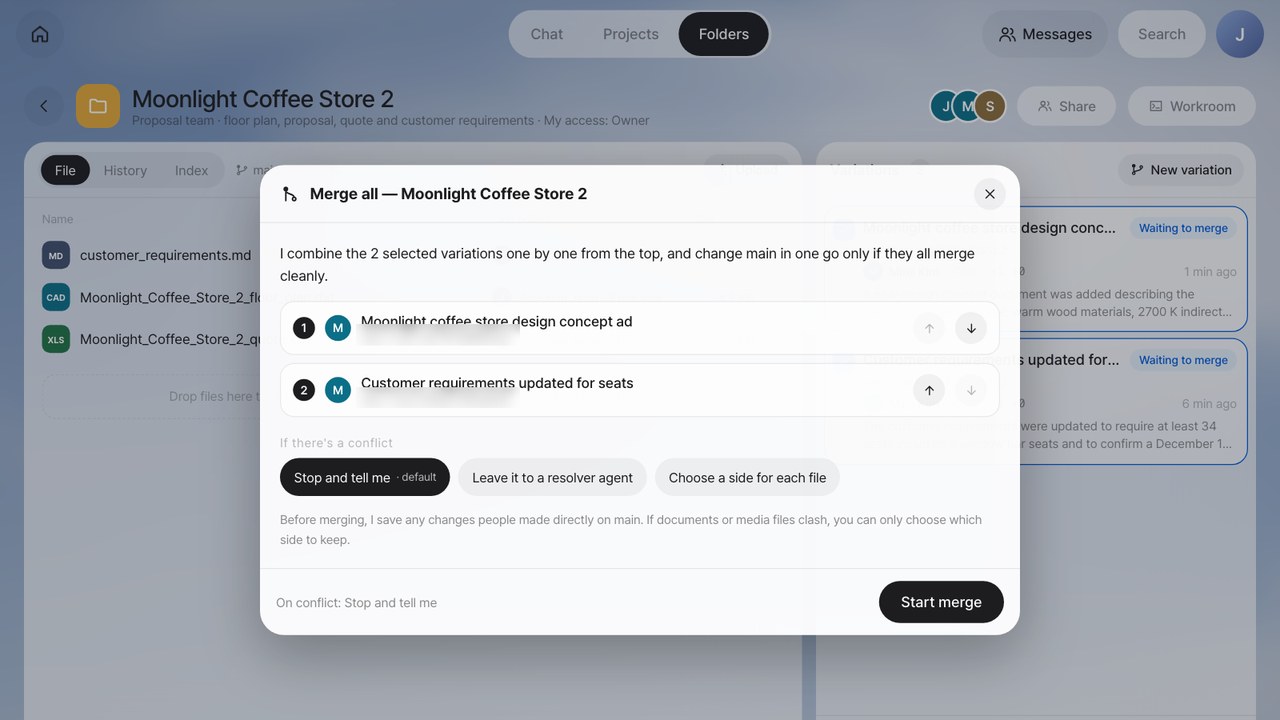
Shared folders for people and agents
Your team shares files like a drive. Agents never touch the baseline directly; they work in variations (branches), and people review the differences and merge only the variations they choose, in one go.
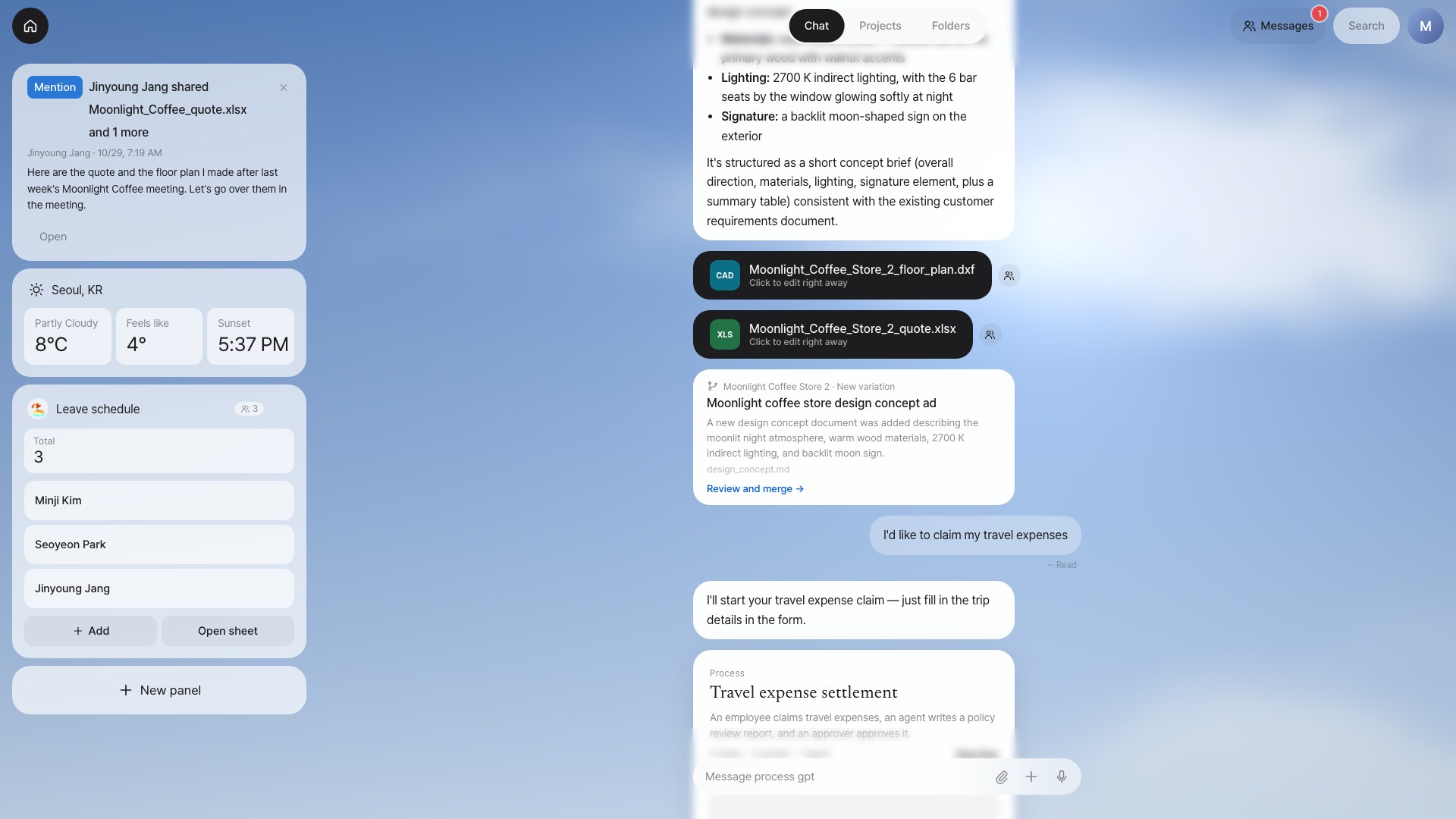
Work apps you build by asking
"Make a panel to track team leave days" is all it takes to put a work app with an input form and a summary on Home. The data lives in a spreadsheet in a shared folder, so the sheet and the panel always work on the same source.
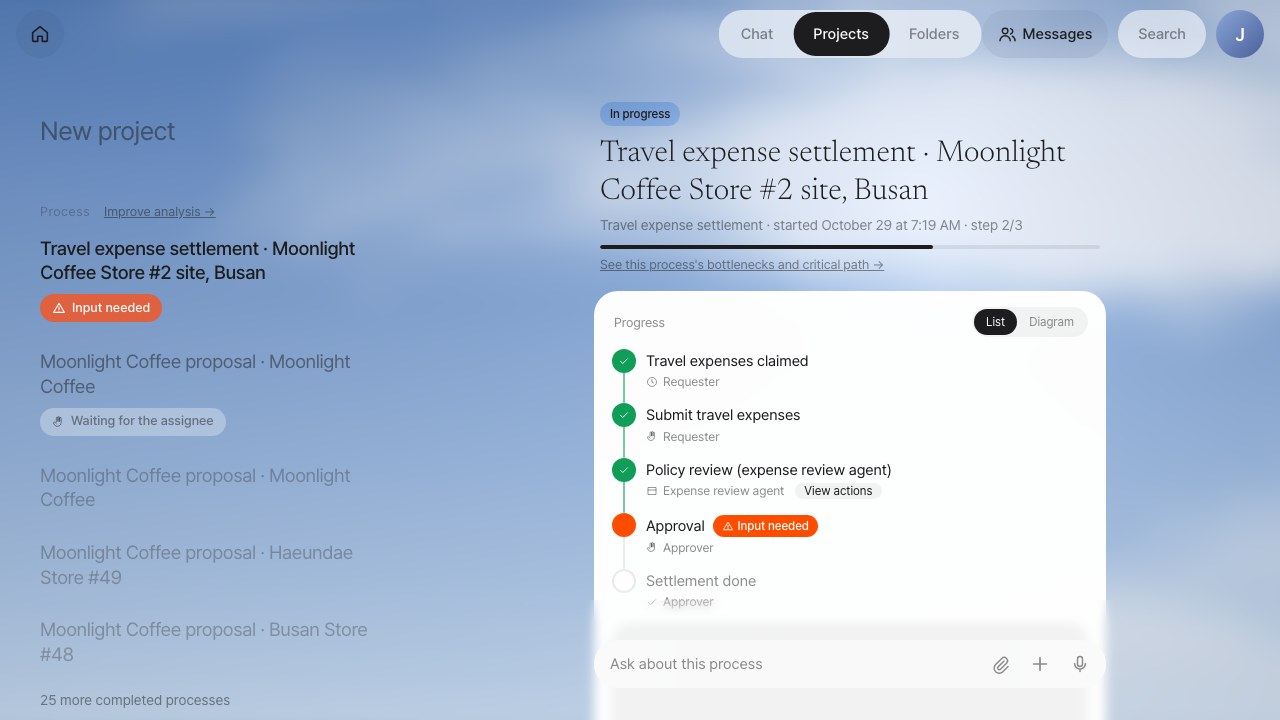
The Process GPT engine, as is
Lite isn’t a separate engine. The agent runtime, process engine, IeumOffice and MCP hub all run on the Process GPT engine, and processes you create in chat are saved as Process GPT BPMN processes.
Benefits
Start small, see results right away, and keep the way you work as an asset of the organization.
Start without process modeling
Notifications only for the people who need them
No more download, edit, re-upload
Even a one-sheet spreadsheet job becomes an app
Security and privacy by default
Team know-how becomes a company asset
Capabilities
Every screenshot comes from the working product, and every topic has a video.
01 · Chat and Home
One chat, starting with what’s waiting for you
Conversations keep their context, and Home shows what needs your action first.
- Context routerPicks the conversation each message should continue. A lightweight routing model answers first; when it is unsure, it falls back to logprob and then to a JSON judgment. The tiered strategy is both fast and accurate.
- Home panels and action cardsWork that needs an approval, a review or a reply arrives as a card, and you decide each step with a button. Panels you created by asking, such as weather or stocks, sit alongside.
- Role-based notificationsAssign owners under Team & roles and each process step goes to the right person. You can also pull in a colleague mid-conversation, as in "Ask the product owner to confirm this."
02 · Work automation
Processes you describe, missions that run every day
One person’s repeat work becomes skills and scheduled missions; work shared by several people and agents becomes a process.
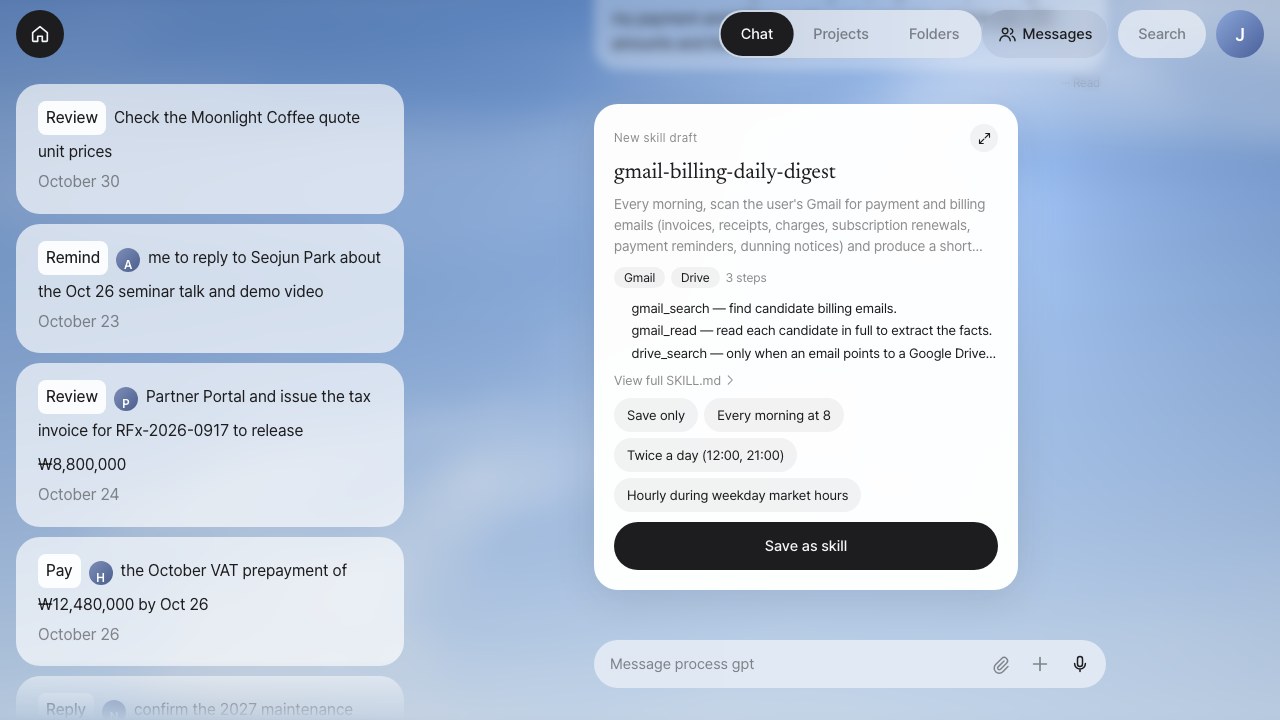
- Build a process in chatSay "Create a purchase request process" and it proposes a draft flow, then saves it as a BPMN process once you confirm. Follow the start form, the steps in progress and the outputs on the Projects screen.
- Turn repeated work into a processWhen the same pattern keeps recurring (an email comes in, documents are made with several tools, teammates review them, a reply goes out), process mining finds the flow in the handover records and recommends it to an admin. Register it and you get a process with BPMN, forms, roles and per-step skills that starts on its own with the next similar email.
- Browser missionsAs one step of a process, a browser agent researches external sites directly, shows you its screen live, and passes the results to the next step.
- Connections · skills · scheduled missionsConnect Google, Slack, GitHub, Notion and YouTube, save requests like "Summarize payment and billing emails every morning" as skills, and run them on any schedule. You only hear about it when something has changed.
03 · Real-world scenario
Daily Social Media Trend Response
Every day it scans social media, escalates only the issues worth bringing into your product, and carries them from the decision through implementation to marketing drafts.
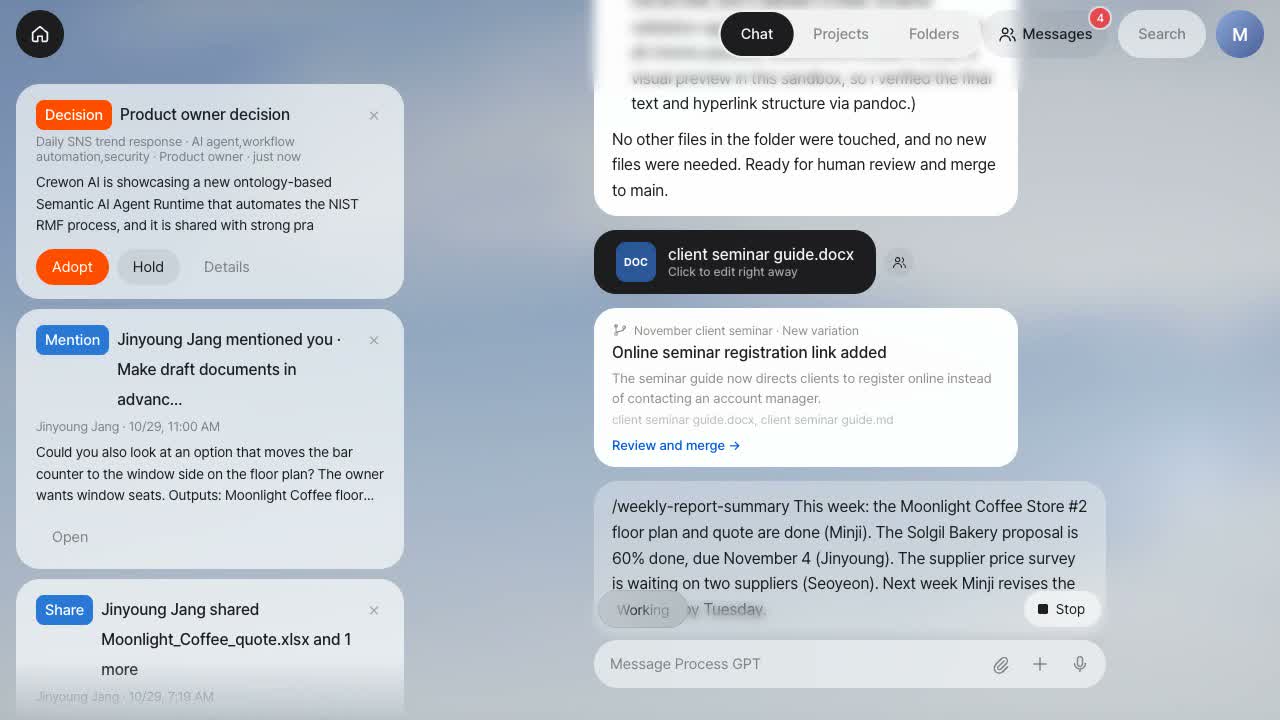
- Only relevant issues reach a personIt first checks whether the most-discussed posts relate to your product. If not, the run ends quietly with no notification; if so, a decision card goes to the product owner together with a benchmarking analysis.
- Decide, and Claude Code implements itOnce the product owner decides to act, a Claude Code agent implements the improvement on a separate working branch of the repository, and people review the result in the Workroom.
- People approve the marketing draftsMarketing content and outreach copy stop at the draft stage; the marketing owner gives the final approval before anything goes out.
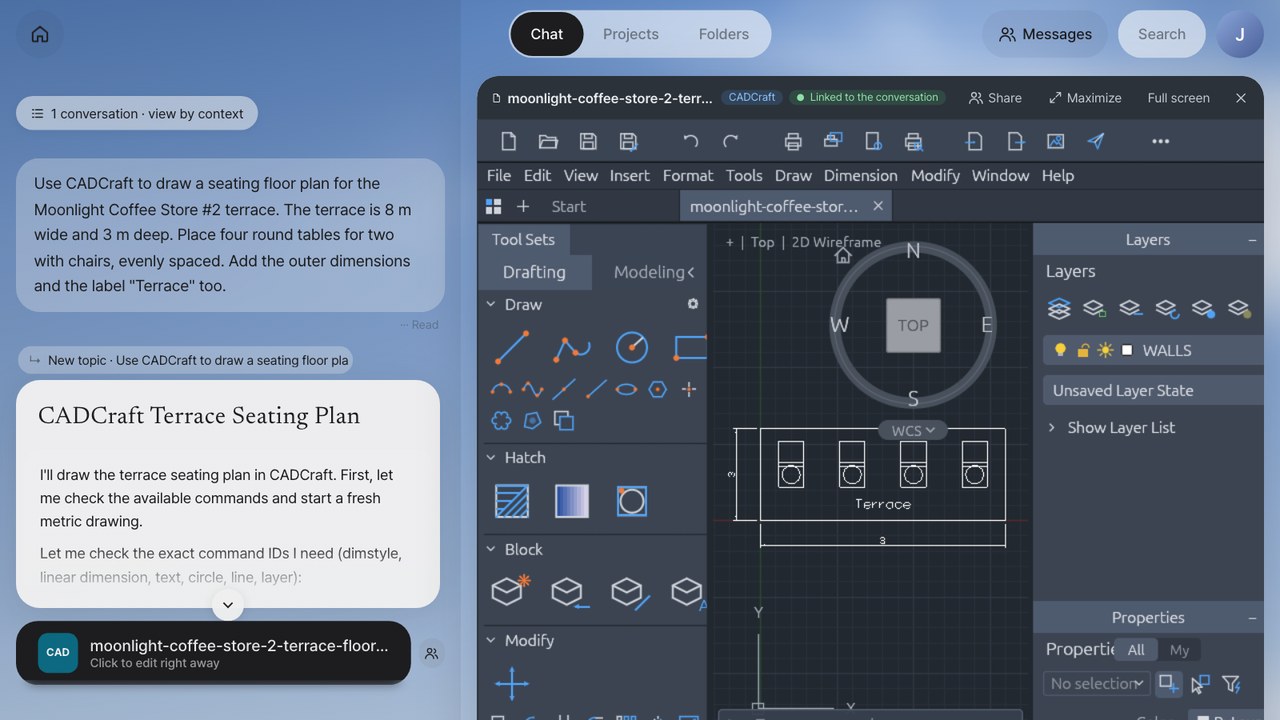
04 · Documents and creative apps
Edit what agents make, right where it is
Not just documents but drawings, vector art, layered images, audio and video: agents create them through MCP, and people fix them in web apps right away.
- IeumOffice document editingOpen HWPX, Word, Excel and PowerPoint files in their native formats and edit them with the document AI helper. Save, and the chat’s document card becomes the edited copy.
- Five ArtCraft creative appsCADCraft (drawings), VectorCraft (vector), PhotoCraft (layered images), SoundCraft (audio) and FilmCraft (video editing) run as web (WebAssembly) apps, so you can edit the files an agent made right away.
- Live co-editingWith an app open, say "Make the title yellow" and the change appears on screen. Call up the input box with the dial on top of the app and give instructions without breaking your flow.
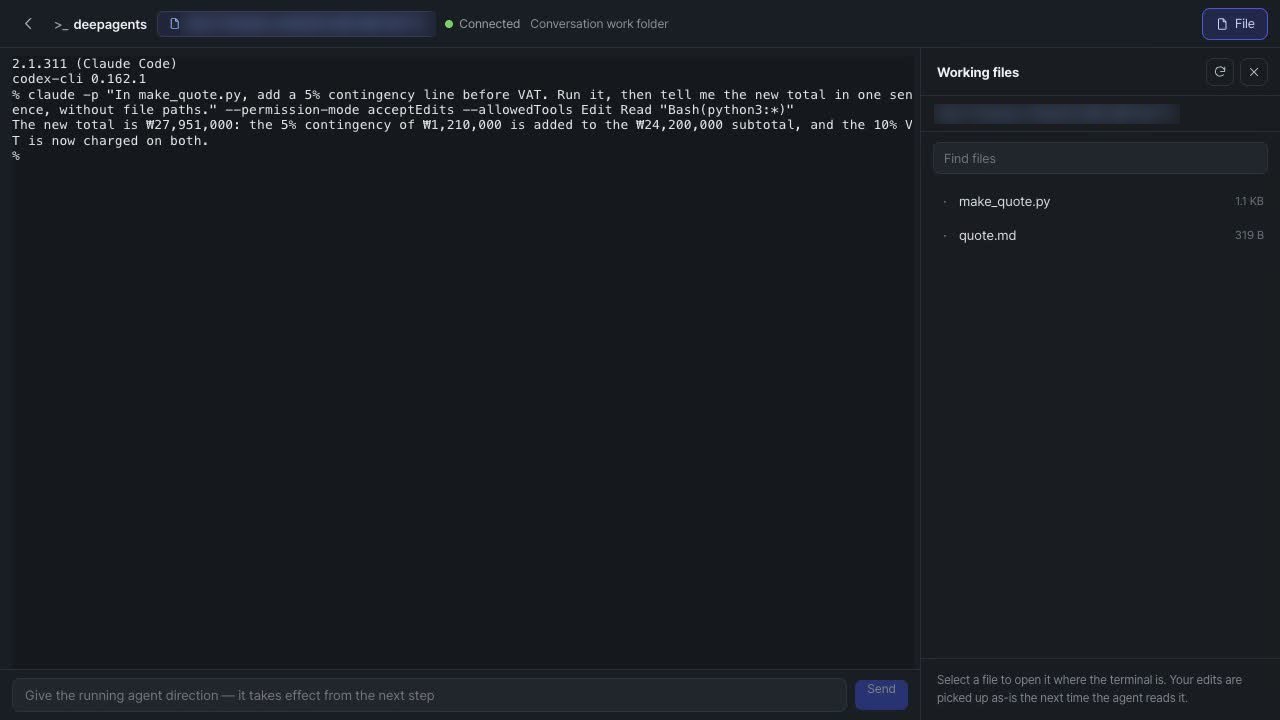
05 · Agent Workroom
Step into the agent’s folder and change course
You don’t just receive results. Open the agent’s working folder, inspect its outputs, edit them yourself, and steer an agent that is still running.
- View outputs and inject codeBrowse the working folder’s file tree and previews (Markdown, images, video, PDF), and put your own file edits in place.
- Claude Code steeringResume a finished Claude Code session with your next instruction, or ask a running agent to change direction.
- TerminalOpen a shell in the same working folder to check the changes and test results on the spot.
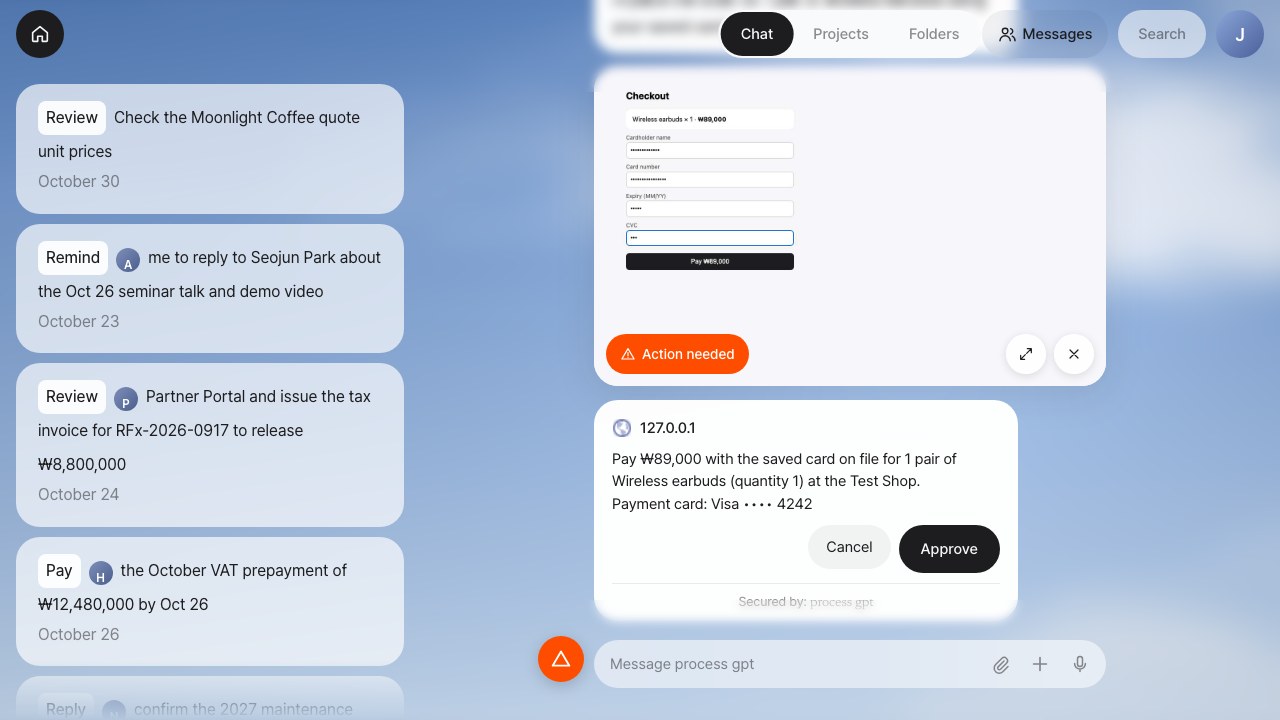
06 · Security
Passwords and cards stay in the Vault, not with the AI
When a browser agent has to enter a login, payment details or a verification code, it pauses, and the system collects the value from the user and handles it on the agent’s behalf.
- Credentials handled by proxyThe user provides the value through a chat card, and the server types it into the page. The value never reaches the AI model, and one-time codes are never stored.
- Envelope encryption (KEK/DEK)Data is encrypted with AES-256-GCM under a per-user data key (DEK), and each DEK is wrapped with a master key (KEK). The master key is never kept in the database.
- Approval before payment, plus an activity logHard-to-undo actions such as payments need the user’s approval right before they run, and every use is logged (when, and which item) without the actual value.
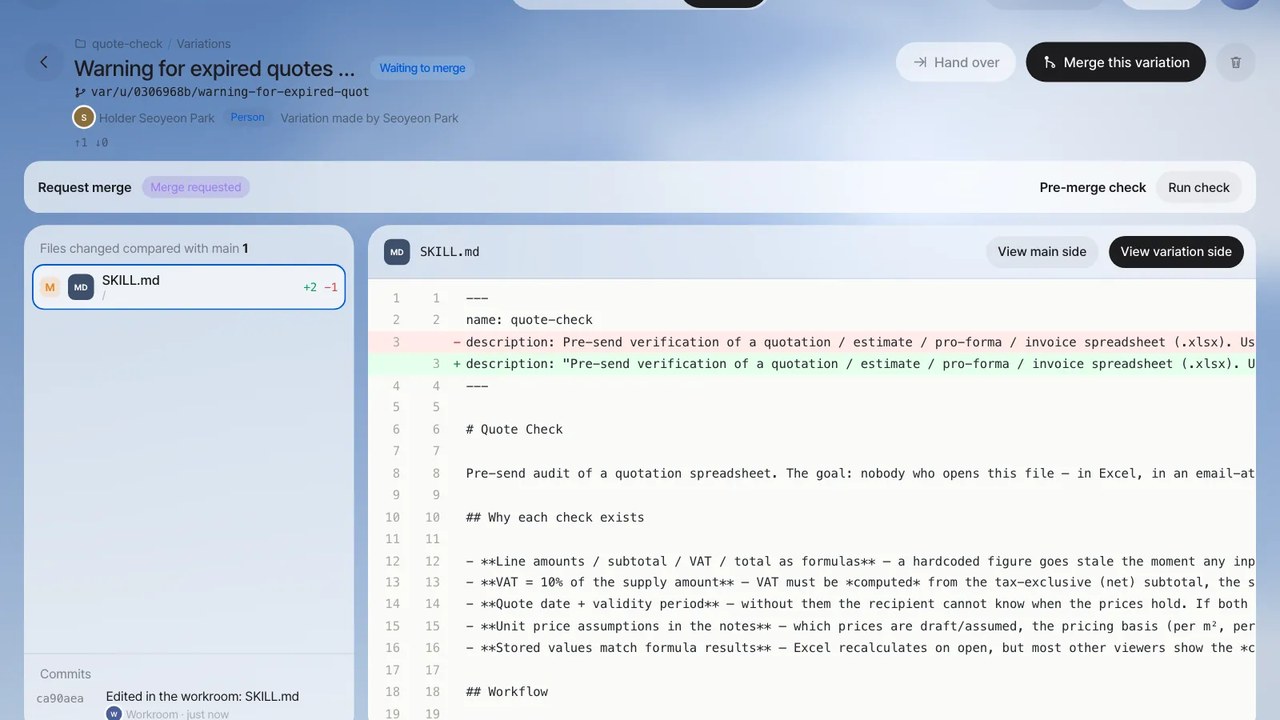
07 · Team collaboration
Shared folders and skill sharing
People and agents work in the same file space, and well-built skills are reviewed, then used by the whole team.
- Shared folders and variationsAgents work in variations (git branches) split off from the folder’s baseline. Have several variations tackle the same job, then merge just the ones you pick, in order, into the baseline in one go. Every file gets a document card, so it’s easy to find.
- From My skill to company-wideA new skill starts as "My skill"; once you have tried it and it fits, share it company-wide. Anyone can use a shared skill and suggest improvements.
- Share outputs with teammates instantlySend an output card or a file from the editor to a teammate or a role with a note, and they get a real-time notification and an Inbox entry. They can open their own copy or hand it to their own agent with "Continue working". Type @ in chat and the teammates you share with most, plus the people the routing model picks, come up first; teammates also message each other one-on-one or in groups.
- Meet right in the roomStart a video meeting in a team room and the helper joins in: it captions each speaker and, when the talk turns to a quote, a floor plan or progress, puts it on screen for the people allowed to see it. Requests made in the meeting become agent tasks, and the minutes, decisions and to-dos land in the room automatically.
- Merged after review and verificationImprovement proposals are merged by the skill’s author or by the owner of an agent that uses the skill (the agent boss), after comparing before-and-after results side by side. Contributions are recorded too.
08 · Panel apps
Build work apps by asking, and keep the data safe
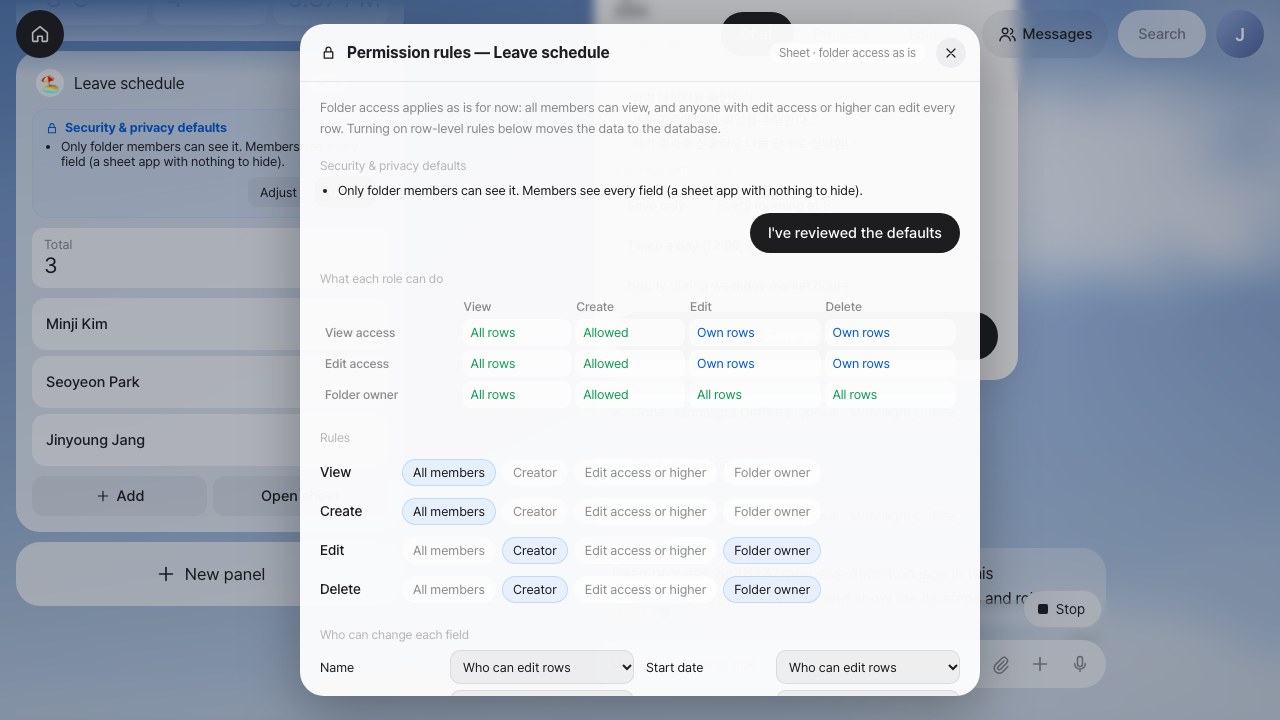
No more waiting on development every time you need a small work app. It safely handles work where quantities go up and down, and data that many people share.
- Work apps backed by a spreadsheetRows entered in the panel build up in a spreadsheet in the shared folder, and edits made in the sheet flow back to the panel. Every change stays in the folder history with its author.
- Event sourcingFor work where quantities rise and fall, such as leave, inventory or points, grants, requests and cancellations are only ever appended as records, and the current balance is recalculated from them.
- Row-level security (RLS) and privacyRules like "only you can edit your own events" are enforced by the database itself. Sensitive fields are classified automatically and visible only to their owner and admins from day one, and the same rules apply on every access path.
09 · Anywhere
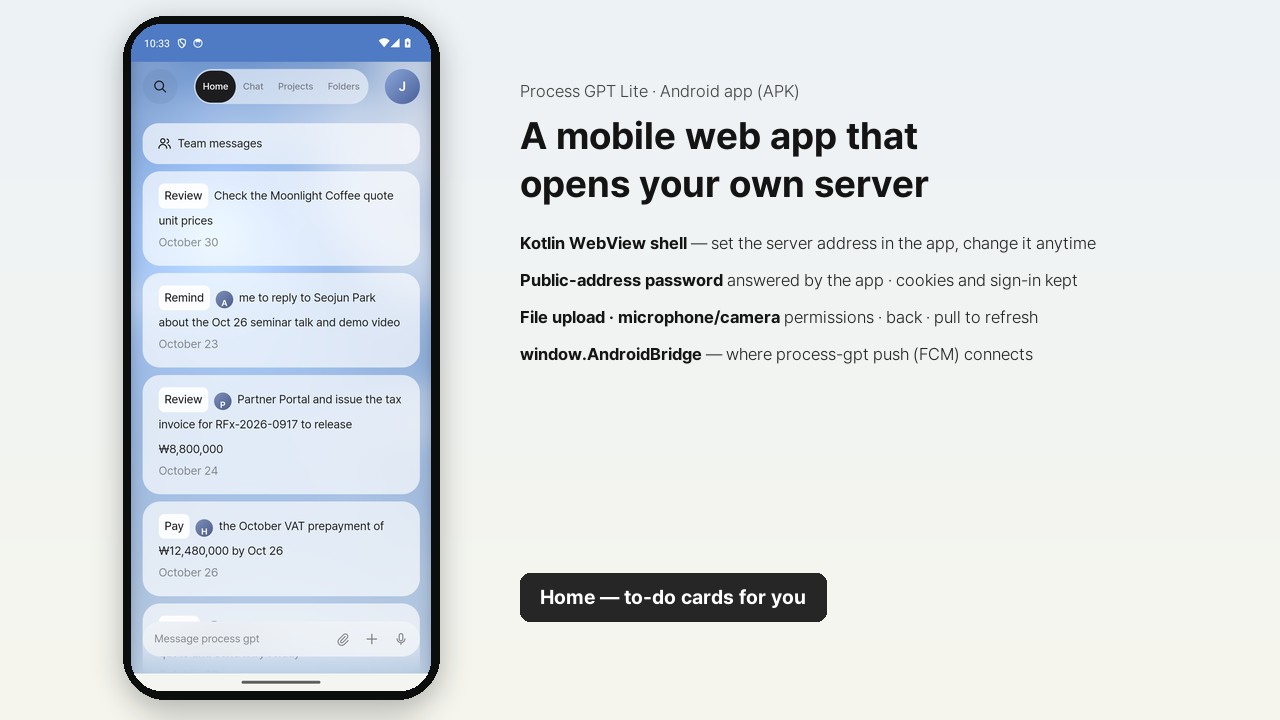
Android app and mobile web
Keep working outside the office, on the same screens.
- Connect to your own serverThe first time you open the Android app, enter your company’s server address and access password; from then on it opens straight into Process GPT Lite on that server.
- Home, Chat and Projects, all thereCheck the action cards waiting for you and ask questions in chat. File uploads, the microphone and the camera work in the app too.
Watch the Videos
A 1–3 minute demo for each feature. Click a thumbnail to play it.
At a Glance
Process GPT Lite: Full Introduction
An 8-minute tour: one assistant that works across apps (one email → floor plan, proposal and quote), Claude Code and Codex, folders and team sharing, and processes that grow out of process mining.
From One Email to Floor Plan, Proposal and Quote
One email from Moonlight Coffee is enough to draft a CAD floor plan, an HWPX proposal and an Excel quote. Point at the drawing to match its colors in PhotoCraft; the assistant checks that every table, wall and label made it through, then puts the drawing back into the proposal.
Team Sharing and Messenger
Share outputs with teammates instantly; they pick up from their own copy or with "Continue working". Plus @mention suggestions and team messaging.
Browse by Conversation
Pick one conversation from the automatically split list, follow just that one, keep asking, and open the outputs each conversation has collected.
Turn Repeated Work into a Process — Process Mining
As email → floor plan, proposal and quote → share and reply keeps repeating, it finds the flow and recommends it. Once registered, the process runs on its own from the next email, and finance reviews the outputs straight in IeumOffice and CADCraft.
Process GPT Lite Tour
From sign-in to Home, chat and running a process: a day’s work in one take.
Chat and Work Automation
Context Router
Routing model → logprob → JSON: how each message finds the conversation it continues.
Build a Process in Chat
Save a process built in chat as BPMN and run it, browser mission step included.
Connections, Skills and Scheduled Missions
Connect Google, YouTube and more, and run skills on a schedule. Also shows Claude Code runs and the mobile screens.
Daily Social Media Trend Response
A process that runs from benchmarking to a Claude Code product improvement to marketing drafts.
Agent Workroom · Security · Mobile
Agent Workroom
Inspect outputs, drop in code, and steer Claude Code.
Vault
Collects the passwords and cards an agent needs on your behalf and keeps them under envelope encryption.
Android App
The mobile app that connects to your own server address.
Documents and Creative Apps
CADCraft Drawings
Agents draw through MCP; people edit right away in web CADCraft.
VectorCraft Vector Graphics
Refine an agent’s vector artwork in web VectorCraft.
PhotoCraft Layered Images
Edit images with live layers in web PhotoCraft.
SoundCraft Audio
Fix agent-made audio in web SoundCraft.
FilmCraft Video Editing
Keep editing an agent’s video cut in web FilmCraft.
PhotoCraft Live Co-editing
Edits you ask for in chat appear in the open app instantly; bring up the input box with the dial.
Team Collaboration and Panel Apps
Online Meetings in Team Rooms
The helper listens in and brings up quotes, floor plans and progress; requests become agent tasks, and the minutes land in the room automatically.
Shared Folders
Agents work in variations; people pick variations and merge them all at once.
Skill Sharing
Share your skill company-wide, then review and verify colleagues’ improvements before merging them.
Build a Panel App
Build work apps such as leave or lead tracking by asking, with the data kept in a spreadsheet.
Event-Sourced Leave Tracker
A leave app that appends records and recalculates balances, plus privacy protection applied from the moment an app is created.
Shared Calendar with Row-Level Security
An app-specific database and RLS enforce "who can edit what".
How It Differs from Process GPT
Both products run on the same engine. Process GPT connects people, AI and existing systems in end-to-end processes to cut lead time across the whole organization; Process GPT Lite puts that engine behind a single chat as a work assistant for individuals and teams. Start small with Lite, and move to Process GPT when work starts crossing departments.
| Category | Process GPT Lite | Process GPT |
|---|---|---|
| Product type | AI work assistant — a chat-first work tool for individuals and teams | Agentic BPM platform — runs end-to-end processes across the organization |
| Primary users | Individuals, small teams and business users at small and mid-sized companies | The whole organization: business users, process owners and IT |
| How you start | Straight from chat — conversations, skills and scheduled missions, no modeling | Process definitions and BPMN modeling, or reverse-engineering policy documents |
| Unit of work | Conversations, skills, scheduled missions and panel apps — processes when you need them | End-to-end processes and instances |
| Main screens | Chat · Home panels · Shared folders · Panel apps · Android app | Process modeler, work lists and instances, analytics and observability |
| Control and governance | Folder member permissions, notifications to role owners, skill review and merge, row-level security | Organization-wide governance, DMN rules, solidifying the execution path, lead time analysis |
| Integrations | Google · Slack · GitHub · Notion · YouTube connectors and MCP | MCP hub, A2A, integration with internal enterprise systems |
| Deployment | Lightweight rollout — use it in a web browser and the Android app | Enterprise deployment on-premises or on Kubernetes |
| Engine | Process GPT engine (agent runtime · process engine · IeumOffice · MCP hub) | Same |
| Growth path | Processes built in Lite are Process GPT BPMN processes — keep using them as they are | Scales team-level work into organization-wide processes |
INSTALL
Install
Install it with one command on any machine that runs Docker. The database, sign-in, AI agents and the document editor all start together, and the same command handles upgrades later.
The installer asks for your LLM endpoint, API key and model name, plus the first admin’s email. You can also clone the repository and run it yourself:
git clone https://github.com/uengine-oss/process-gpt-lite.git && cd process-gpt-lite/install && ./install.sh
Have Docker Desktop (or Docker Engine) and an API key for an OpenAI-compatible LLM ready.
Run the command above. The first run builds the images in 20–40 minutes; after that, it starts in 1–2 minutes.
Open http://localhost:18080, enter the admin email, then type the 6-digit code from the mailbox at http://localhost:18025.
▶ Requirements Docker, memory, CPU, disk, LLM key
| Item | Minimum | Recommended |
|---|---|---|
| Docker | Docker Desktop 4.x or Docker Engine 24+ (Compose v2) | - |
| Memory allocated to Docker | 6GB (about 1.5GB in use while running) | 8GB or more (first build) |
| CPU | 4 cores | 8 cores |
| Disk | 20GB (images take about 11GB) | 30GB |
| LLM | OpenAI-compatible API endpoint, key and model name (OpenAI, an in-house LLM, vLLM and others) | |
▶ Profiles lite by default; full adds the process engine
| Profile | Included services | What you can do |
|---|---|---|
| lite (default) | Web app and server, Supabase (PostgreSQL, auth, API, storage), mailbox, Deep Agents + sandbox, document generation (office-mcp), IeumOffice editor | Delegate work in chat, agent tasks, document creation and editing, shared folders, panel apps, Vault, browser agent |
| full (preview) | lite + process engine (completion · polling) + MCP hub | Start and run BPM processes, manage MCP servers |
./install.sh --profile full.
• The context router (a GPU is recommended for the routing model), Claude Code and Codex runs (cli-agent) and document search (memento) run separately; connect them by adding their addresses to
.env.▶ Upgrade · Uninstall Managed with the same install script
.env is created at install time (mode 0600), with secret keys generated automatically. Upgrades leave it as it is.
• To connect from other machines, edit
.env: set PUBLIC_URL to this machine’s address and LITE_BIND=0.0.0.0, configure SMTP, then run ./install.sh again.▶ Troubleshooting Common issues
| Symptoms | Fix |
|---|---|
| Port 18080 is taken by another program | ./install.sh --port 28080 |
| The sign-in code doesn’t arrive | Check the mailbox at http://localhost:18025; see docker compose logs auth |
| Chat doesn’t answer | Check the LLM endpoint, key and model in .env, run ./install.sh, and see docker compose logs deepagents |
| Agent tasks hang | On Linux, add your user to the docker group; check that docker ps lists deepagent-sandbox-* |
| The first build fails for lack of memory | Give Docker 8GB of memory or more and run it again |
| Windows | We recommend installing Docker Engine inside WSL2 |
▶ Kubernetes Coming soon
• For a multi-user production setup, contact us and we’ll design it with you.
Learn & Build
AI Work Class for Your Company
Learn with your own company’s work, then use it right at your company. Bring one real task, practice it in Process GPT Lite, and the initial installation in your agreed company environment is included in the training.
STEP 1 · Training
A 12-module hands-on course
First chat and context → IeumOffice HWPX and Excel → Craft apps → co-editing → panel apps → shared folders → skills and scheduled missions → drafts from email → process mining → Agent Workroom → a capstone on your own work.
STEP 2 · Deployment
Installation included in the training
Installed with Docker Compose on one agreed server, with initial setup such as the admin account and a connection to the LLM your company uses. The skills and apps made in practice move over as they are. LLM and server costs and custom integrations are separate and explained up front.
STEP 3 · Adoption
Mentoring subscription
Consultants support diagnosis, process innovation, training and change management online, monthly and on demand, tailored to staff, teams and executives. Three plans from ₩2M to ₩10M a month (VAT excluded, negotiable).
The transformation program: diagnosis → bottlenecks → agents and automation → process innovation → training → change management See the program →
Start with a single message
Hand today’s work to AI with Process GPT Lite, then grow it into your team’s workflow.
Talk to us about adoption, or ask for a demo.
Have more questions?
If you would like to learn more about Process GPT Lite or have any questions, please contact us anytime.