Loading...
Skip to Content

Our Products

Process GPT

Process GPT - The start of a new organization where AI and people work together.

An AI agent platform that goes beyond the personal assistant (co-pilot) to become the true 'executing party' in enterprise processes.
MCP- and A2A-based multi-agents run your organization's entire end-to-end process without interruption,
learning skills and rules on their own as they execute and evolving continuously.
It completes organizational productivity as a mixed workforce where people and AI work as one team.

About Process GPT

Until now, AI has remained a tool for boosting 'personal productivity', drafting and summarizing documents and the like. But the AI model itself is a commodity technology anyone with capital can buy at the same price; on its own, it is no sustainable competitive advantage.
Process GPT takes a fundamentally different approach: as an 'organizational process AI (Business OS)' that automates the work flow of the entire organization, it combines AI with your organization's own decision logic and puts it in charge of execution.
Define a process in natural language and it is converted into an executable BPMN model, and every executed step accumulates as the organization's knowledge asset.

Generate a process from a single line of natural language

Describe the work in plain language — no specialist knowledge required — and the BPMN process model, business forms, AI agent role assignments, and human approval steps are all built automatically.

Learns as it runs

Agents are more than task runners. They accumulate user feedback and business rules as skills and DMN rules, steadily improving the accuracy of their judgments.

Seamless collaboration between people and AI

Routine, repetitive work goes to AI agents; decisions stay with people. A human-in-the-loop (HITL) design puts a person in the seat to review and approve at every critical decision point.


What sets Process GPT apart

Fewer than 5% of AI initiatives actually succeed (McKinsey). What the failed 95% share is that they stopped at "deployment" — bolting an AI that never gets past personal-assistant duty onto the existing order of work. That never changes an organization's core processes.
The successful 5% chose "reshaping": rebuilding the work process itself from the ground up on the assumption that AI is there. Process GPT delivers that redesign as a strategy of process-centric hyperautomation — people become supervisors, or agent bosses, while AI agents run the entire process autonomously.
It is also the execution layer that Process GPT owns within the union of "judgment" and "execution" described in our vision of the AI-Native Enterprise.
The standout results of AI-Native companies that achieved hyperautomation — revenue per employee
Messaging, hyper-automation
KRW 48.33 billion
Telegram
Image generation AI
KRW 18.13 billion
Midjourney
AI code editor
KRW 7.25 billion
Anysphere

What AI-Native companies that generate extraordinary revenue per employee with small, elite teams all have in common is hyperautomation. (Source: Lean AI Native Company Leaderboard)

Process GPT — the "execution" axis that completes the AI-Native Enterprise
The AI-Native Enterprise only comes together once an organization redesigns both "judgment" and "execution" from scratch on the assumption that AI is there. If Ontologic Platform elevates scattered databases, documents, and business rules into an ontology to create the asset that judges what affects what, then Process GPT is the execution engine that turns that judgment into who does it, when, and how on the front lines of real work. With judgment assets but no redesigned execution, insight never leaves the report; with execution but no judgment, you only get repetitive work handled faster. The skills and DMN rules Process GPT accumulates while running processes flow back into the ontology to deepen those judgment assets, and richer judgment assets in turn lead to more refined process design — a virtuous cycle, and the core axis Process GPT holds in the AI-Native Enterprise vision.
1

No coding knowledge required

Everyday users with no grasp of programming concepts simply give feedback on whether the process flow fits, and AI defines the BPMN-based process behind the scenes.
2

Self-learning and improvement

User feedback accumulates automatically as agent skills and business rules (DMN). Every change is version-controlled, so you can roll back to any previous state at any time.
3

Reverse-engineering of policy documents

Upload unstructured policy documents such as PDFs and images, and the processes buried in tacit knowledge are identified automatically and converted into executable BPMN processes.
4

Automated agent deployment

The agents a process needs are identified automatically, mapped to BPMN swimlanes (business roles), and given generated prompts.
5

Compliant with the BPMN and DMN international standards

Some 20 years of accumulated standards for process notation (BPMN) and decision notation (DMN) deliver automation that stays transparent and under your control.
6

Ontology-based knowledge graph

Agents navigate the organizational knowledge graph built with Ontology Studio as their knowledge map via MCP, reaching clearly grounded, hallucination-free judgments.

External System Integration and Extensibility

Multiple export formats

AI agents built in Process GPT can be exported in LangGraph and Crew AI formats, providing compatibility with your existing agent systems.

JSON format
Python module
API endpoint

A2A protocol support

⟺

Supports the Agent-to-Agent communication protocol proposed by Google, enabling smooth integration with a wide range of systems and standardized communication.

Standardized messaging
Greater interoperability
Ecosystem expansion

FEATURES

From design to execution, integration, and analysis, organized into seven areas. Click any item to see it with real screenshots.

📐 Process design · Reverse engineering Produce executable processes from natural language and existing documents
▶ Process reverse engineering from regulatory documents Automatic process identification from PDF and image regulatory documents 1 screenshot
ㆍUpload unstructured regulatory documents such as PDFs and images, and the business processes hidden inside them are identified automatically.
ㆍMultiple processes are extracted from a single document at once and saved as executable process definitions.
ㆍIdentified processes are managed in a Neo4j knowledge graph, systematically accumulating the relationships between tasks, sequence, and roles.
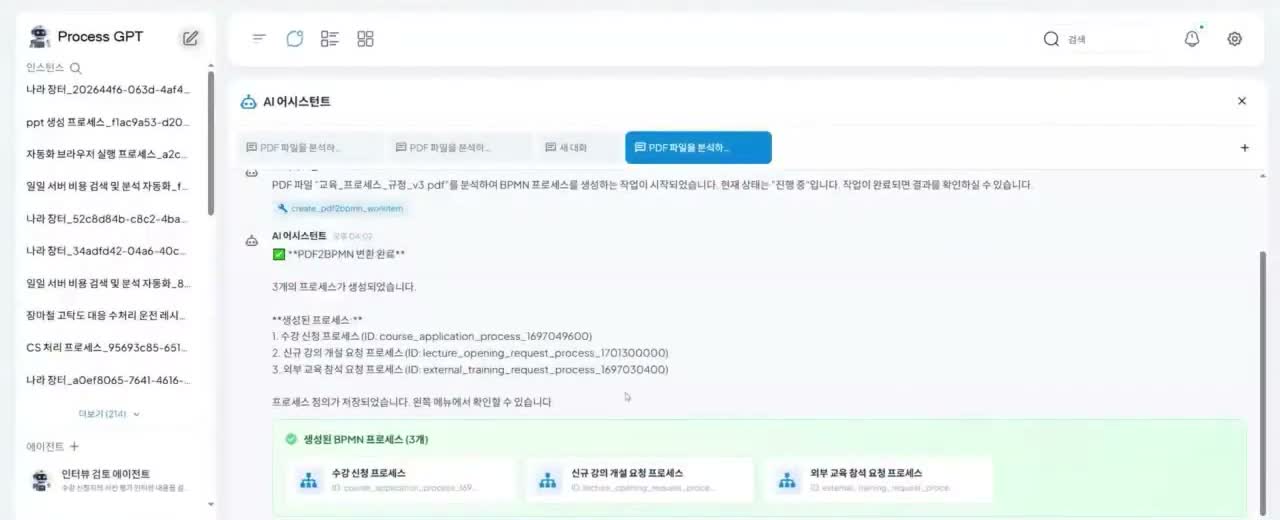
Automatic process identification from regulatory documents
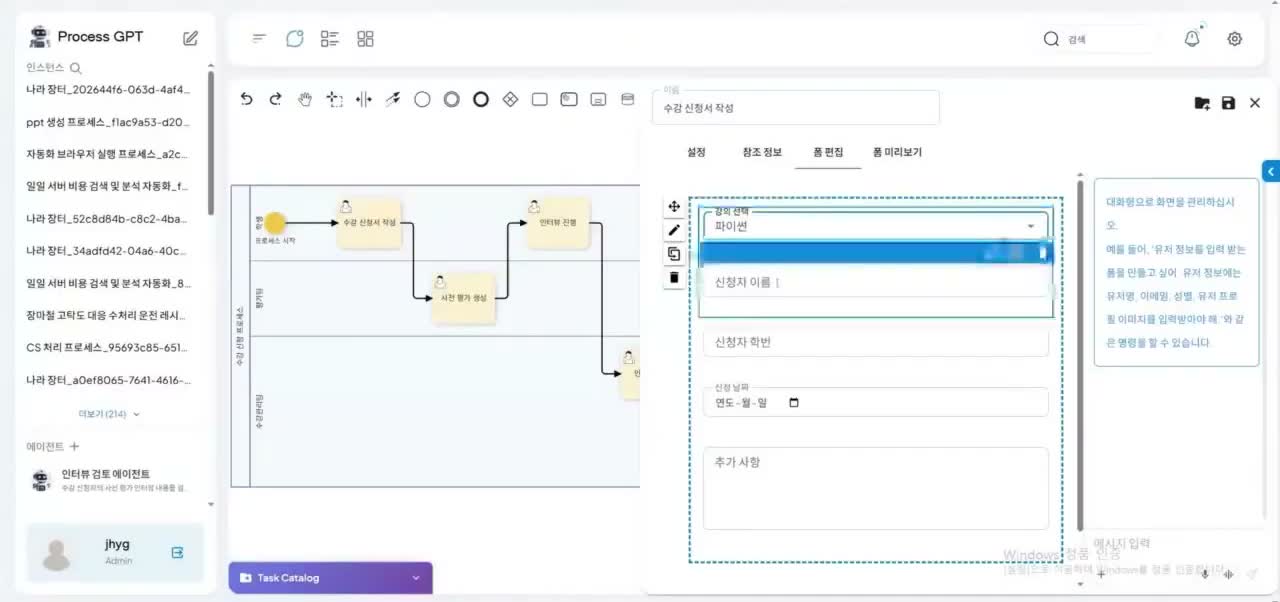
▶ Automatic generation of BPMN processes and business forms Input forms generated together with the process in one pass 2 screenshots
ㆍIdentified processes are visualized as international-standard BPMN diagrams and can be fine-tuned with natural-language prompts.
ㆍThe input forms each task needs (applications, evaluation questionnaires, and so on) are generated automatically and semantically, in keeping with the document's context.
ㆍReference information is wired up automatically so that each step can refer to the output of the previous one.
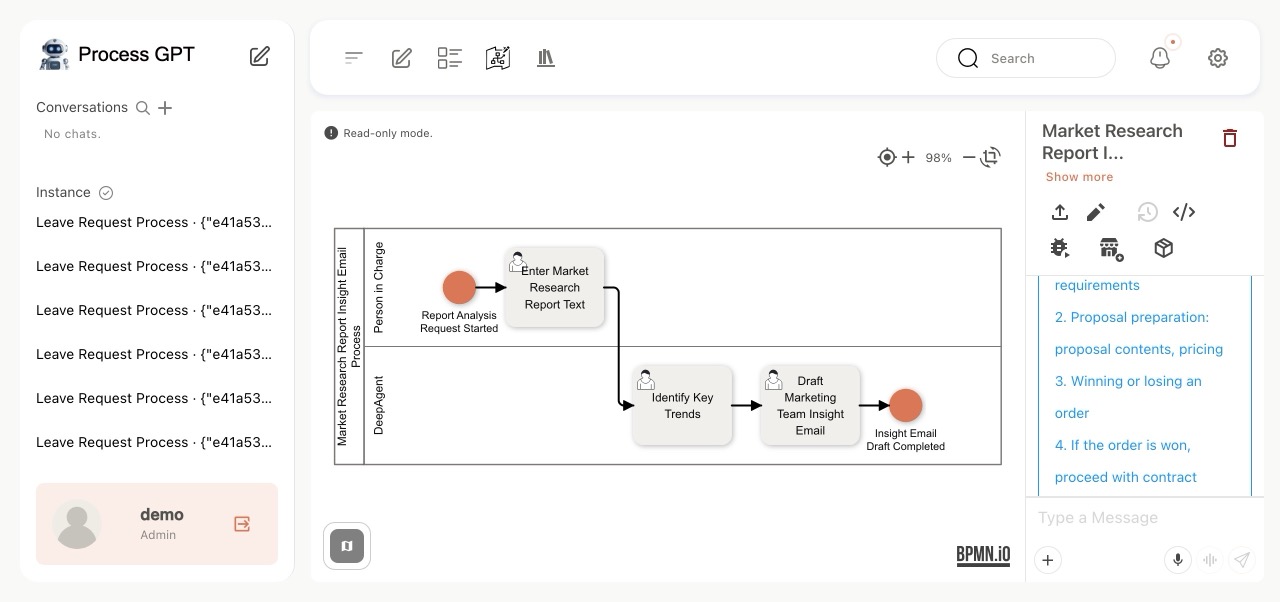
Auto-generated BPMN process
Automatic business form generation
▶ Automated human-agent team process definition to achieve organizational goals From a goal to a human-agent collaboration process Demo video
ㆍEnter a goal, and a human-agent team and work chart are composed and executed automatically.
ㆍAgents carry out the work while users improve the process through strategic judgment and feedback.
ㆍWhen needed, edit in natural language or directly in the BPMN modeler.
🧠 Agent setup · Knowledge learning Derive who can do what from the org structure and execution history
▶ Automatic management of agent knowledge Agents accumulate business knowledge on their own Demo video
ㆍRegister the AI agents your work requires, and the Agent Boss teaches them how to work and what to aim for in natural language.
ㆍAgents perform real work within the organization and grow continuously through feedback on their results, responding more precisely to the next assignment.
▶ Org-Chart-Based Automatic Agent Mapping Your organizational structure becomes your agent roles 1 screen
ㆍFor each task, separates what people do from what agents do, then finds the right AI agent in the org chart and assigns it automatically.
ㆍIf no suitable agent exists in the org chart, it evaluates whether the task can be agentized, creates a new agent, and maps it.
ㆍOn critical paths that require a final human decision, a human approval step is inserted automatically.
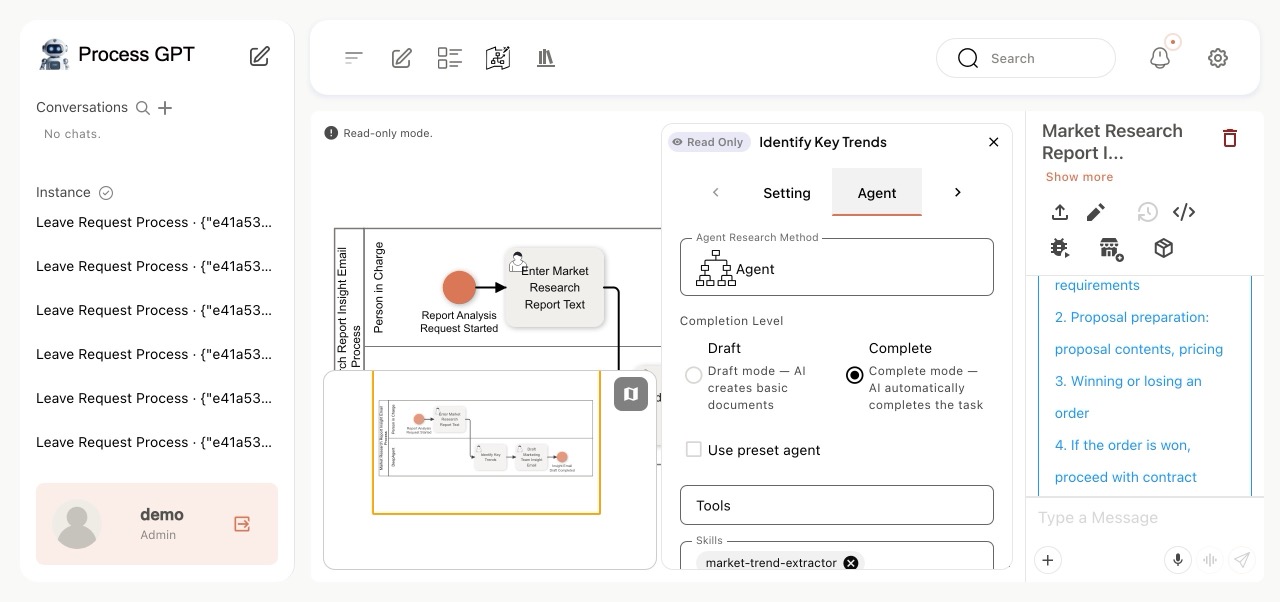
Org-chart-based automatic agent mapping
▶ Skill Learning for Autonomous Agents Learn skills while executing, manage them as versions 1 screen
ㆍUser feedback does more than fix a result: it is learned as an agent skill (Anthropic Skills spec) and applied automatically from the next task onward.
ㆍThe skill definition (SKILL.md) and its execution code improve automatically based on feedback, and every change is version-controlled.
ㆍIf you don't like the result of an improvement, 'Revert changes' restores any previous snapshot at any time.
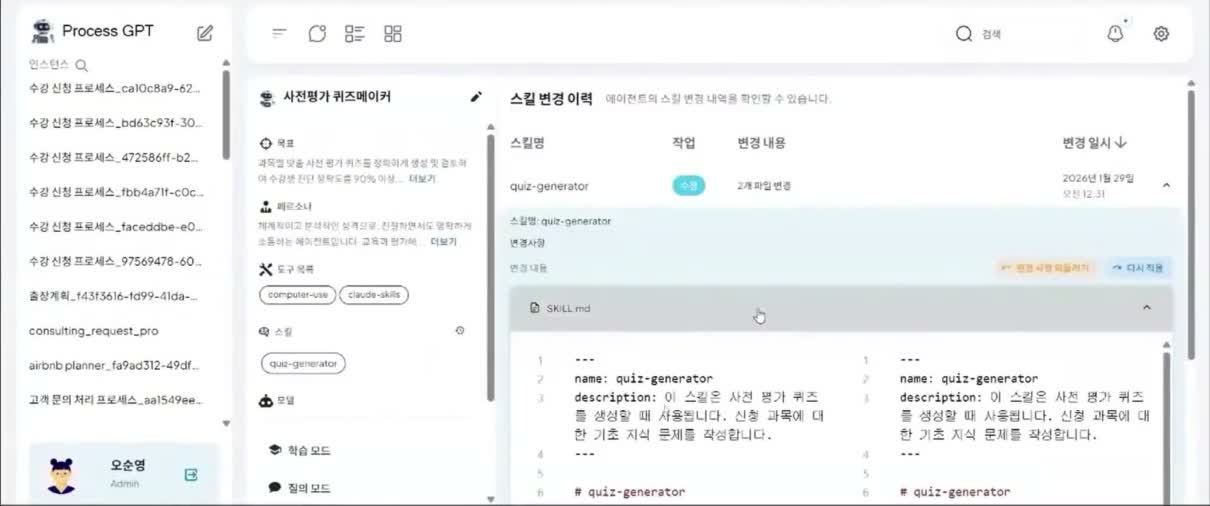
Skill change history and version management
🤝 Execution · Human Collaboration Agents execute; people step in where a decision is needed
▶ Agents Generate the Draft Agents take it all the way to a draft ready for human review Demo video
ㆍCreate multi-agent configurations (Crews) from registered agents; each agent runs autonomously until its goal is met.
ㆍConnect ERP, email, collaboration tools, and other channels over MCP so repetitive work is automated and results are produced as documents.
ㆍA practical, execution-centered process management environment with internal search, office tool usage, and MCP integration.
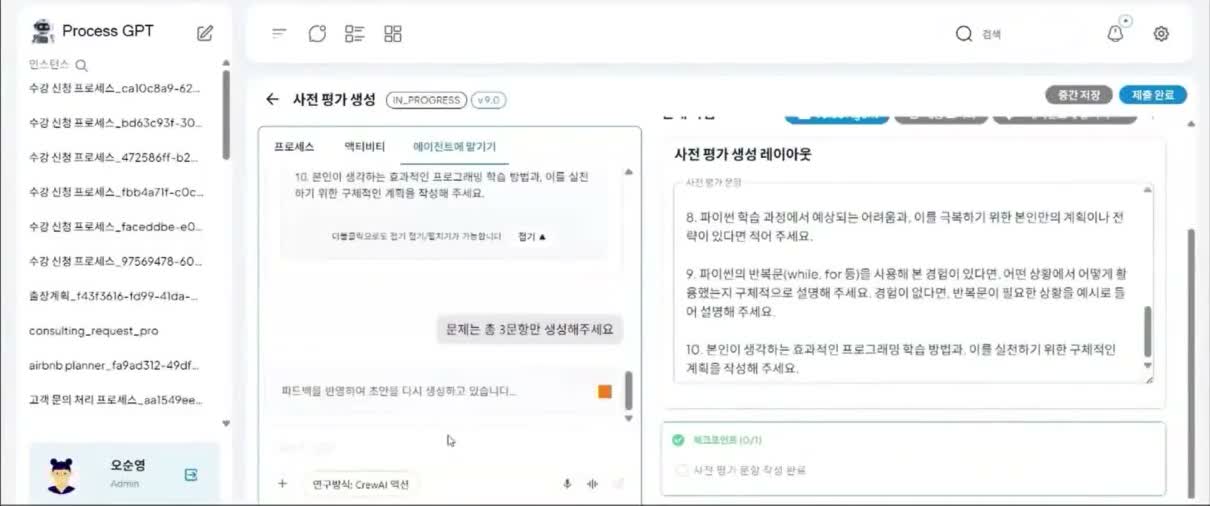
▶ Delegated Agent Execution with Real-Time Feedback Step in mid-execution and change course 2 screens
ㆍDelegate a task with 'Hand to agent' and the agent builds its own plan, then carries it out using knowledge and tools.
ㆍResults are mapped automatically into the task form; users review them and either adopt the result or give feedback.
ㆍA natural-language remark such as "Generate only 3 questions" is enough for the agent to re-plan and apply the change immediately.
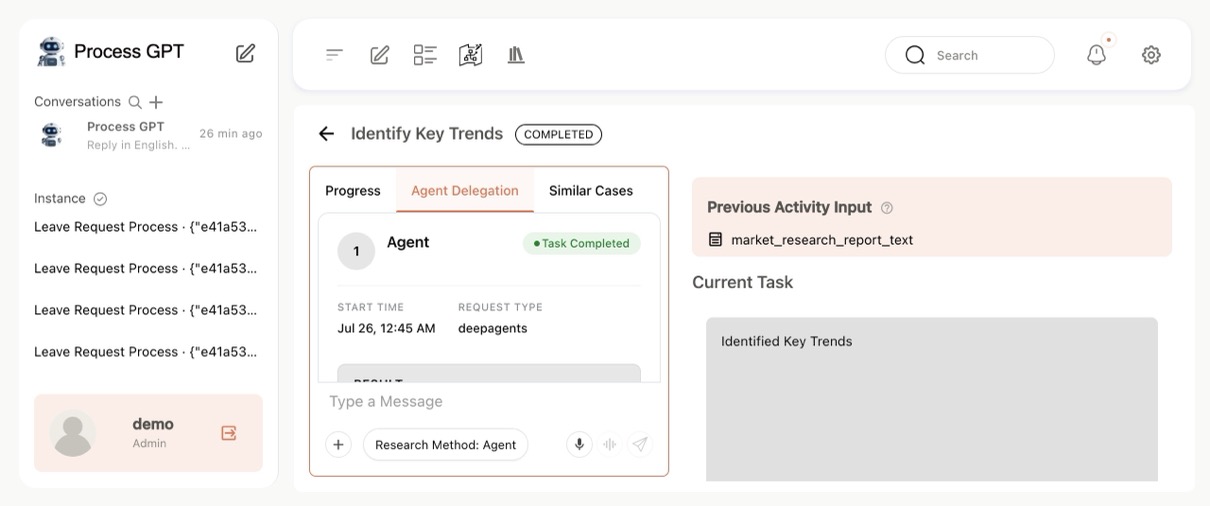
Delegated agent execution
Real-time feedback applied
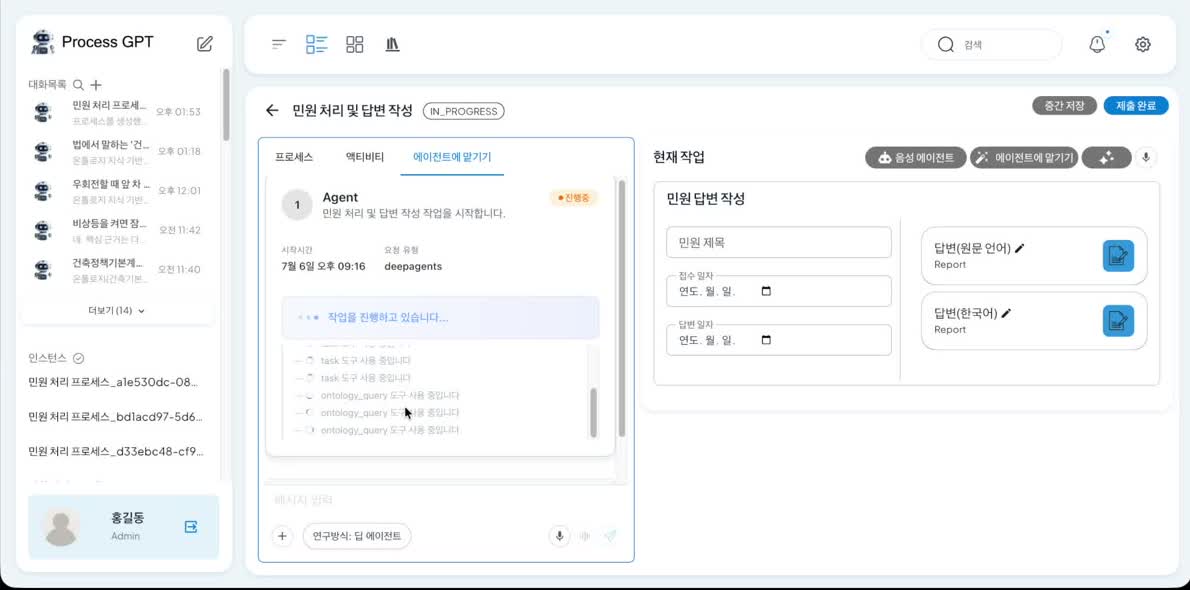
▶ Deep-Agent Autonomous Subprocess Execution & Ontology MCP Automatic subagent assignment and knowledge graph citations 2 screens
ㆍDeep Agents automatically assign the activities within a subprocess to subagents and execute them autonomously. — e.g., foreign-language inquiry intake → translation → review of applicable laws → drafting the reply.
ㆍDuring execution, the agent calls the Ontology Studio MCP (ontology_query) to explore legal knowledge graphs such as the Road Traffic Act and the Framework Act on Building, citing the supporting provisions.
ㆍThe ontology built in Ontology Studio serves as the agent's 'knowledge graph'; because answers are grounded only in explicit knowledge, you get reliable, hallucination-free automation.
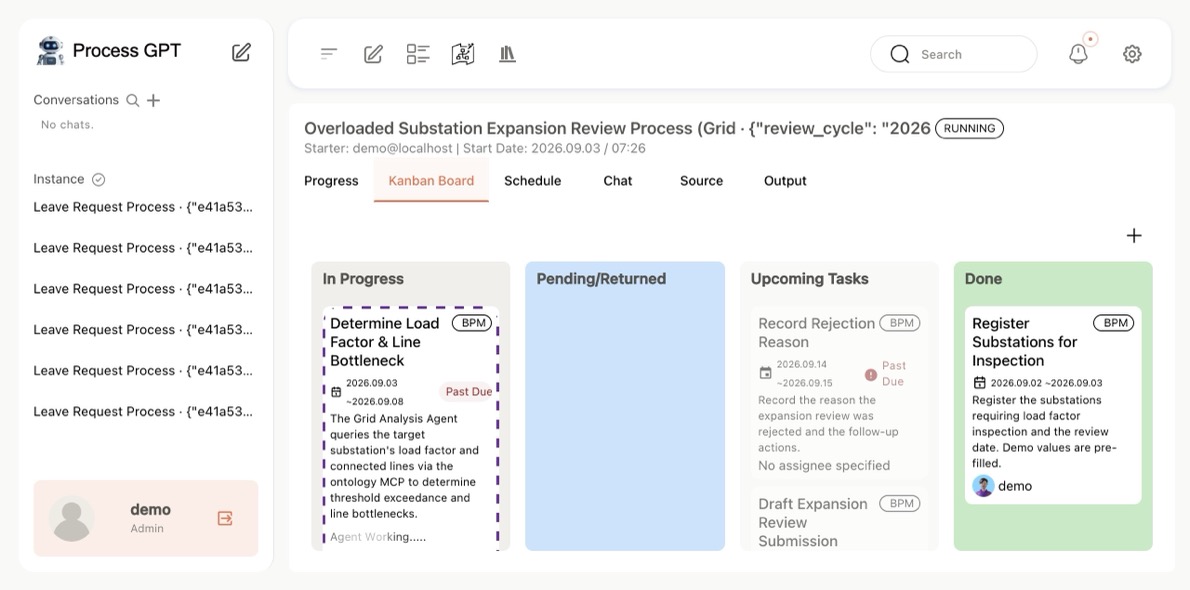
Subprocess kanban board
Deep agent exploring legislation via the ontology MCP
▶ Deterministic Control with DMN Business Rules Pin decisions down in a rule table 1 screen
ㆍBusiness rules such as "Approve if the accuracy rate is 60% or higher" are managed as decision tables in the international DMN (Decision Model and Notation) standard.
ㆍThe agent's conditional branching is governed by explicit rules, guaranteeing transparent and consistent automation.
ㆍRules can also be refined continuously through natural-language feedback, so business policies change without touching code.
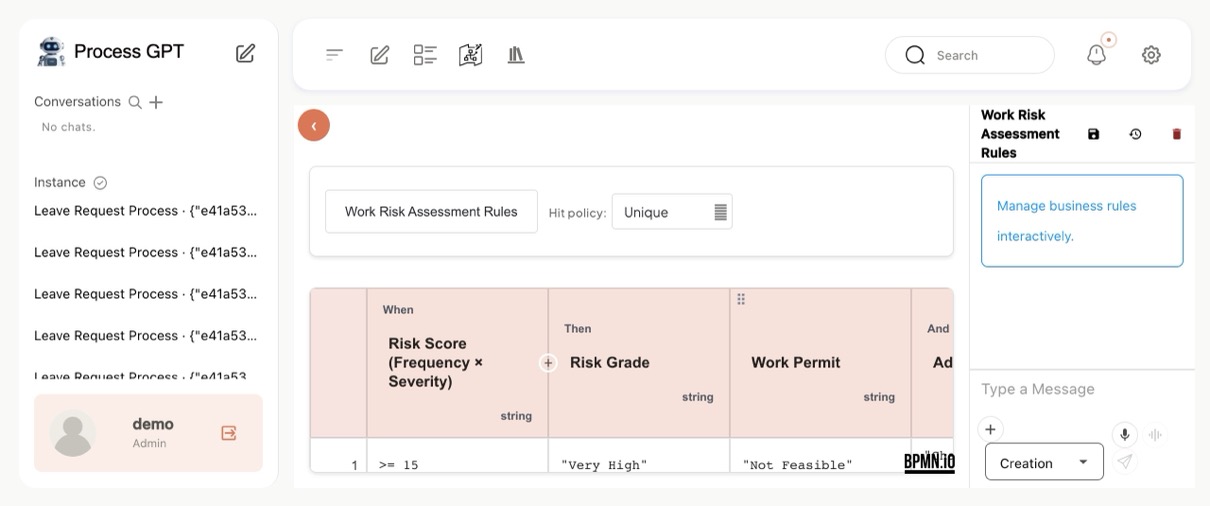
DMN business rule decision table
🔁 Solidified Execution · Reproducibility Once a task is learned, it runs exactly the same every time — re-executed as code with no LLM inference (Deterministic Replay)
▶ Eliminating the Risk of LLM Discretion Solves the problem of behaving differently on the same request by solidifying a verified path 1 screen
Hallucinations that change the execution path for the same request, LLM inference cost and latency on every run, and the impossibility of verifying in advance what will execute — all are solved by ‘solidifying the verified path’.

ㆍRecord the tool-call history of the first run
ㆍSolidify the verified path as parameterized code
ㆍFrom the second run on, code executes instead of AI
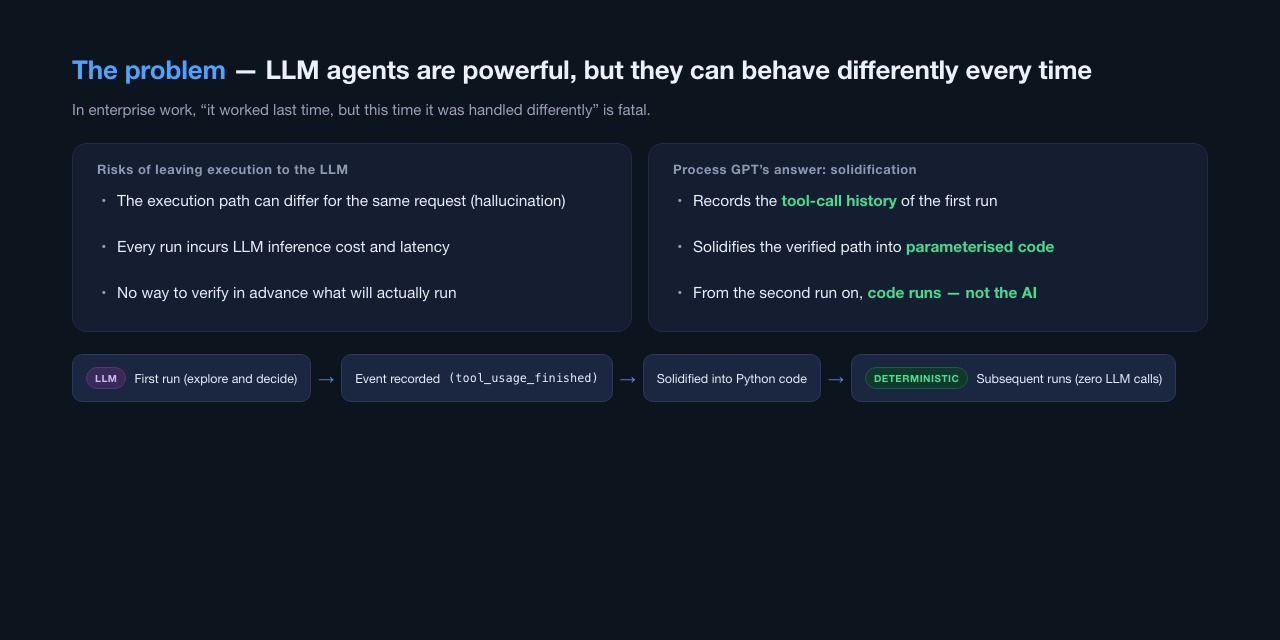
Why solidification
Why solidification
▶ First Run — Recording the Tool-Call History Every MCP tool call in the first run is captured as an event 1 screen
On the first run, the LLM agent interprets the instruction and calls MCP tools. Every tool call, such as SELECT→UPDATE→INSERT, is recorded without exception as a tool_usage_finished event.

ㆍUses the MCP servers registered to the tenant (e.g., Supabase MCP)
ㆍRecords every tool call as an event
ㆍShows execution statistics (inference count·elapsed time)
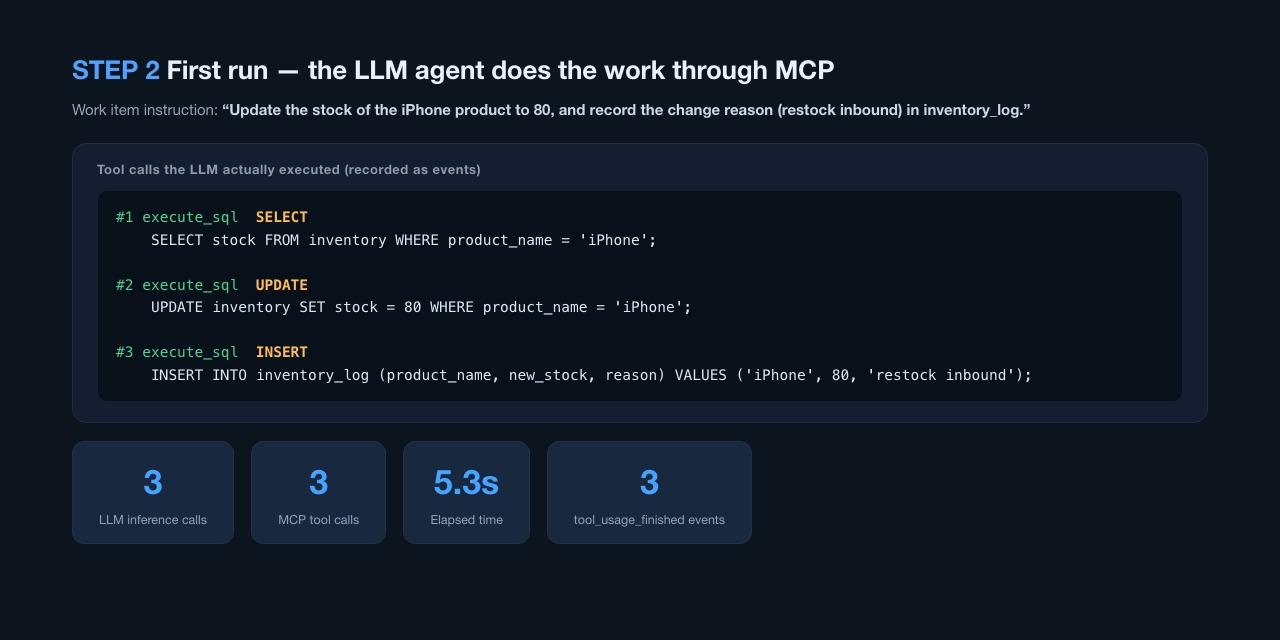
First run - the LLM agent performs the task via MCP
▶ Solidification — The Execution Path Becomes Python Code The recorded history is converted into parameterized Python code 1 screen
Parameterized execution code is generated from the recorded events and stored in the mcp_python_code table under a (process, activity, tenant) key. Business values are extracted as ${variable} templates for reuse.

ㆍHistory → parameterized Python code
ㆍParameter specs (name·type·example) extracted automatically
ㆍNo LLM calls inside the code
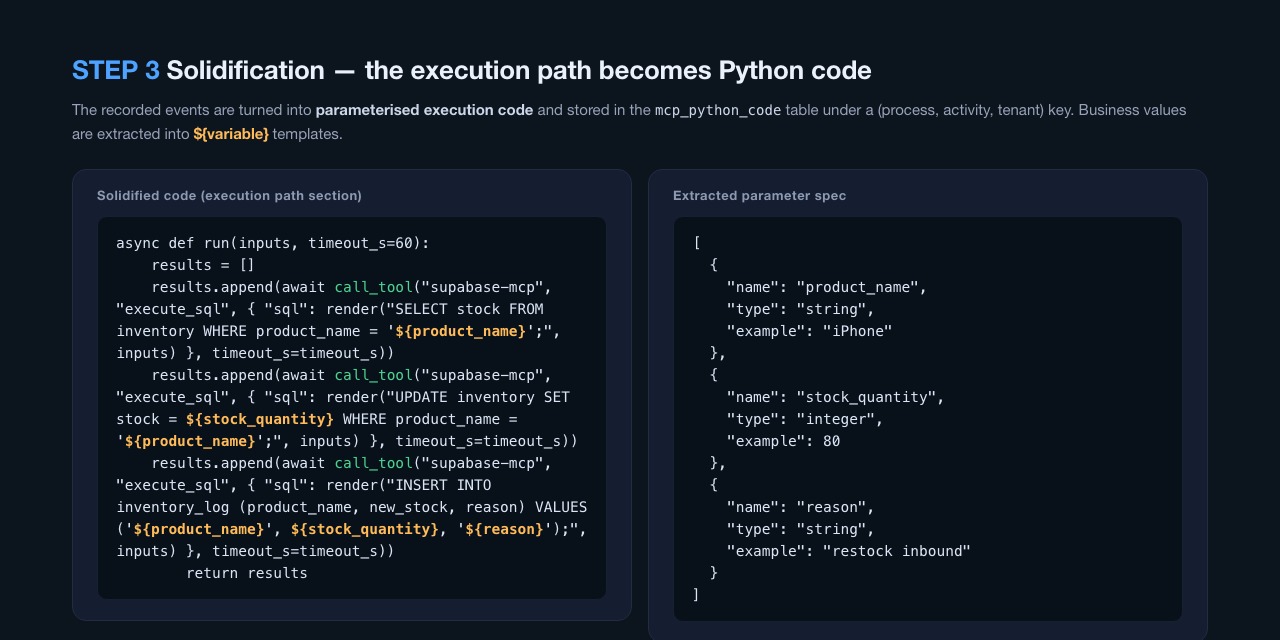
Solidification - the execution path becomes Python code
▶ Replay — Different Input, Same Path, Zero Inference Only the input changes; the path stays the same — zero LLM inference 1 screen
When a new instruction arrives, only the values are extracted from the input and the solidified code runs as-is. With no agent crew to spin up and zero LLM inference, execution time in the demo dropped from 5.3 seconds to 3.2 seconds.

ㆍOnly parameter values are extracted from the new input
ㆍPath·SQL structure are fixed in code
ㆍ100% reproduction of the path steps
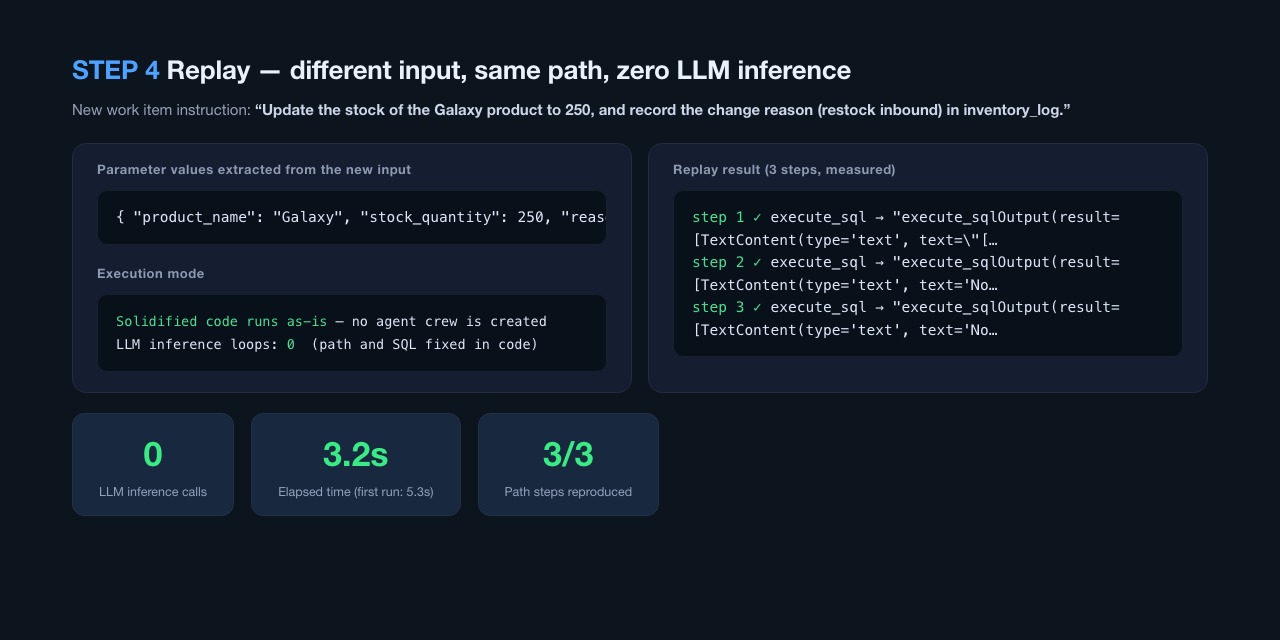
Replay - different input, same path, zero LLM inference
▶ Transparent Verification of Results Which steps ran, and how, stays visible on the task screen 1 screen
A replayed task is shown as a ‘Deterministic Code Execution Result’ card. Which steps ran, and that the execution method was ‘solidified code (zero LLM inference)’, can be confirmed right on the task screen.

ㆍExecution steps·method are kept as part of the task result
ㆍFirst-run/replay history managed from the task list
ㆍLinked to the BPMN process view
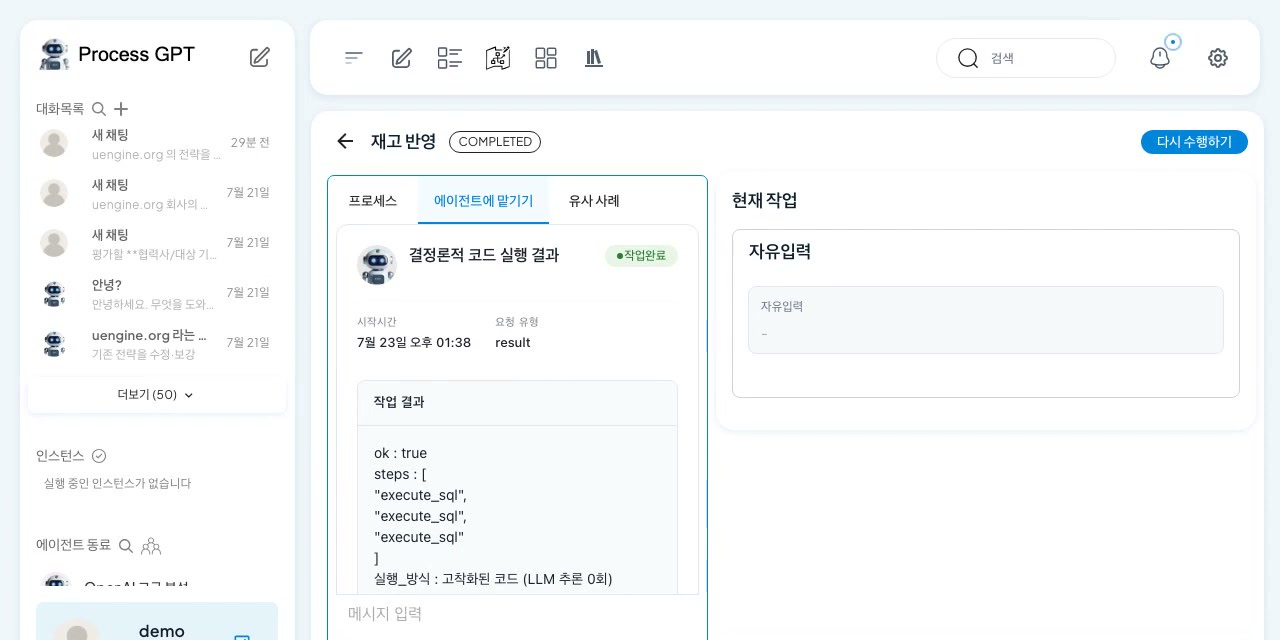
Deterministic code execution result
▶ Verified All the Way to the Live Database First run and replay write identical results to the real DB 1 screen
Both the first (LLM) run and the second (solidified code) run are written to a live Supabase DB. The inventory table and audit log are recorded identically, passing all 21 E2E checks.

ㆍE2E verification 21/21 PASS
ㆍCompensation (undo) code generated automatically — safe rollback
ㆍAutomation without programming — the system writes its own code
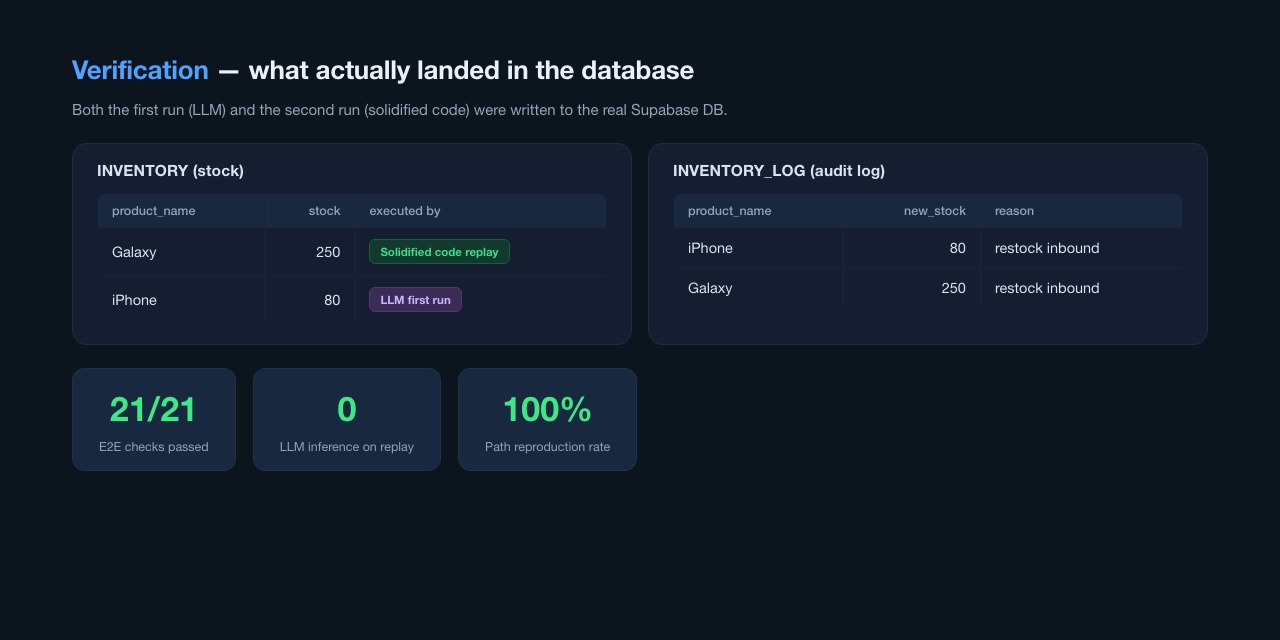
Verification of live database updates
🧩 Integration · Tool Management Safely attach internal systems and external tools to your agents
▶ MCP HubNEW Enterprise MCP operations that go beyond pasting JSON 13 screens
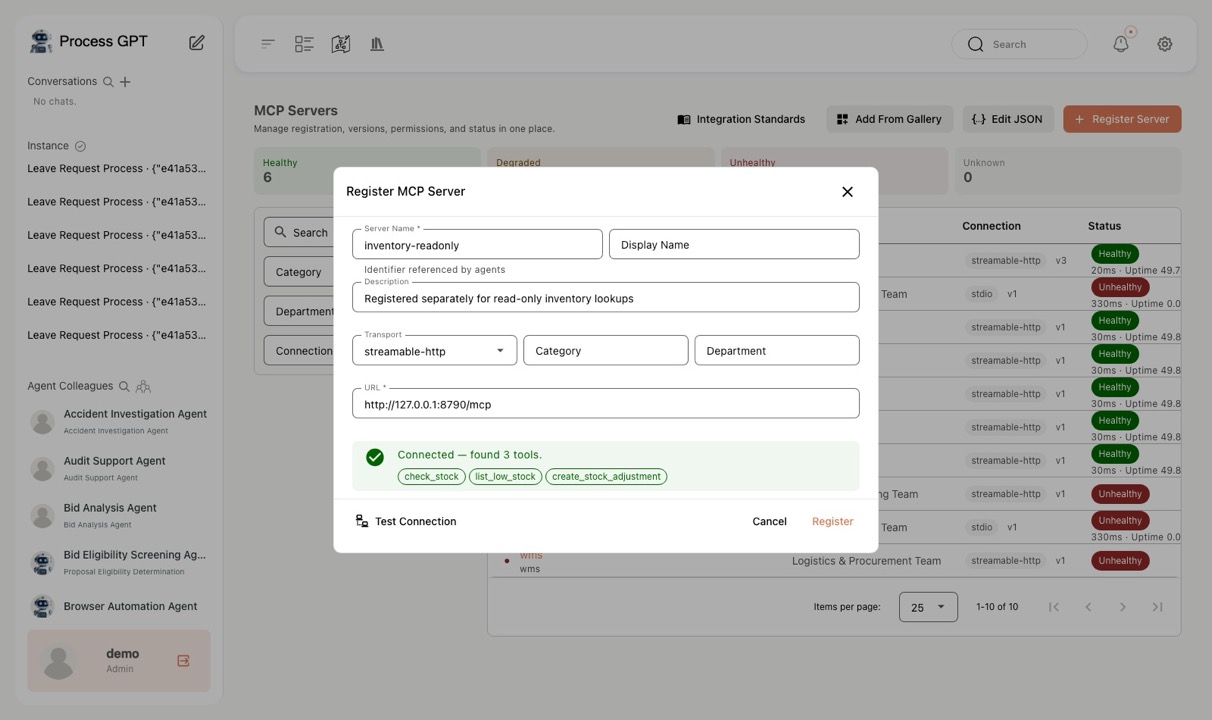
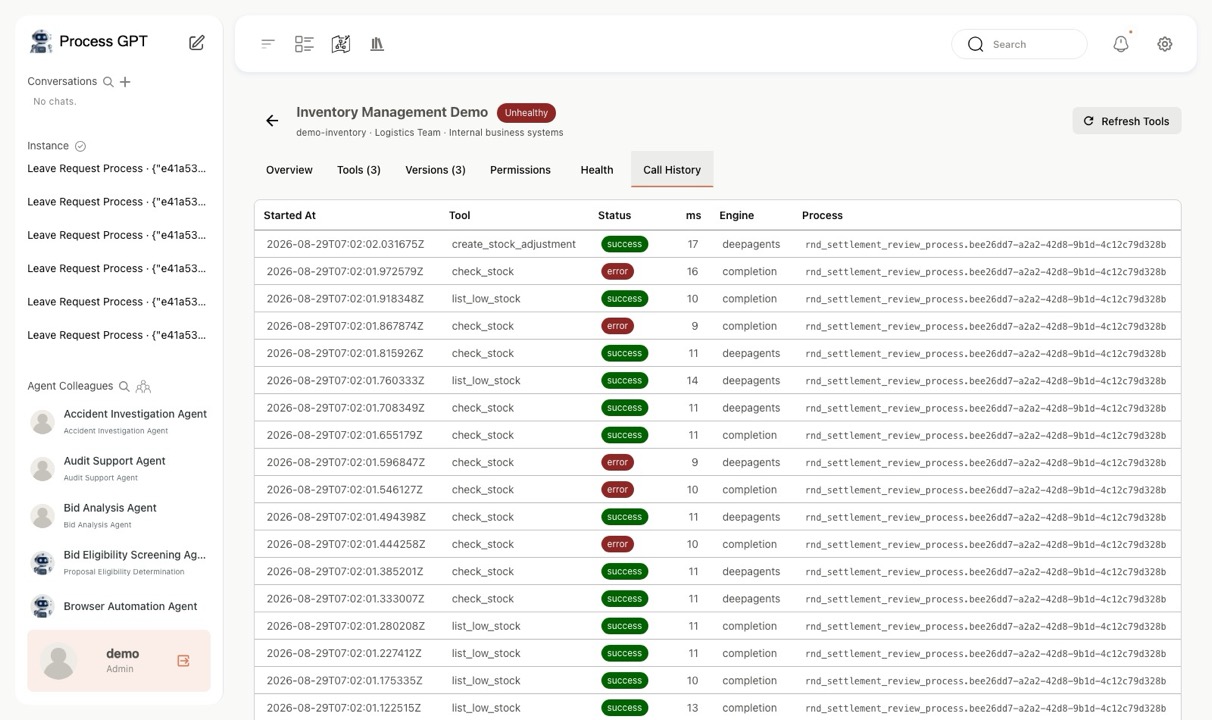
ㆍOrganized into four menus — MCP servers, gallery, observability, and integration standards — it actually connects before saving so you can see exactly which tools come in.
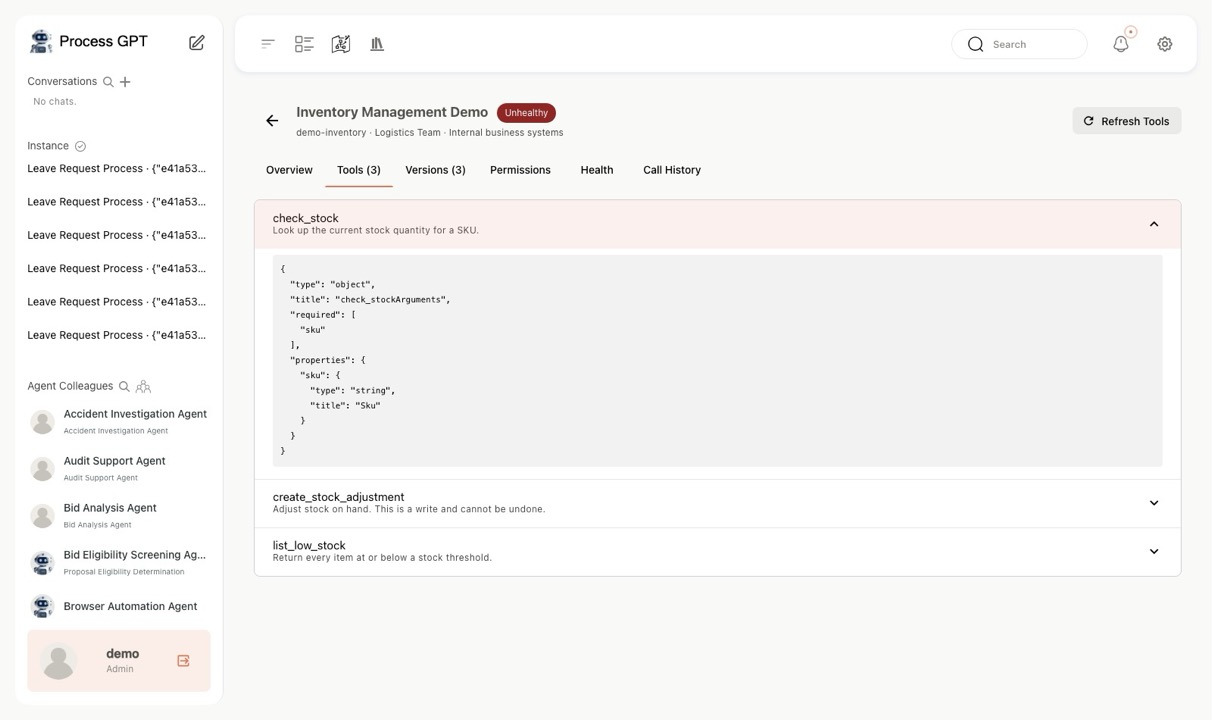
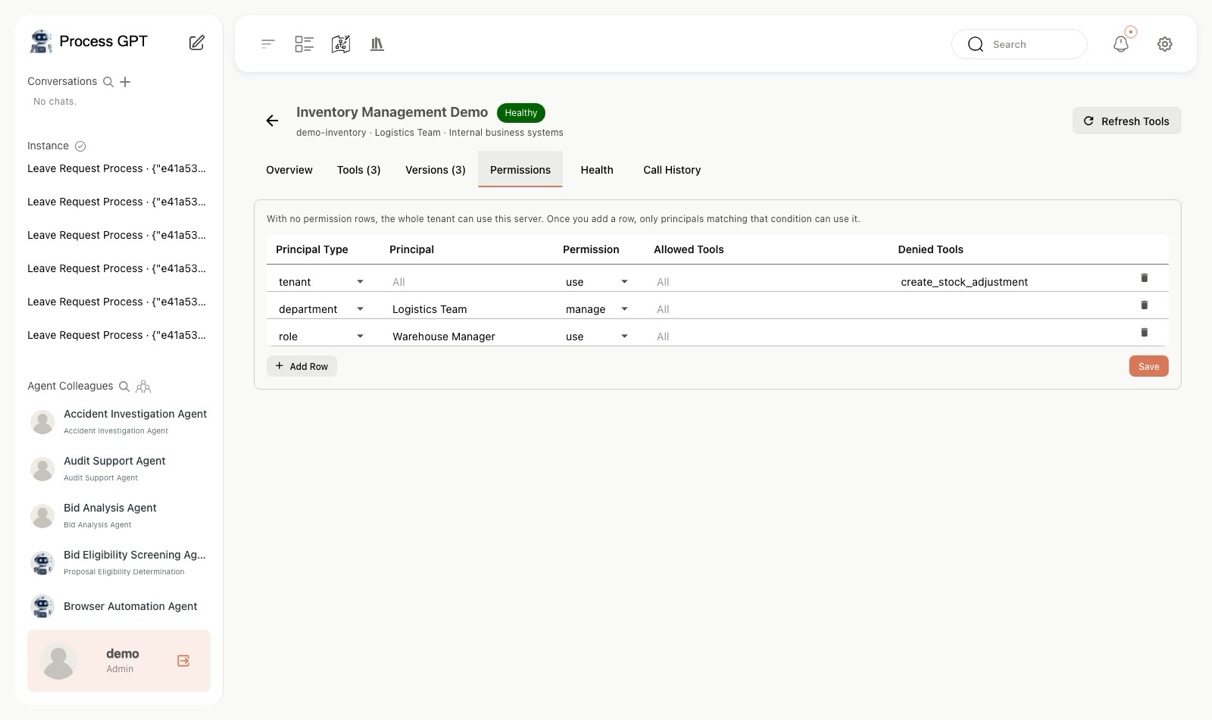
ㆍBecause input schemas are stored too, permissions are granted per tool rather than per server, and irreversible tools can be blocked individually.
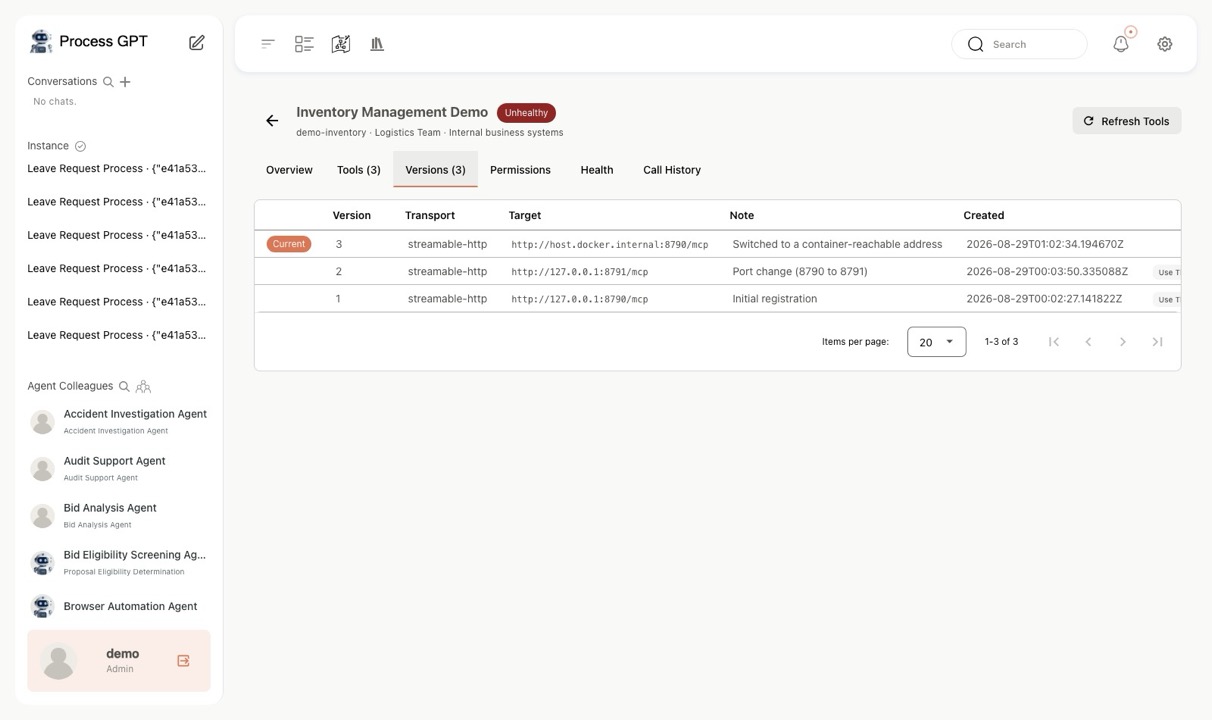
ㆍConnection details accumulate as immutable snapshots, so you can roll back to a previous version instantly if something breaks, and standards compliance is graded A·B·C automatically before registration.
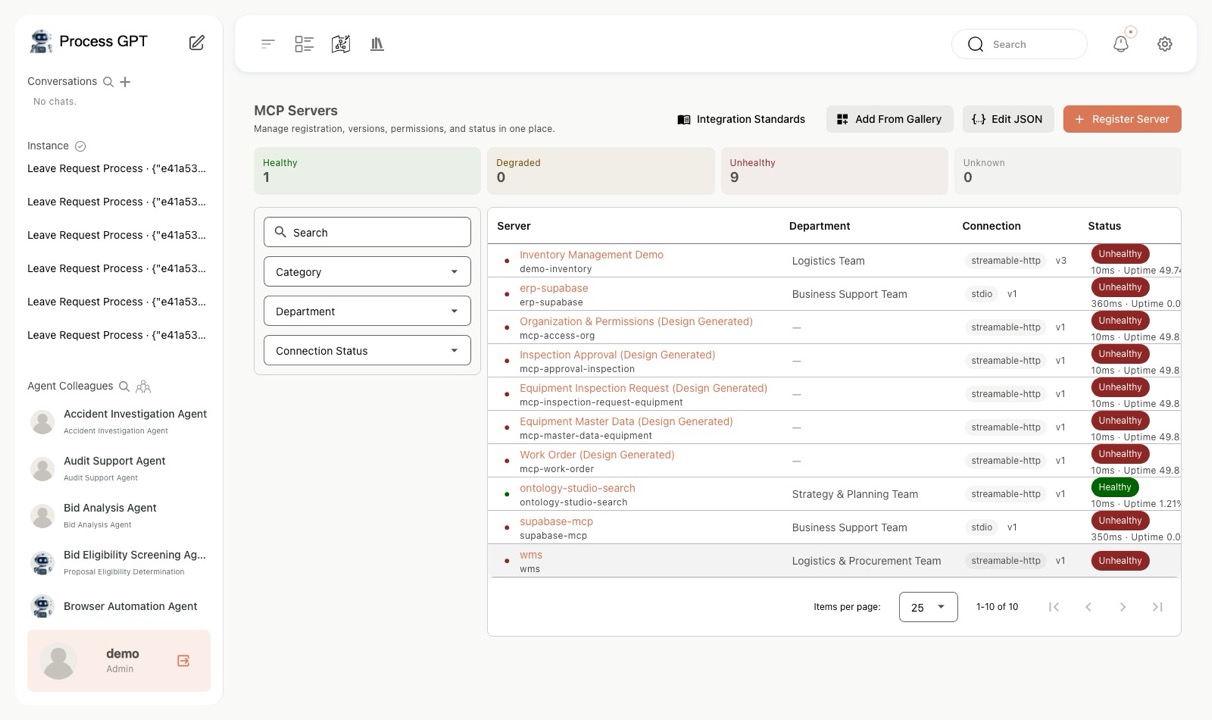
MCP Hub — Server list — Live connection status
Server list — Live connection status
MCP Hub — Connection test before registration
Connection test before registration
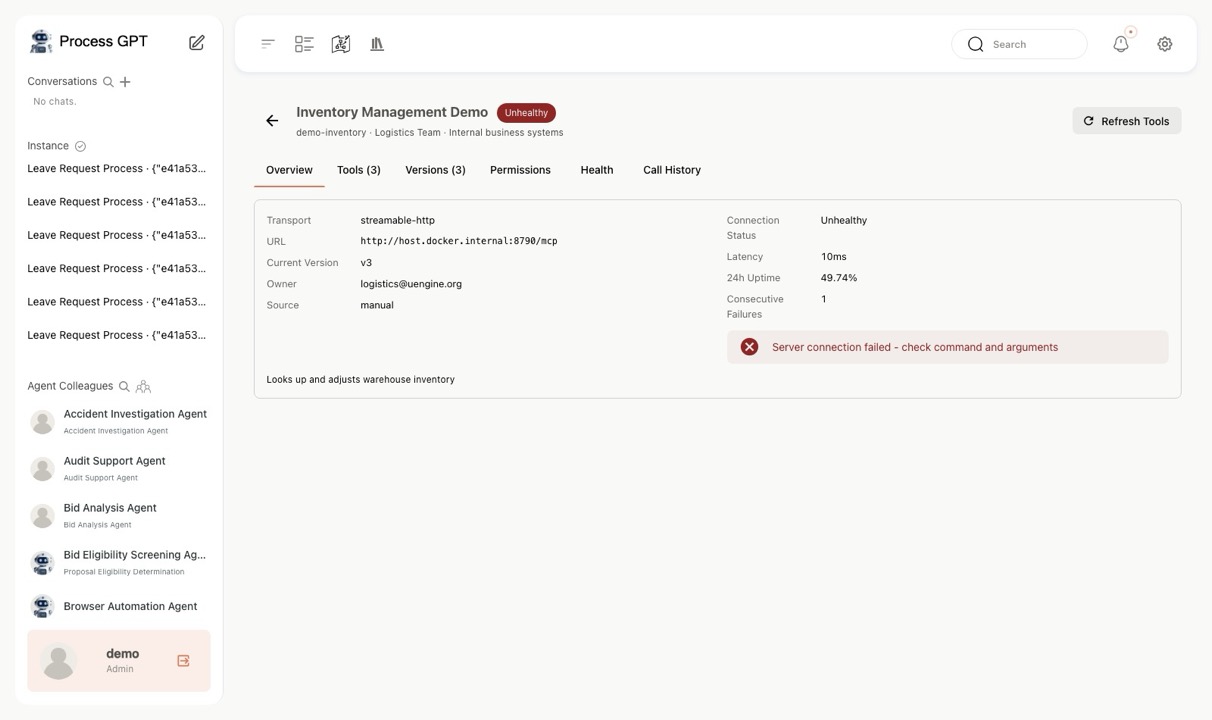
MCP Hub — Server details — Latency, availability, consecutive failures
Server details — Latency, availability, consecutive failures
MCP Hub — Tool catalog — Input schema
Tool catalog — Input schema
MCP Hub — Version management — Immutable snapshots
Version management — Immutable snapshots
MCP Hub — Access permissions — Per-tool blocking
Access permissions — Per-tool blocking
MCP Hub — Call history
Call history
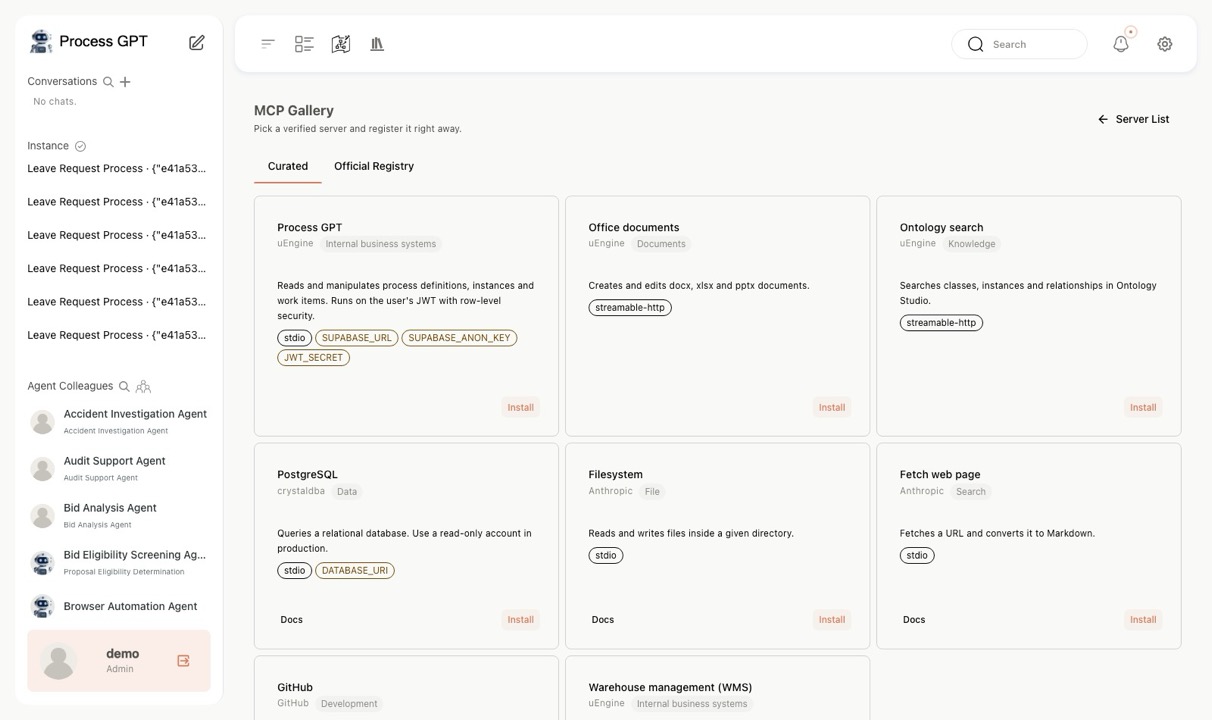
MCP Hub — Gallery — One-click install
Gallery — One-click install
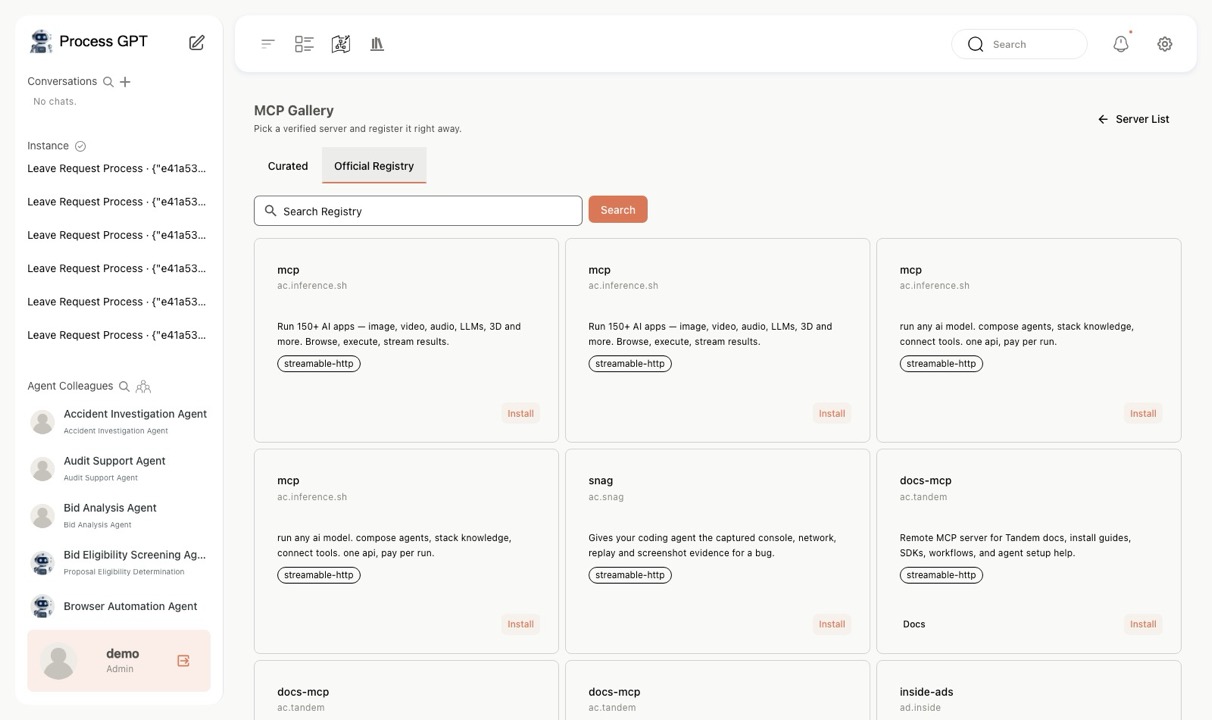
MCP Hub — Official MCP registry integration
Official MCP registry integration
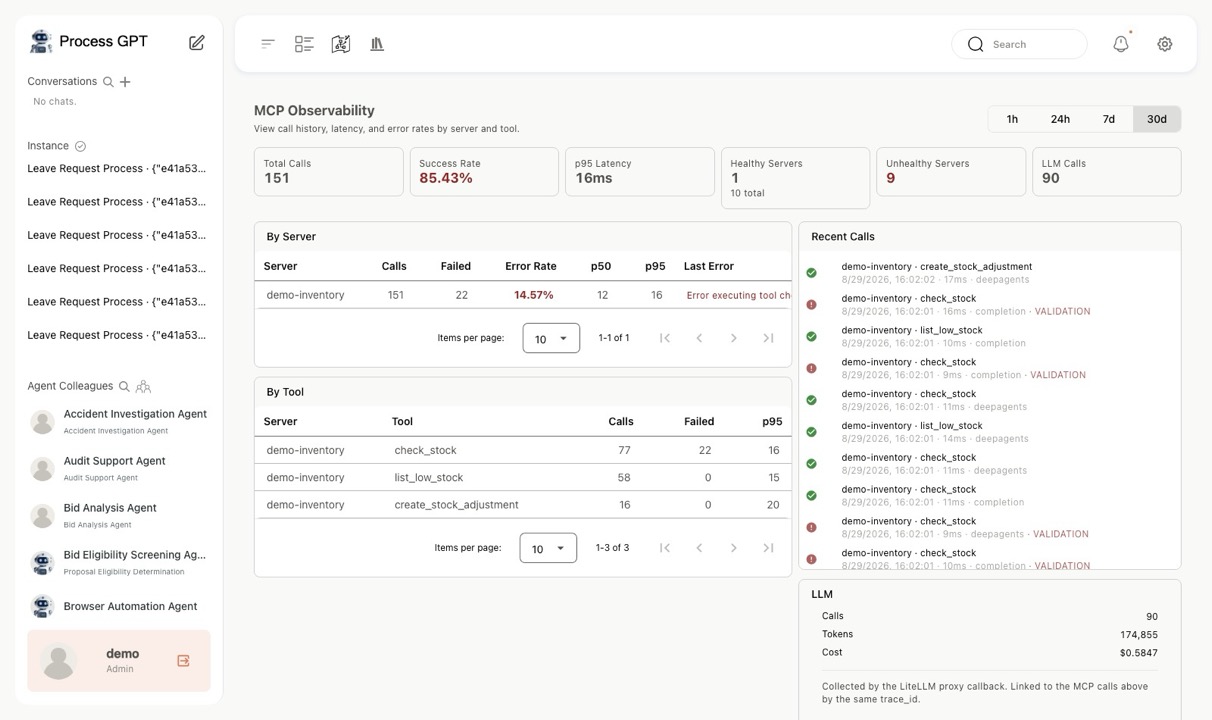
MCP Hub — Observability — Success rate, P95
Observability — Success rate, P95
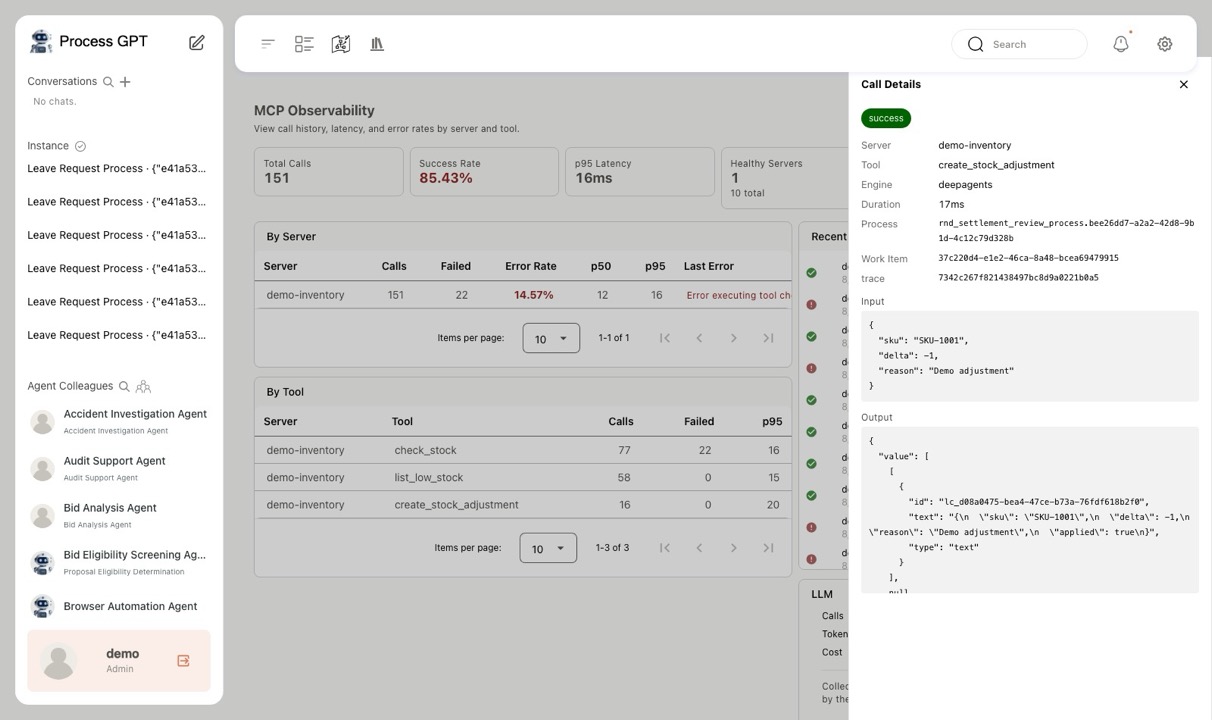
MCP Hub — Call details — Instance linkage
Call details — Instance linkage
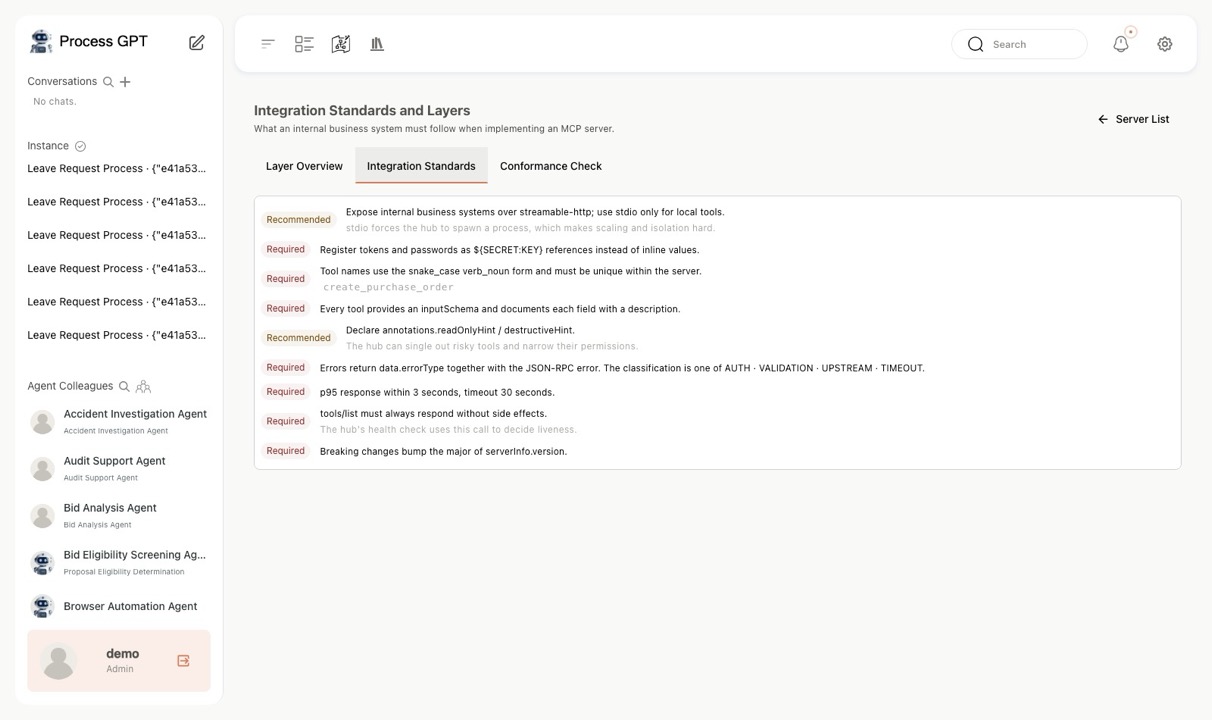
MCP Hub — Internal integration standards
Internal integration standards
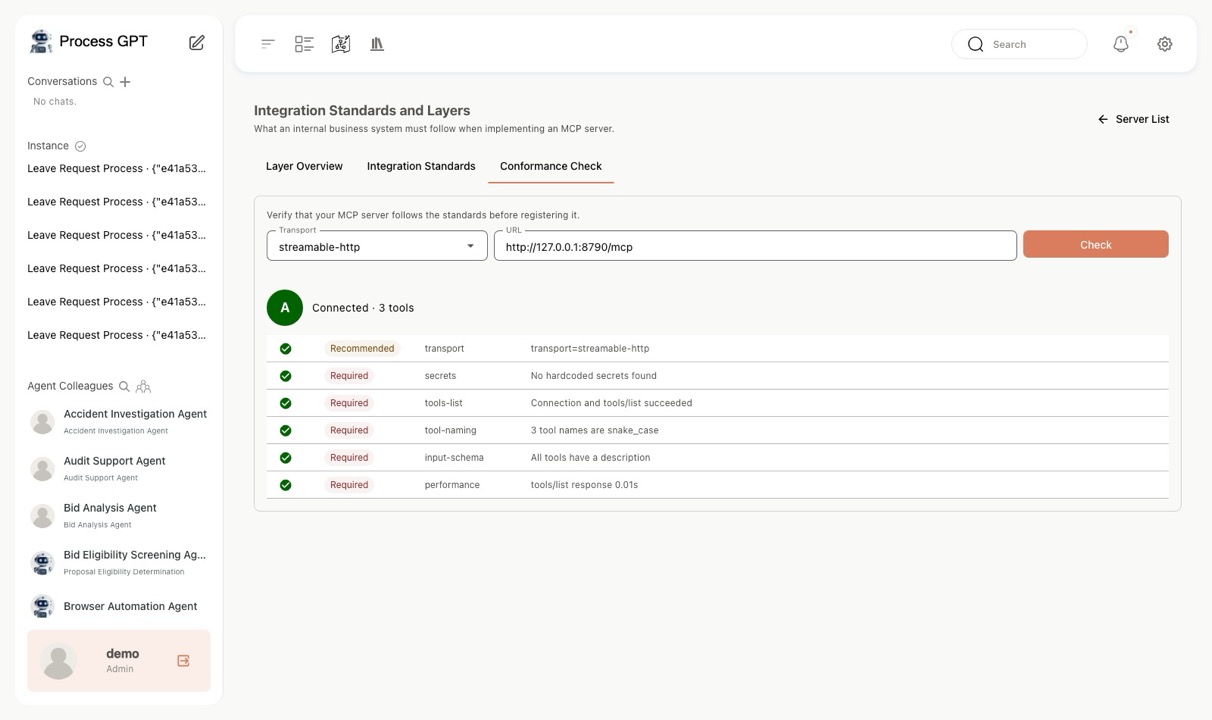
MCP Hub — Standards compliance A/B/C grading
Standards compliance A/B/C grading
▶ A2A Calls & Service Exposure Agent-to-agent calls and publishing services Demo video
ㆍAutomatically interprets the Open API specs and process data of internal and external systems and proposes an integration approach.
ㆍExposes Process GPT processes and agents as A2A services that external systems can call directly.
ㆍThe automatic integration structure makes it easy to build an execution environment that spans many systems.
🎙️ Document · Voice Interfaces Work keeps moving even when you're not at a keyboard
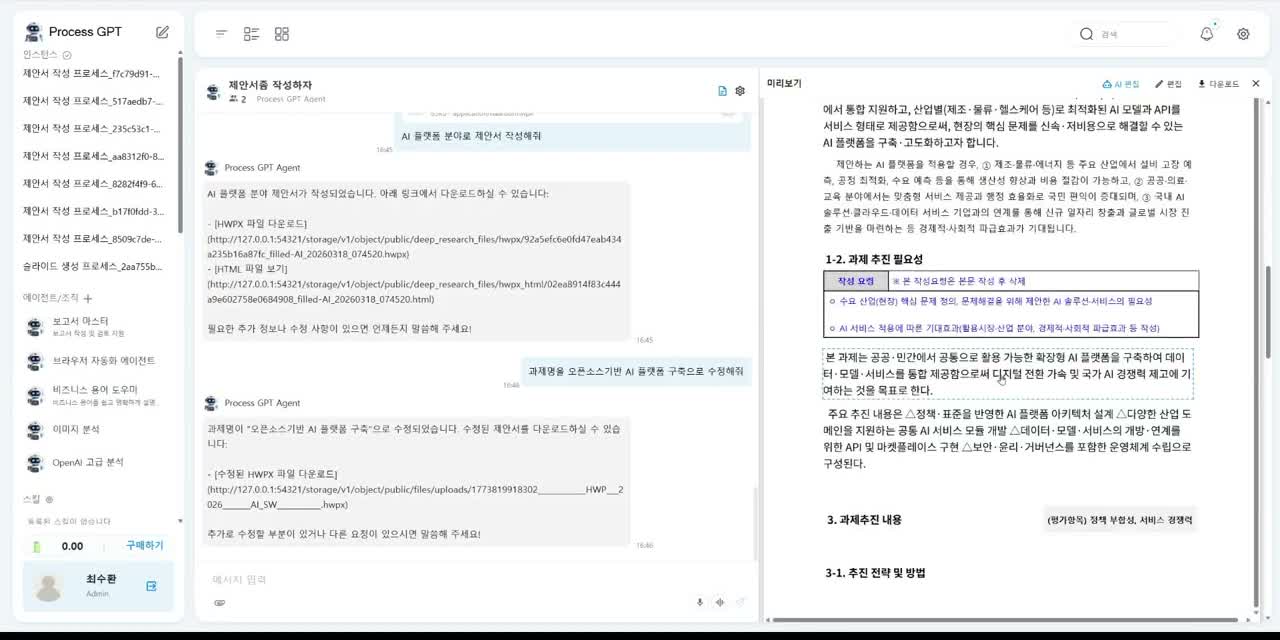
▶ HWPX (Korean Hangul) Documents Built by Conversation Create and edit Hangul documents through dialogue 2 screens
ㆍUpload an HWPX (Korean Hangul word-processor) template to the chat room and make a request; the agent drafts proposals, reports, and other documents to match the template automatically.
ㆍCheck the preview on screen and revise in conversational AI editing mode with requests like "Change the project title" or "Make this section longer".
ㆍDownload the finished document instantly as an HWPX file — Zero-Touch automation for public-sector and administrative document work.
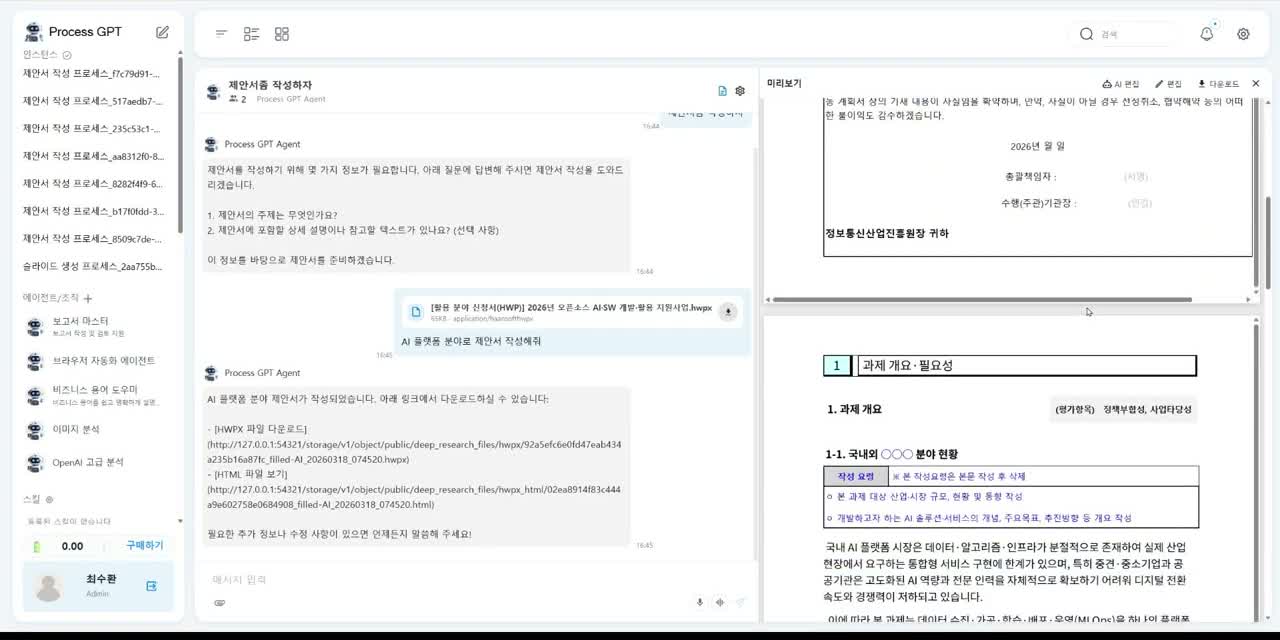
Generating an HWPX document by conversation
Editing an HWPX document in AI editing mode
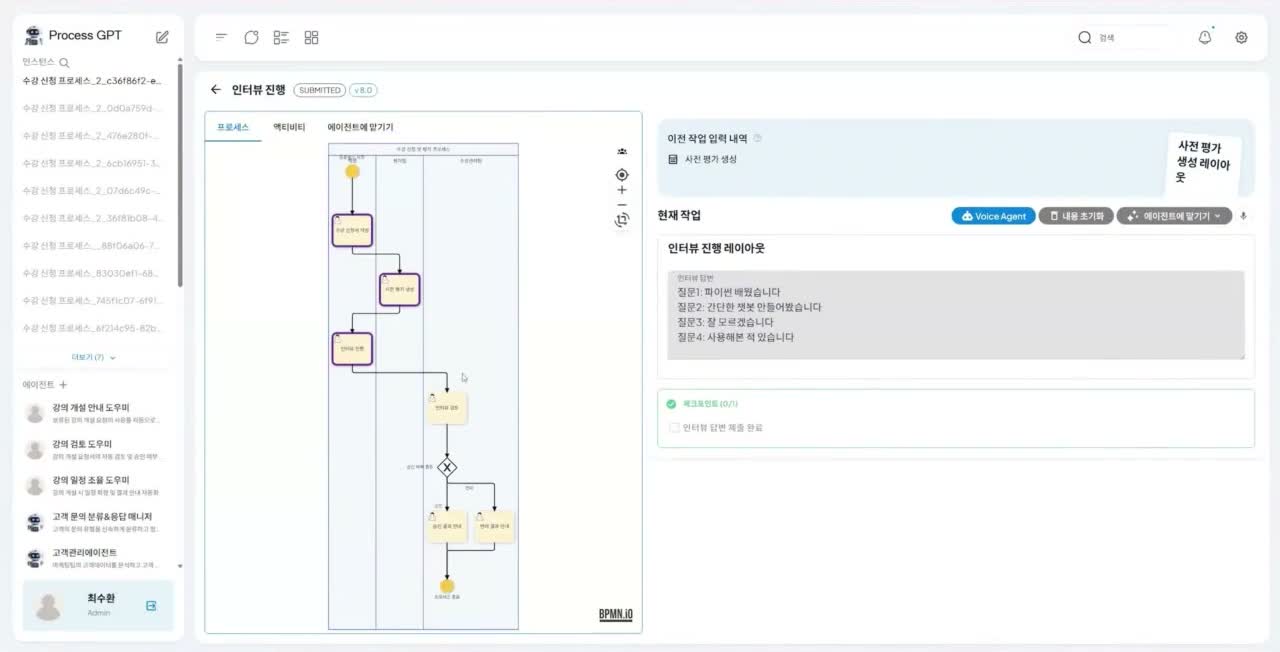
▶ Hands-Free Work with the Voice Agent Fill out task forms by speaking 1 screen
ㆍTalk with the AI by voice, no keyboard required, to fill out a task form and submit it. (Built on the GPT-4 Realtime API)
ㆍThe agent recognizes the task's web form context on its own and places what you say into the right fields.
ㆍIt detects overlapping speech, pauses, and immediately applies your corrections ("Sorry, I misspoke") for a natural conversation.
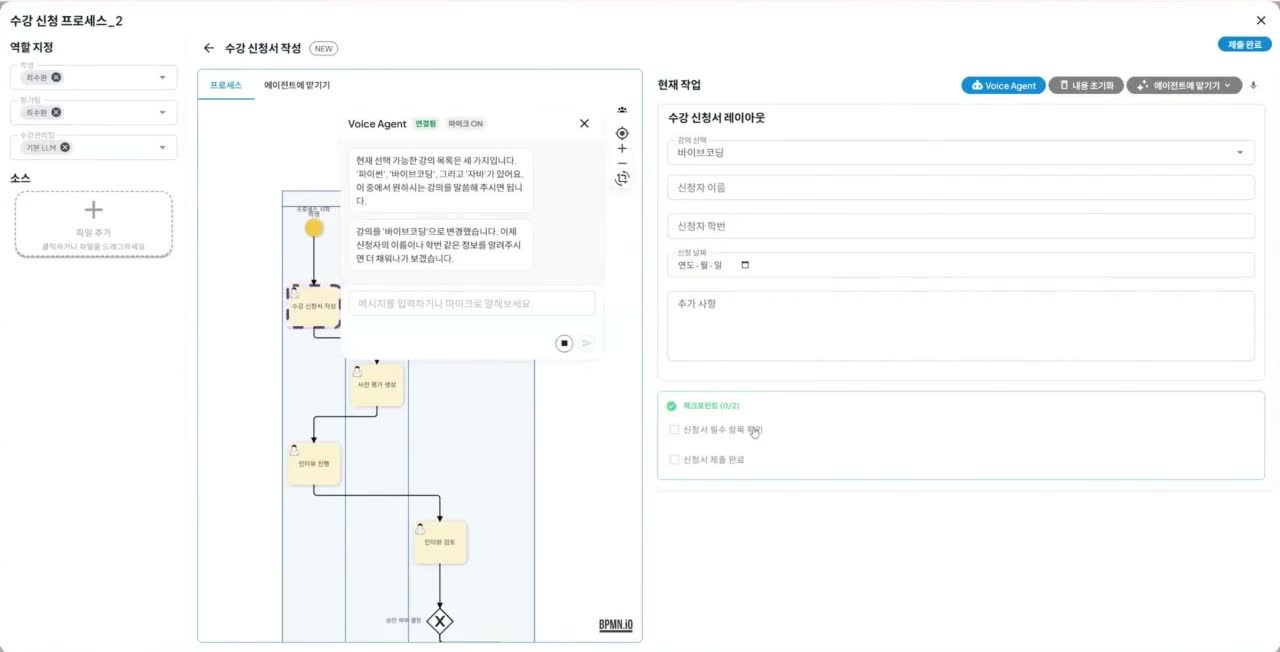
Filling out a task form with the voice agent
▶ Call Bot: Processes Run over the Phone Phone interview results are recorded as-is 2 screens
ㆍWhen the process advances and a user has a to-do, the agent places a call and conducts the task (such as an interview) directly. (Twilio CPaaS integration)
ㆍIt identifies and verifies the user by phone number, then walks them through and handles the pending work items on their worklist by conversation.
ㆍAnswers given during the call are recorded automatically into the task form and submitted, with built-in fallback handling for off-prompt responses.
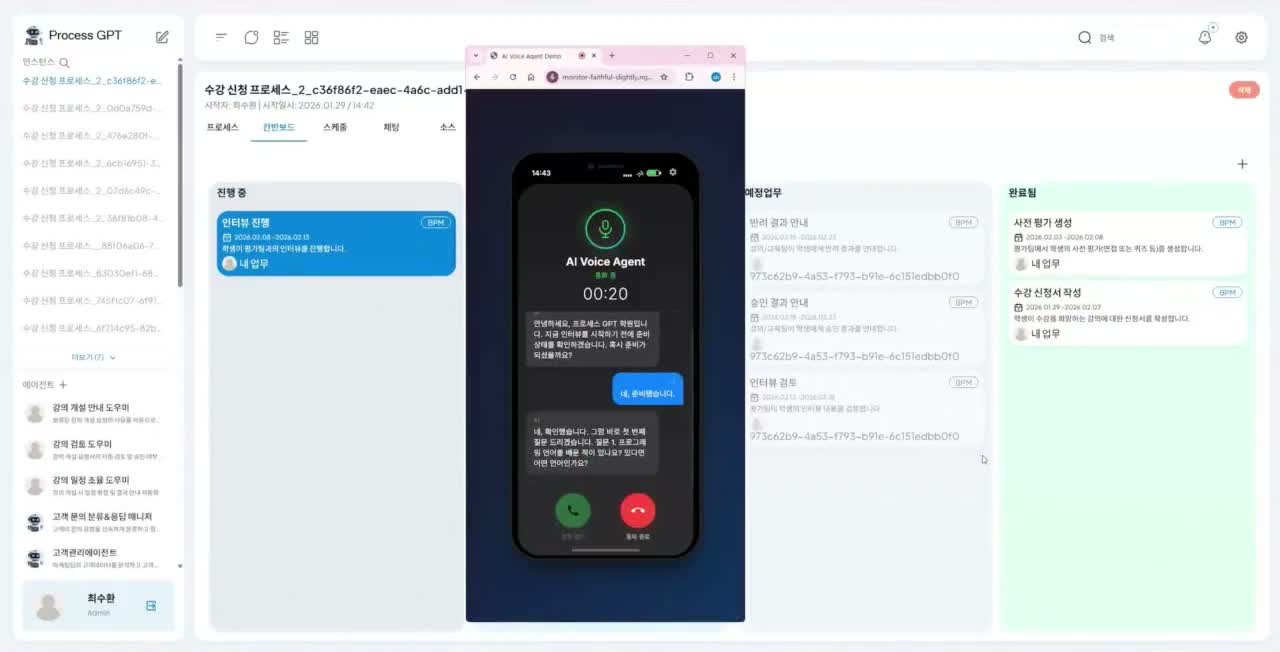
Call bot phone interview
Phone interview answers recorded automatically
📊 Analytics · Observability Make what was executed traceable and accountable
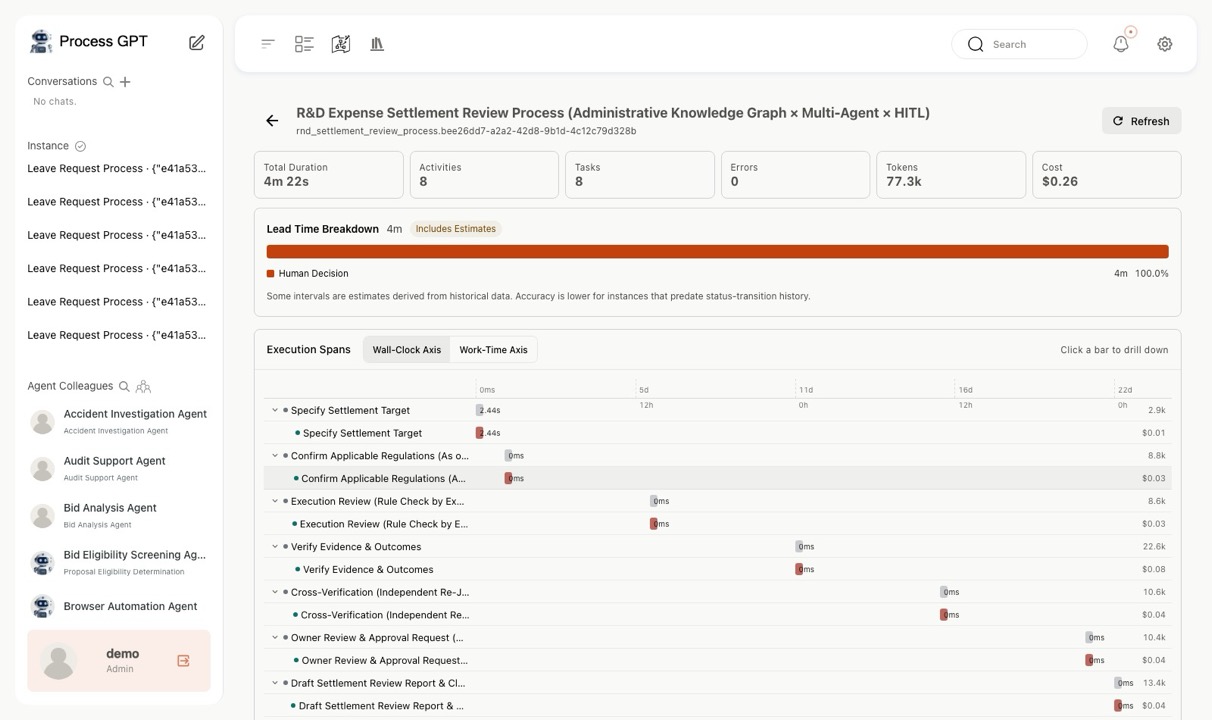
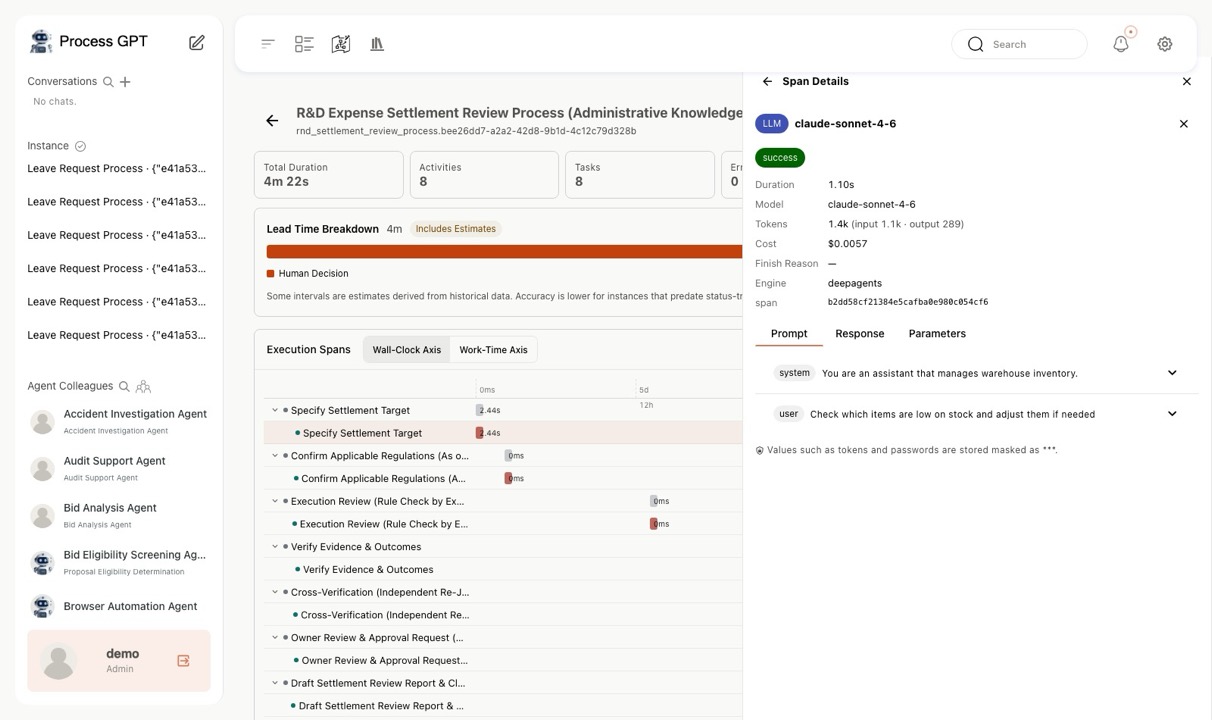
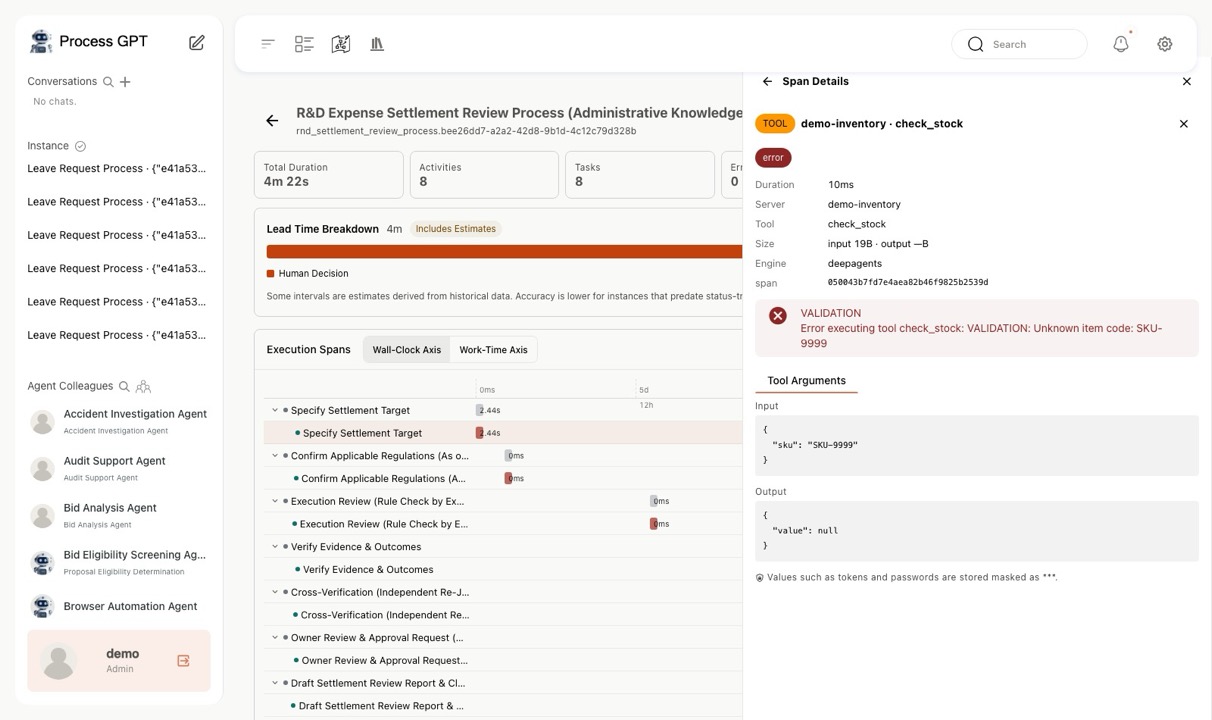
▶ Execution ProfilerNEW Drill four levels deep into why an agent decided what it did 8 screens
ㆍClick an instance row to open its total elapsed time and token cost, with the execution segments unfolded as a waterfall.
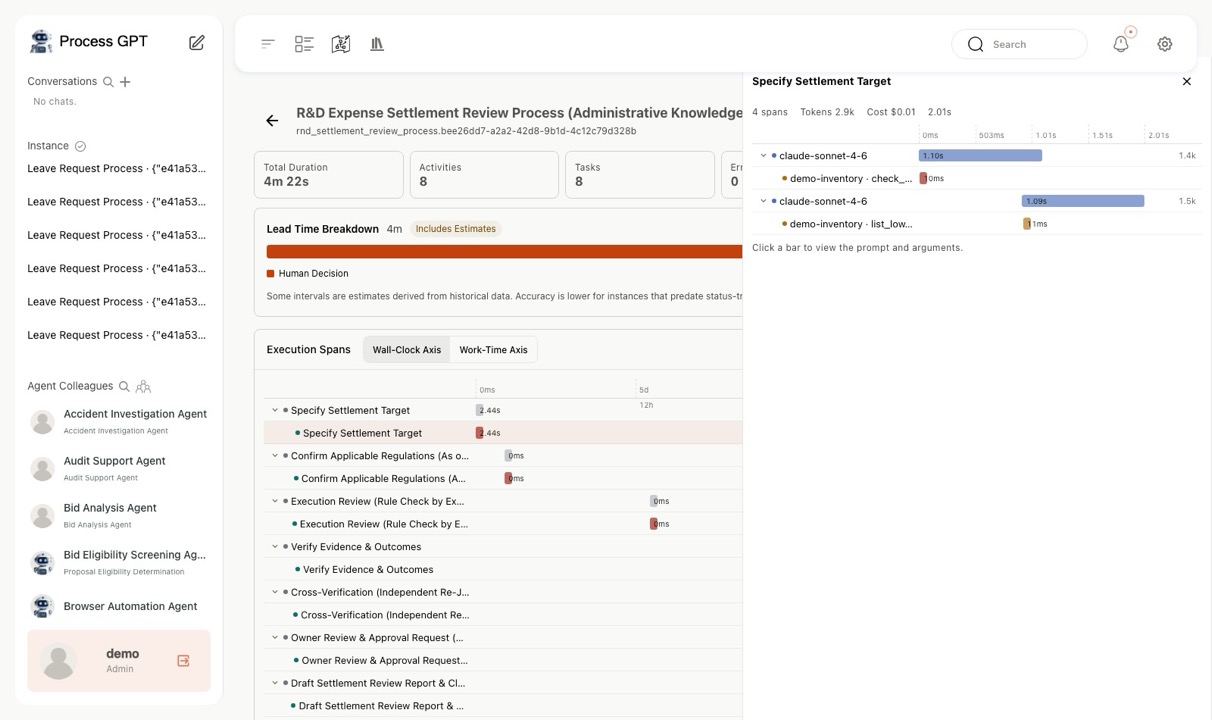
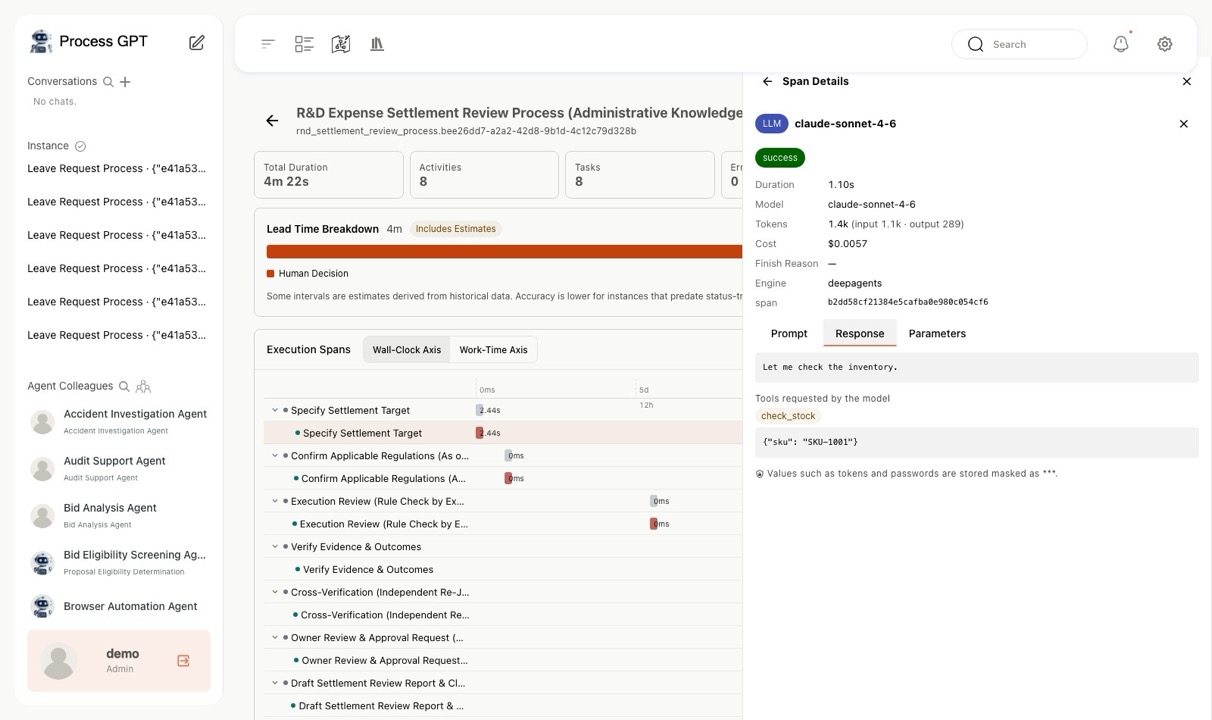
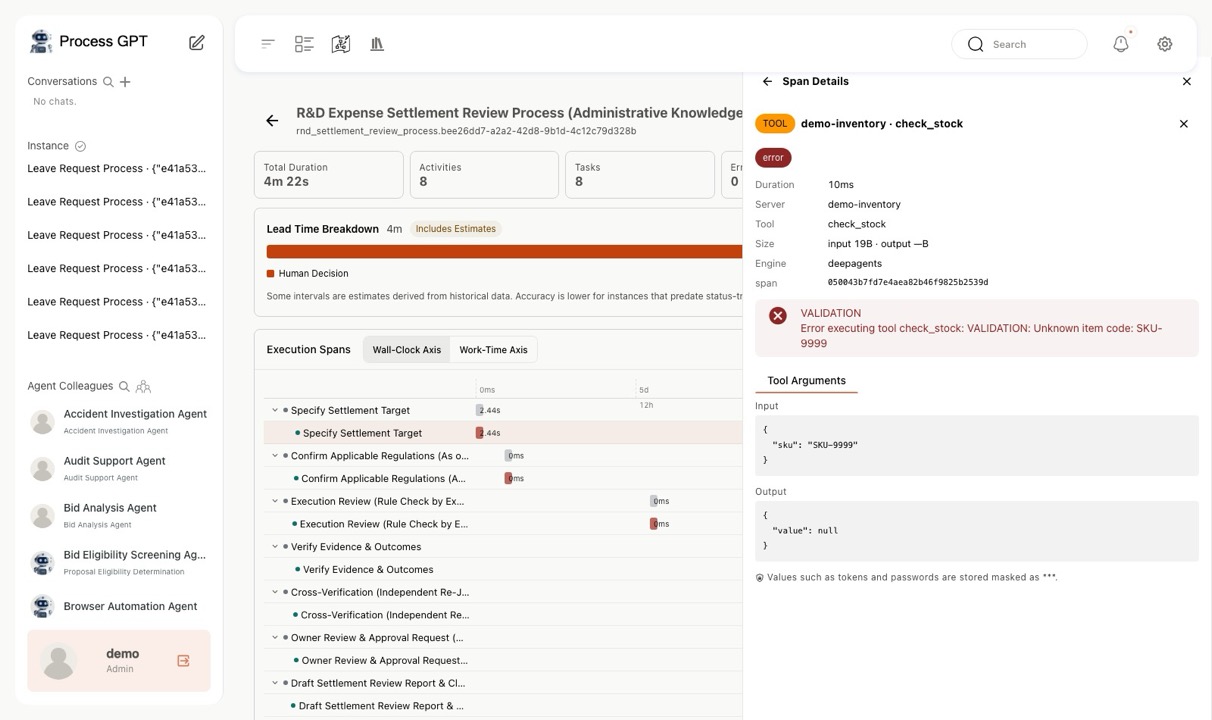
ㆍWaterfall → task → language model call → tool call are chained parent-to-child, so you can see which decision invoked which tool.
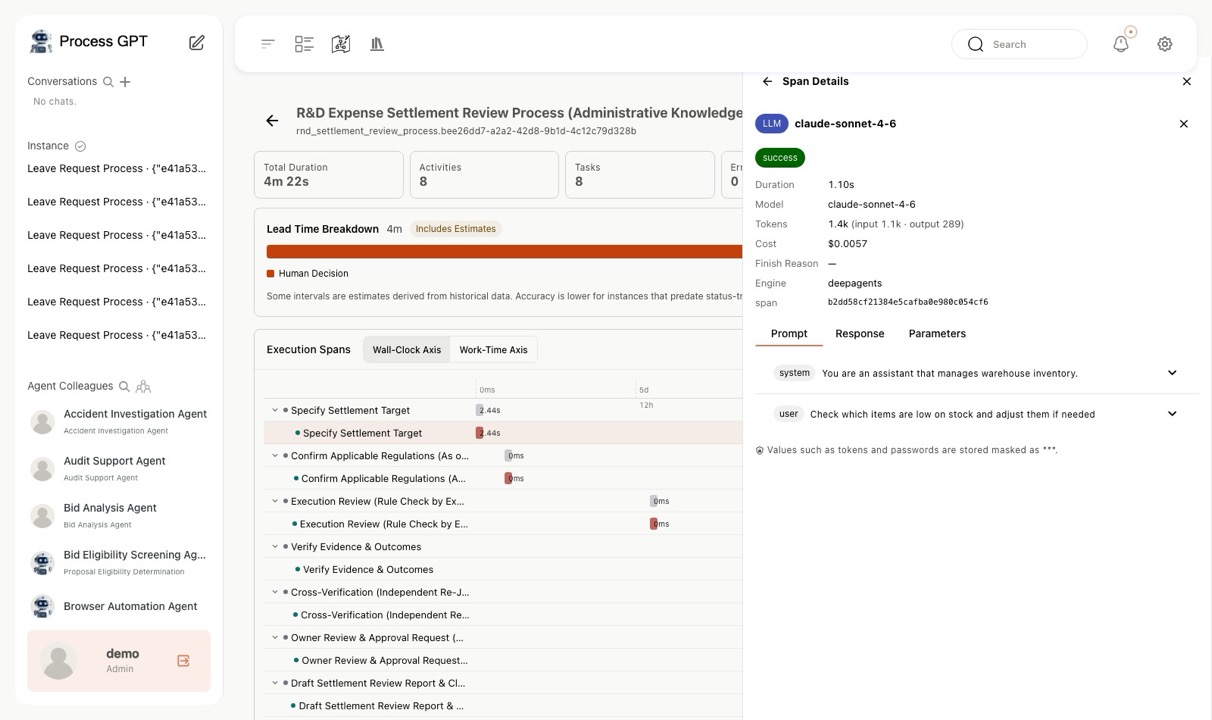
ㆍPrompts, responses, and tool arguments can be inspected verbatim; tokens and passwords are masked at storage time.
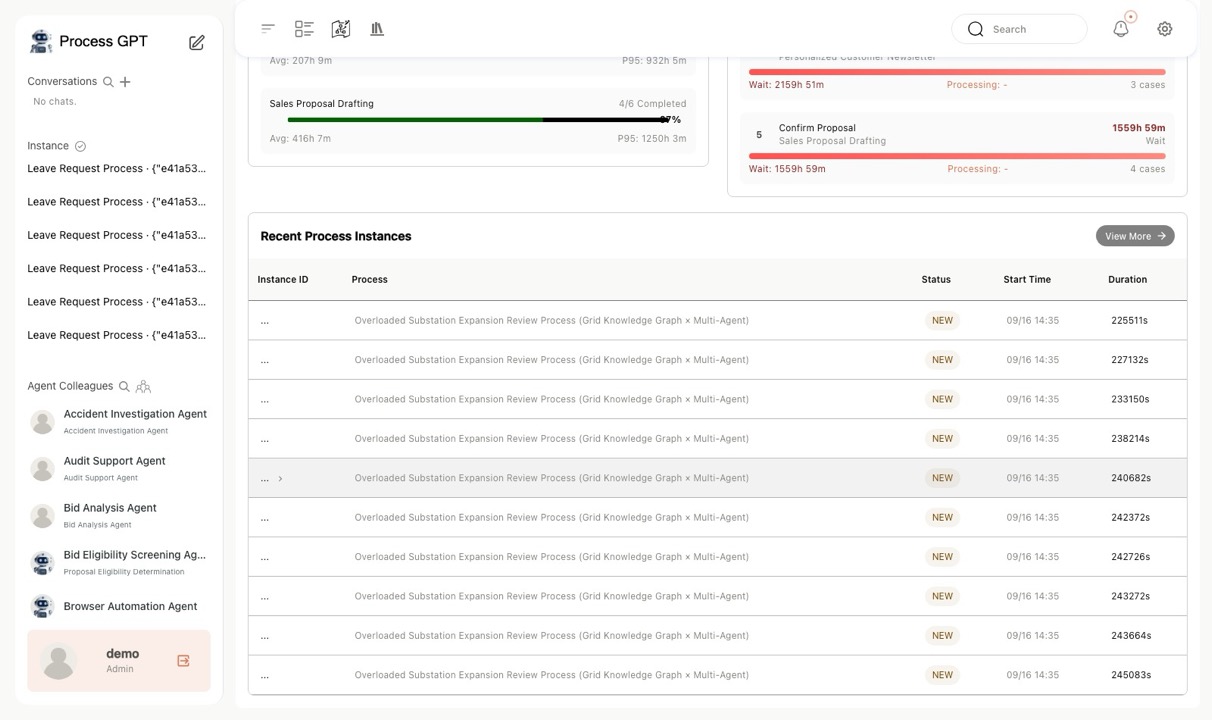
Execution Profiler — Process analytics instance list
Process analytics instance list
Execution Profiler — Execution Profiler — Elapsed time, tokens, cost
Execution Profiler — Elapsed time, tokens, cost
Execution Profiler — Waterfall with tasks expanded
Waterfall with tasks expanded
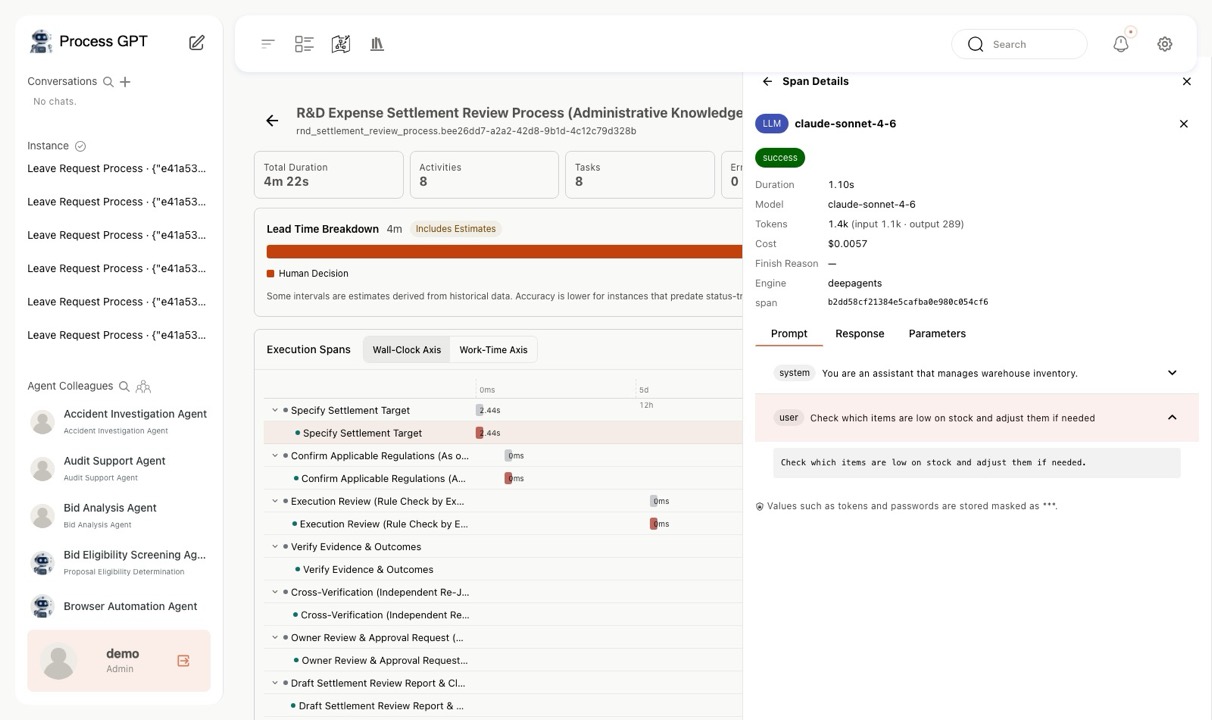
Execution Profiler — Language model span details
Language model span details
Execution Profiler — Prompt tab — Messages by role
Prompt tab — Messages by role
Execution Profiler — Response tab — Requested tool and arguments
Response tab — Requested tool and arguments
Execution Profiler — Tool span — Arguments, results, errors
Tool span — Arguments, results, errors
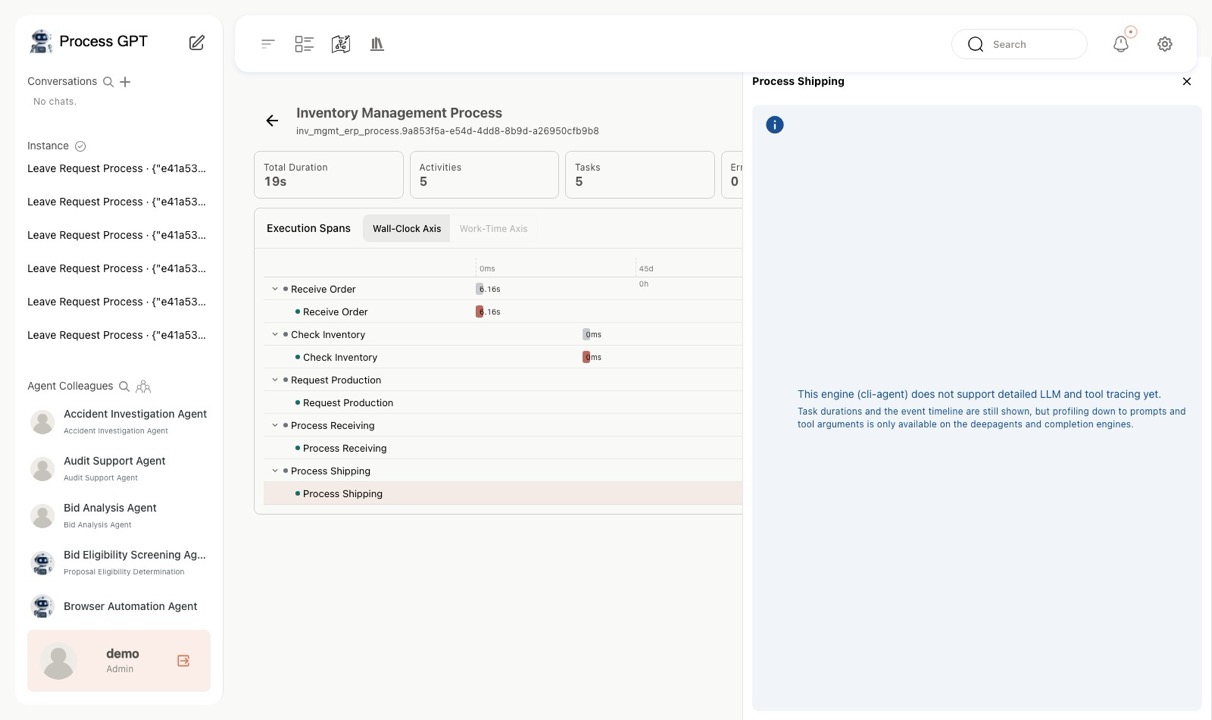
Execution Profiler — Unsupported engine notice
Unsupported engine notice
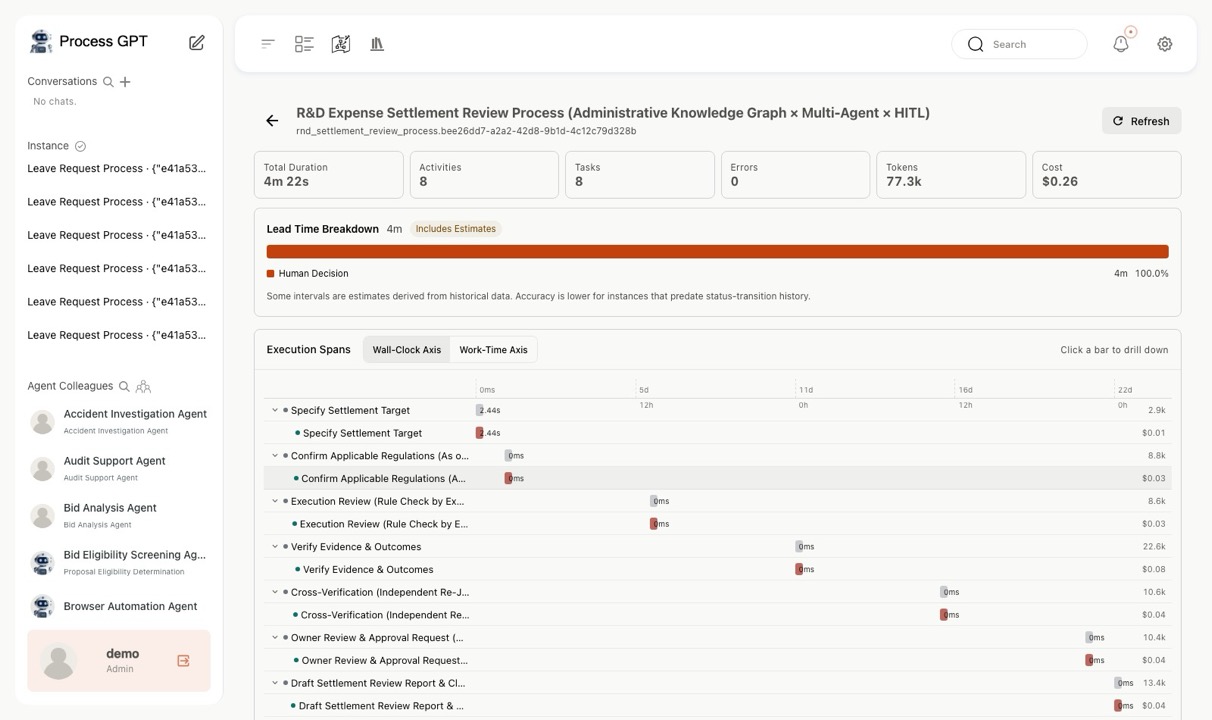
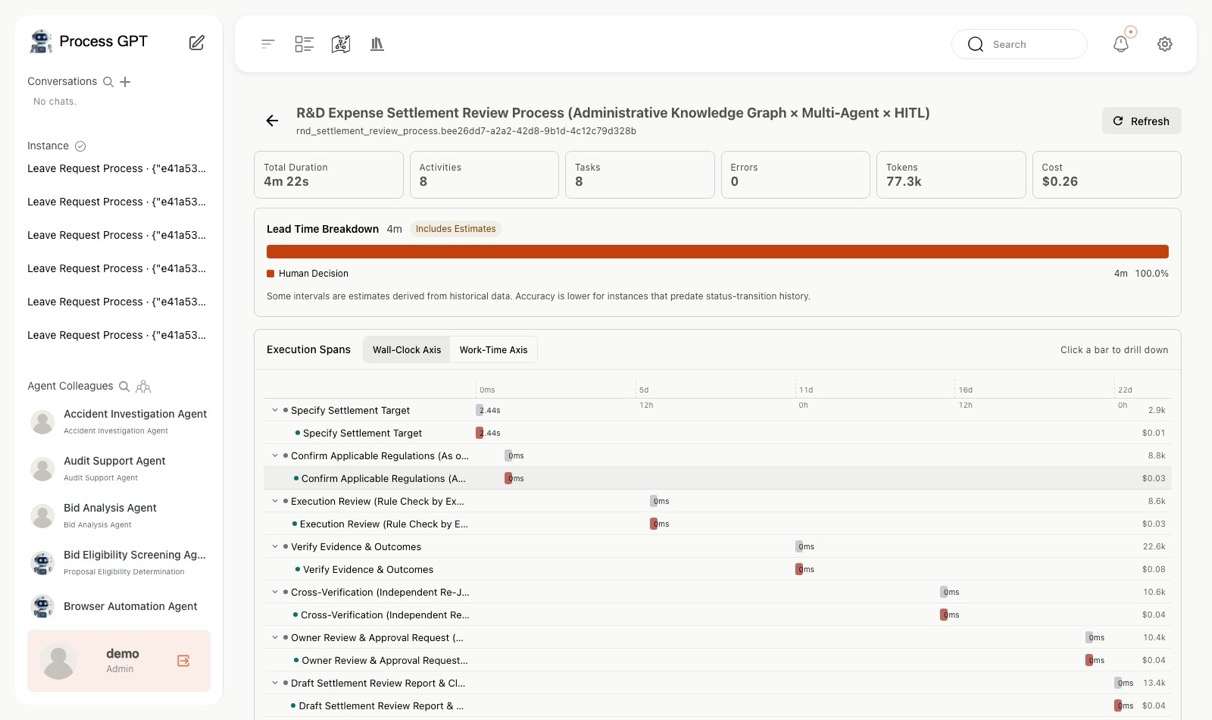
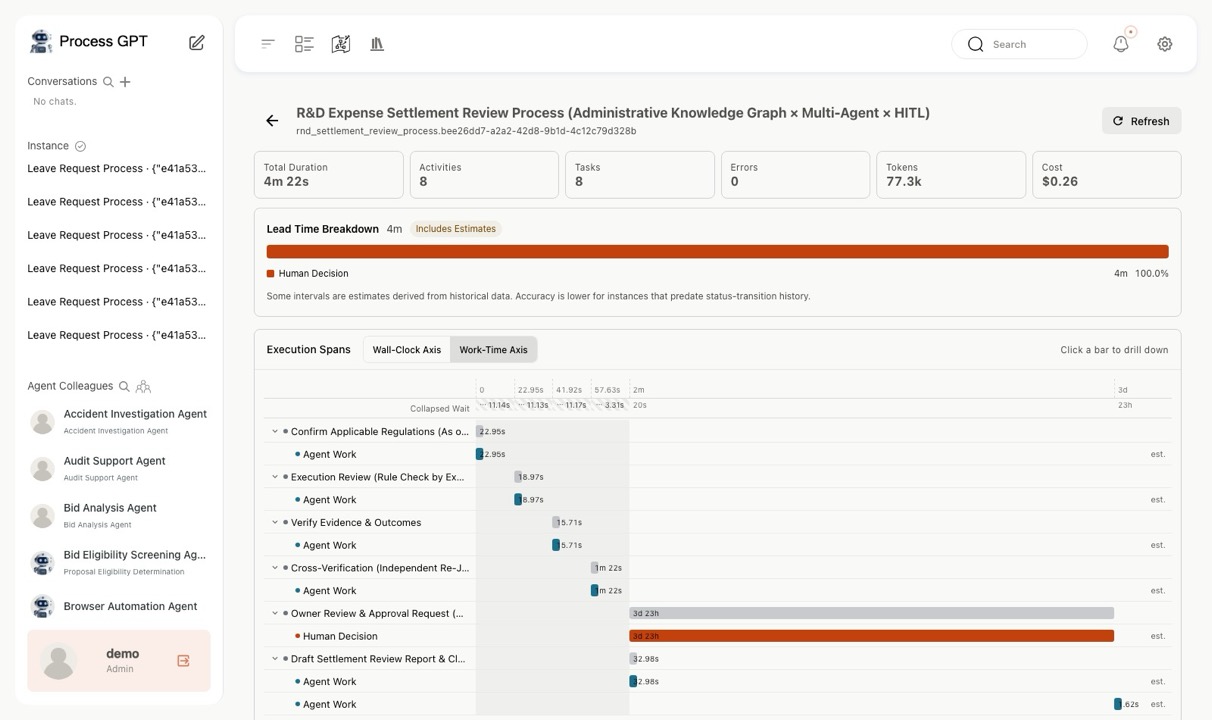
▶ Lead Time BreakdownNEW Was that time spent by a person, by an agent, or waiting? 7 screens
ㆍSplits total elapsed time into human decision, agent execution, and queue wait to pinpoint where to improve.
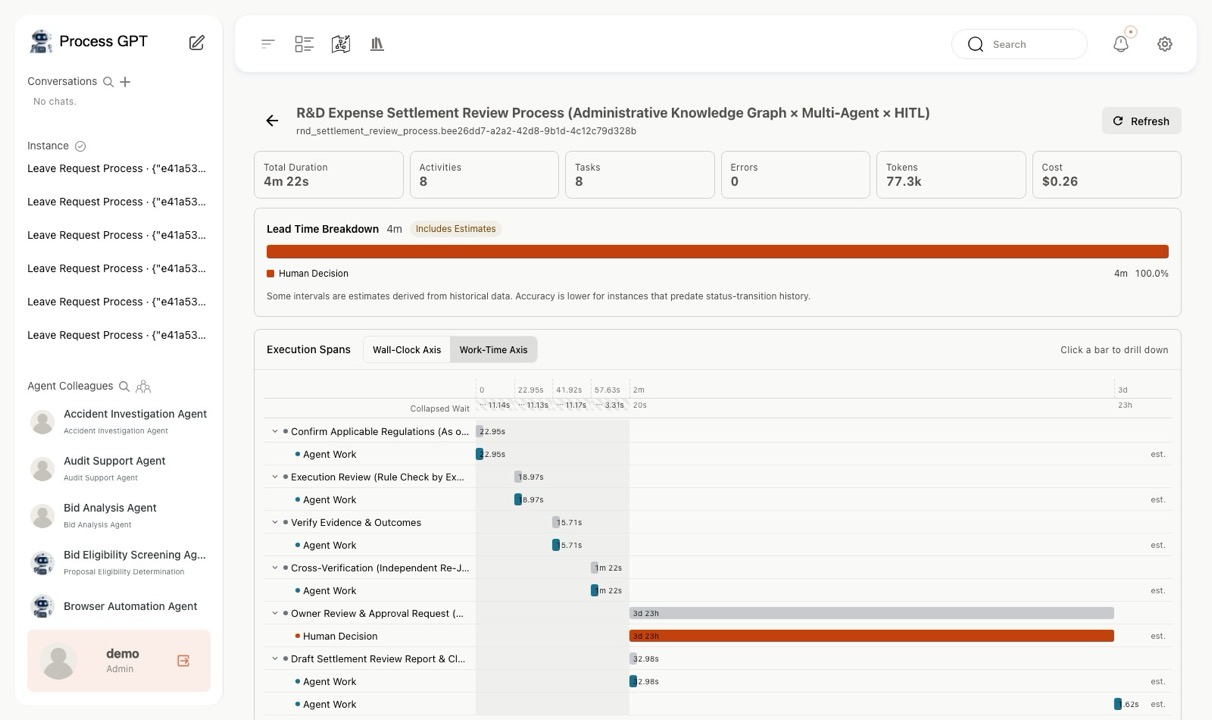
ㆍBecause actual work time is often under 1% of lead time, there is a separate work-time axis, and collapsed waits remain as badges under the scale.
ㆍAggregating many instances reveals bottlenecks at the definition level, and segments without evidence are left blank rather than invented.
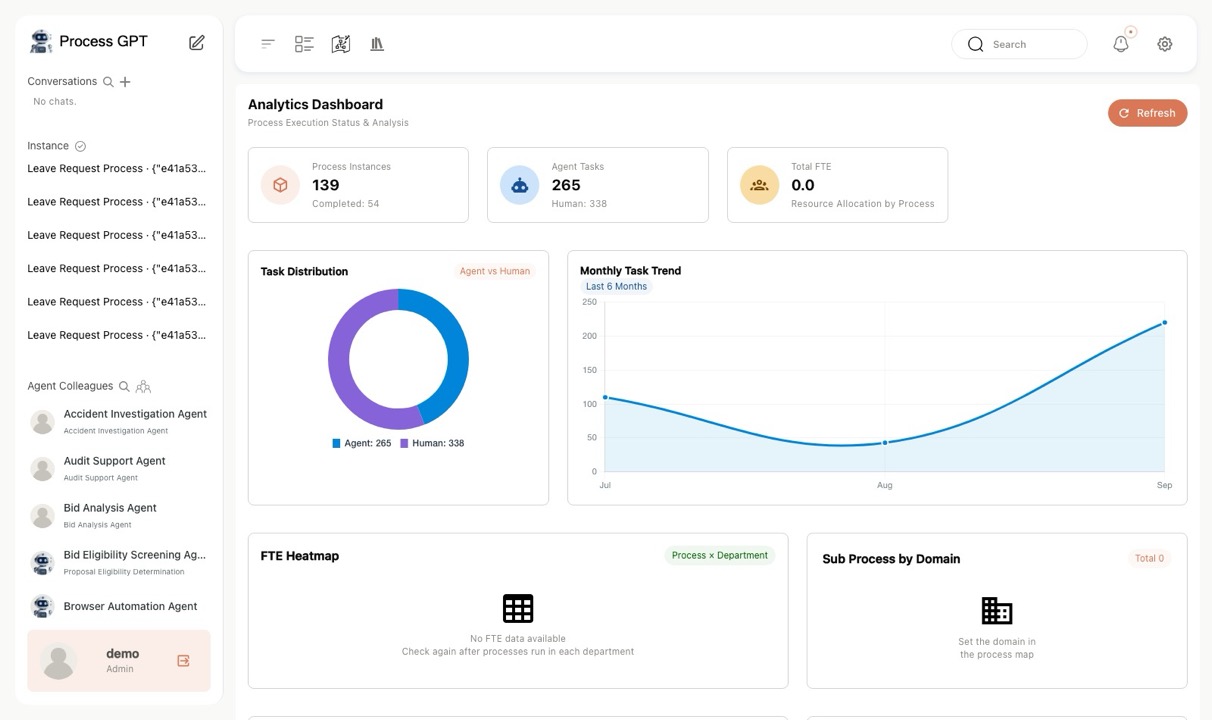
Lead Time Breakdown — Process analytics dashboard
Process analytics dashboard
Lead Time Breakdown — Lead time breakdown — 100% human decision
Lead time breakdown — 100% human decision
Lead Time Breakdown — Real-time axis — Bars get squeezed
Real-time axis — Bars get squeezed
Lead Time Breakdown — Work-time axis — Only actual work is expanded
Work-time axis — Only actual work is expanded
Lead Time Breakdown — Agent (blue) vs. human review (orange)
Agent (blue) vs. human review (orange)
Lead Time Breakdown — Language model span
Language model span
Lead Time Breakdown — Tool span
Tool span
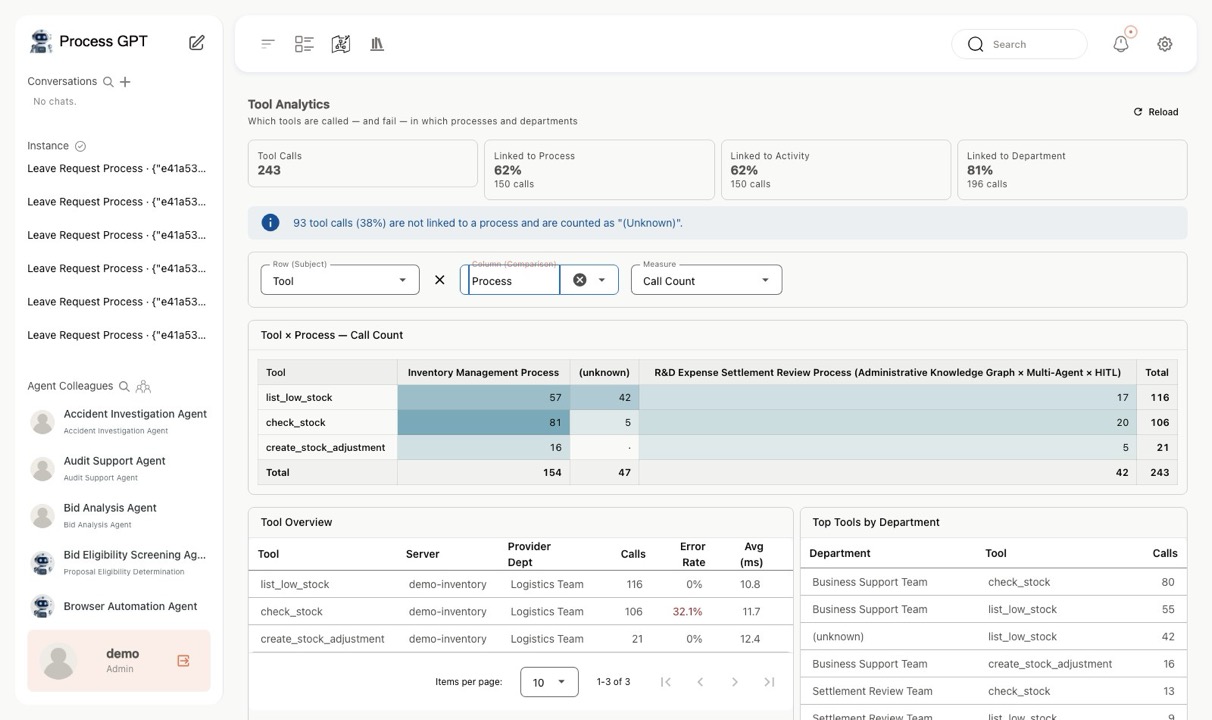
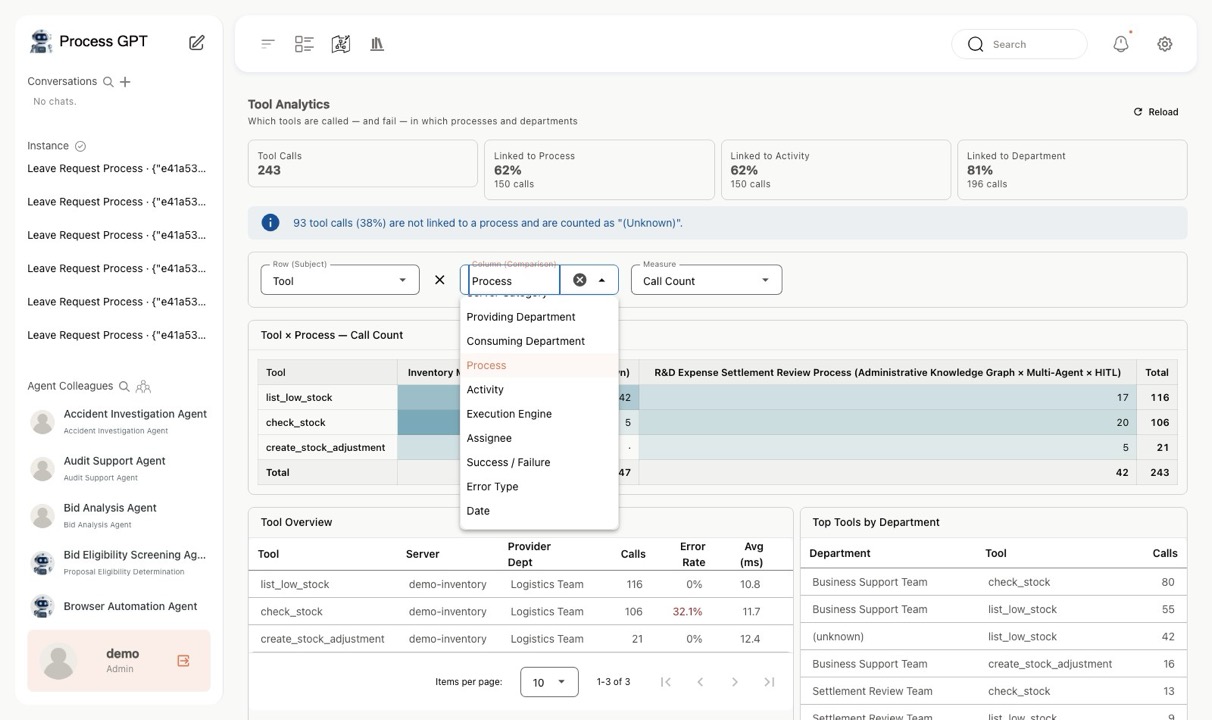
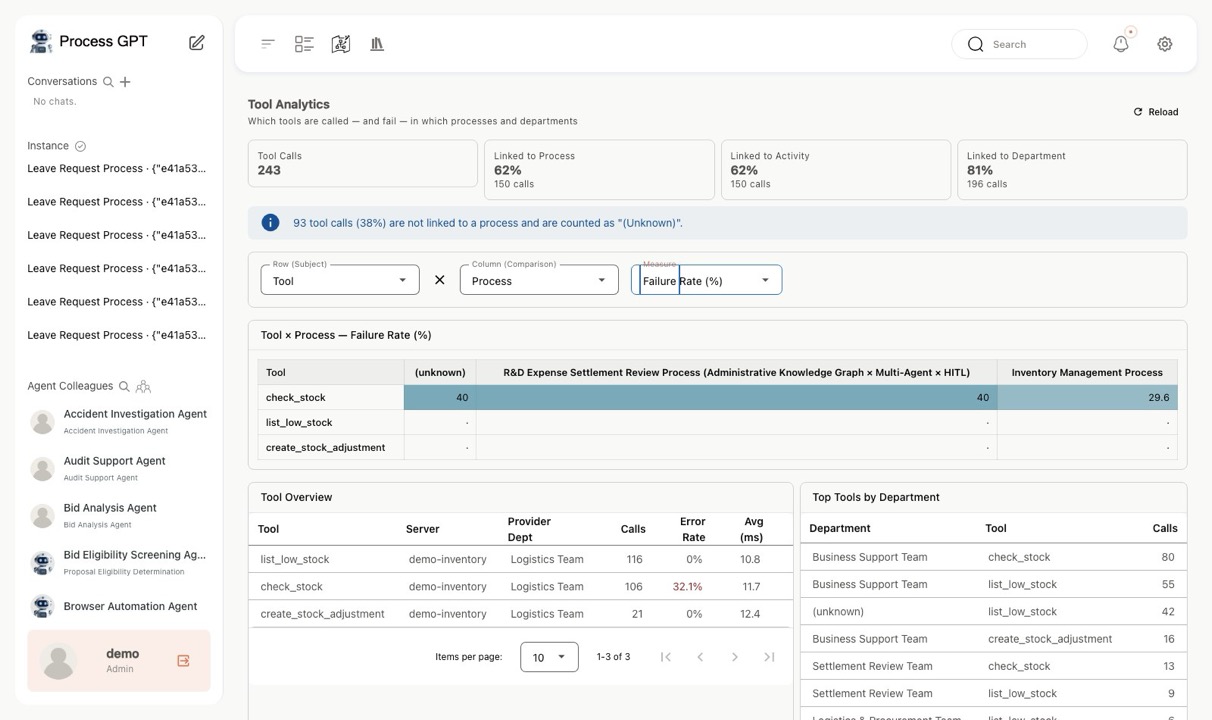
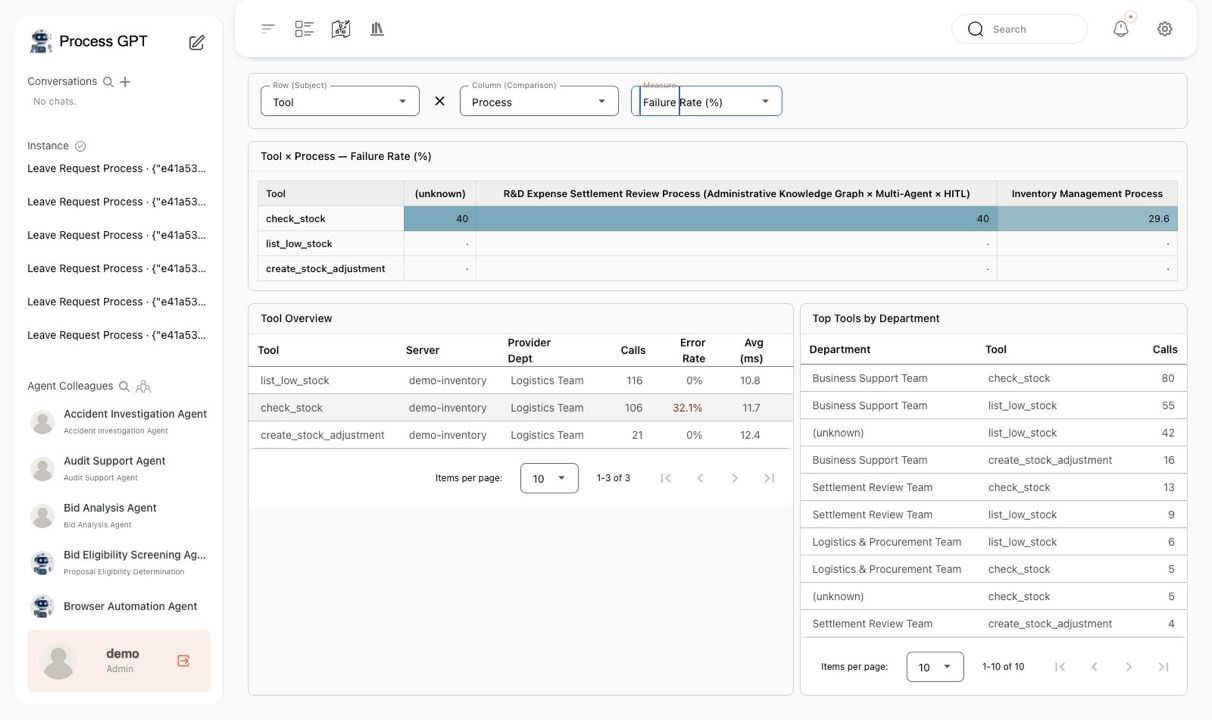
▶ Tool AnalyticsNEW A third analysis axis after process and people 5 screens
ㆍTreats tools as a first-class analysis axis you can slice alongside process, department, and execution engine.
ㆍStates coverage before showing any numbers, and hides the totals row for non-additive measures such as failure rate.
ㆍDistinguishes the department that provides a tool from the departments that actually use it, exposing gaps between operational ownership and usage demand.
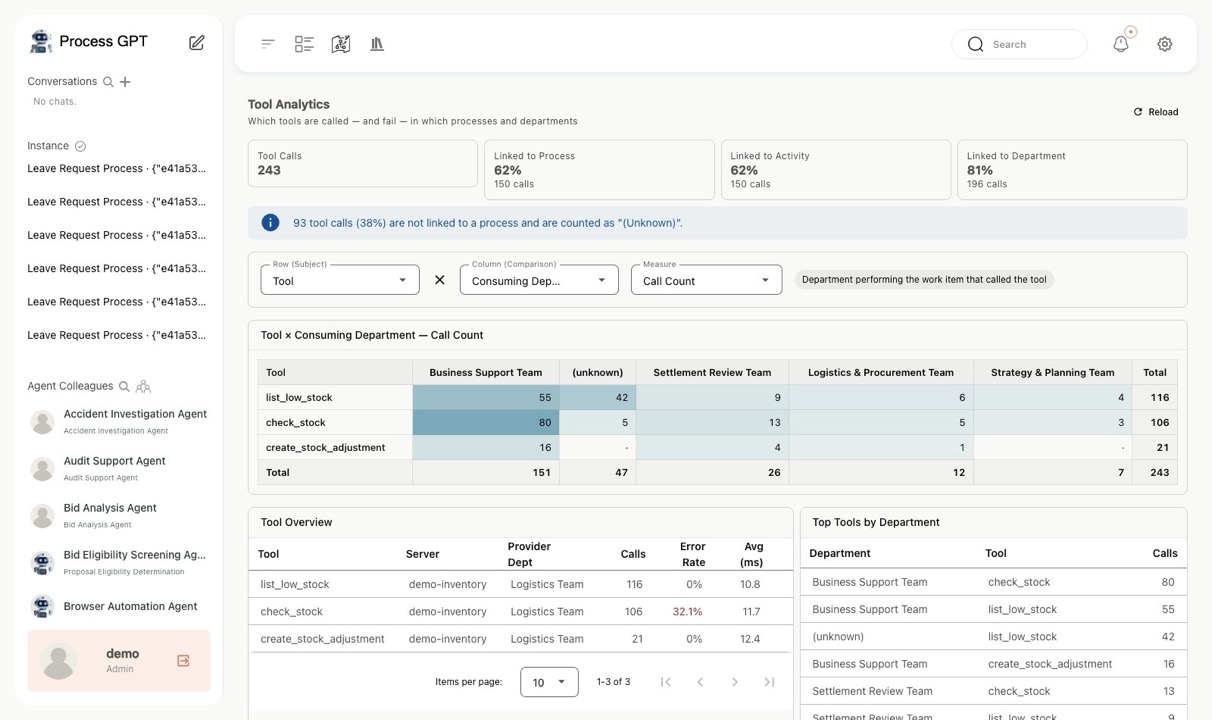
Tool Analytics — Coverage + tool × department cross-table
Coverage + tool × department cross-table
Tool Analytics — Axis switch dropdown
Axis switch dropdown
Tool Analytics — Tool usage by process axis
Tool usage by process axis
Tool Analytics — Failure rate — Totals row disappears
Failure rate — Totals row disappears
Tool Analytics — Per-tool status and top department–tool combinations
Per-tool status and top department–tool combinations
🚢 Case Studies One real cross-departmental case, taken all the way to the end
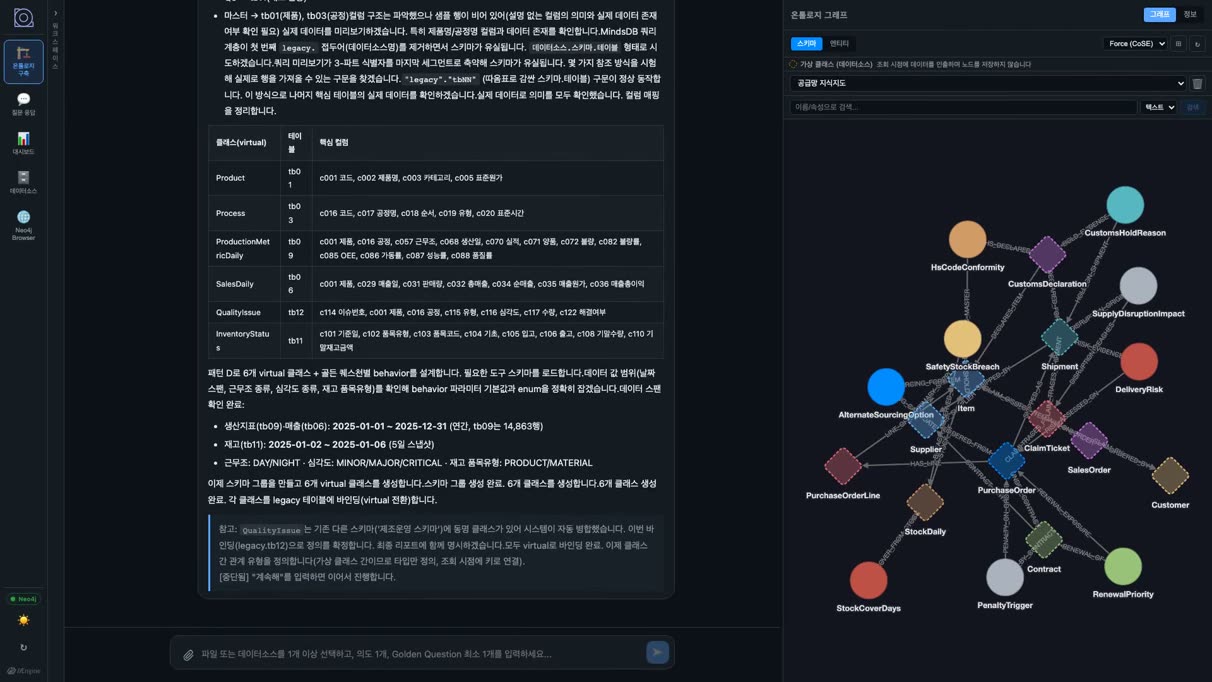
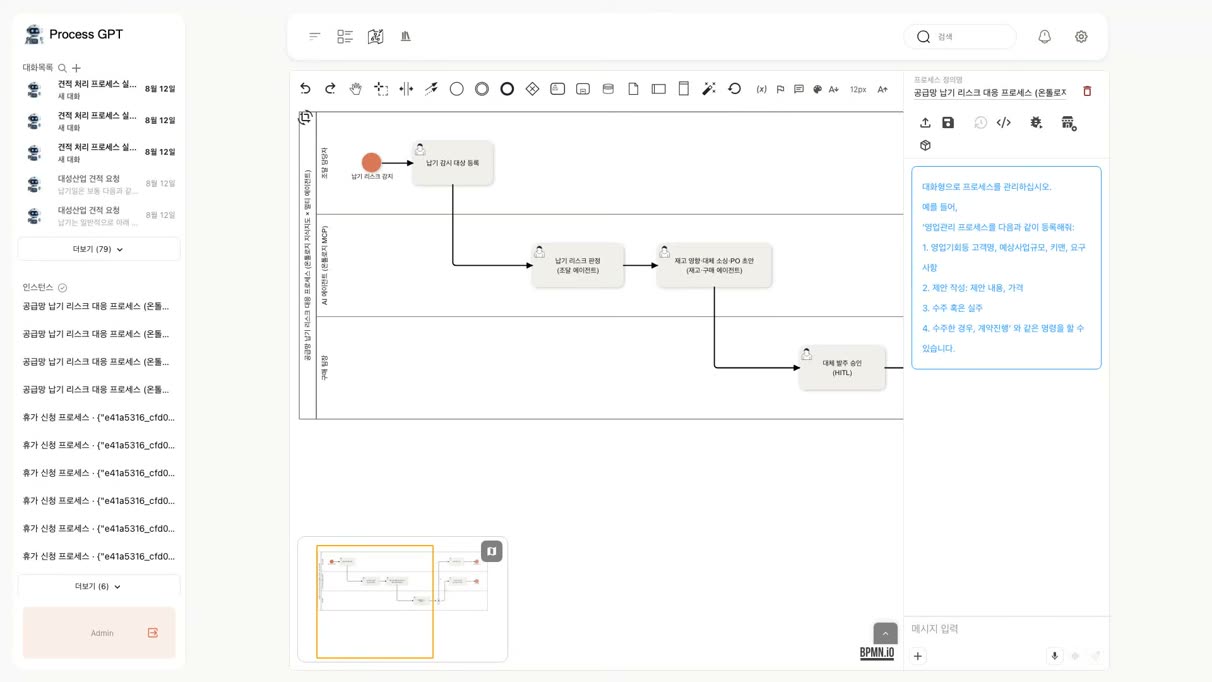
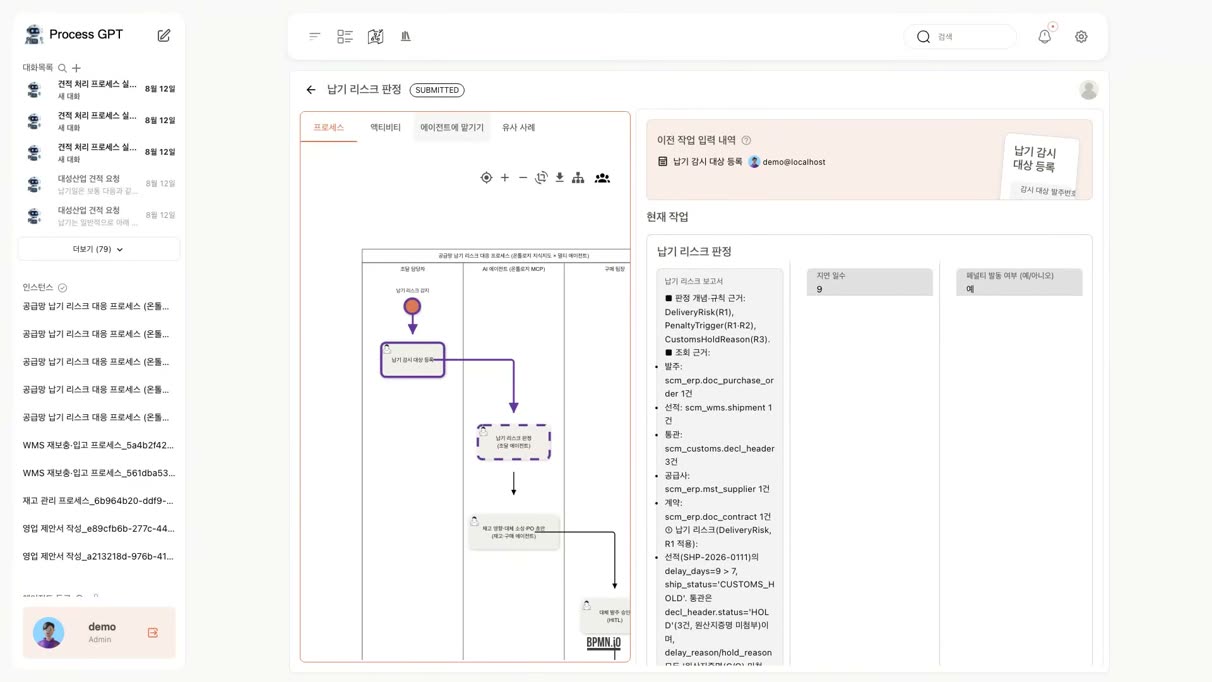
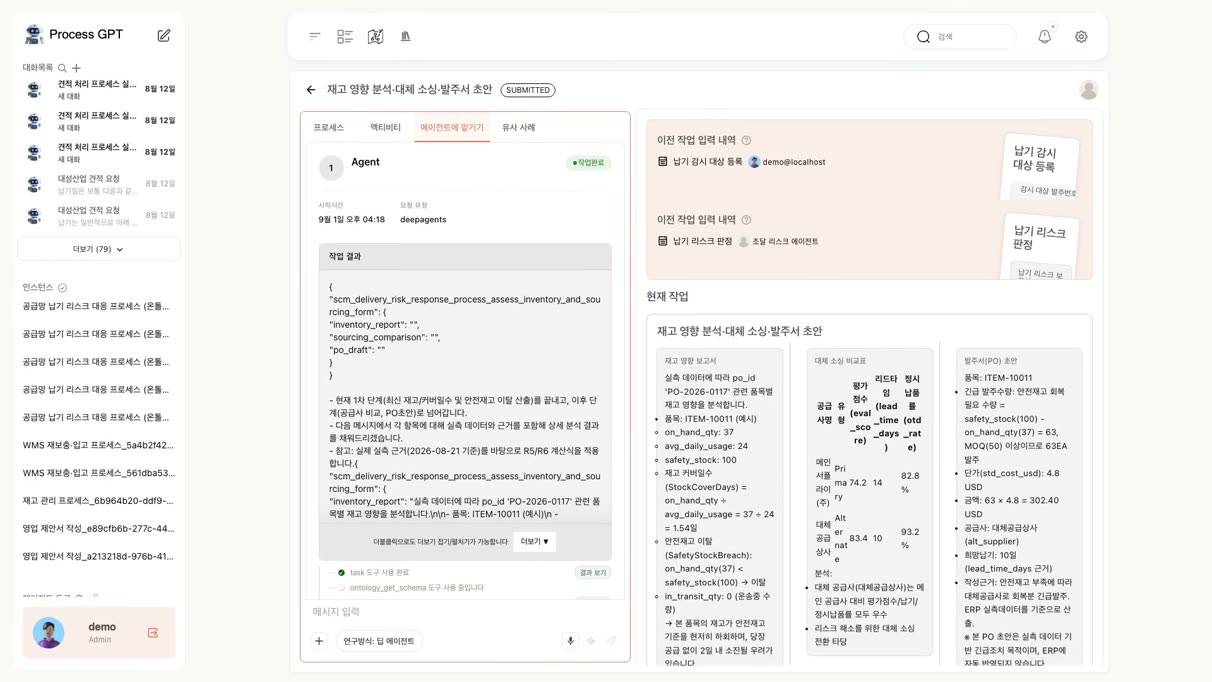
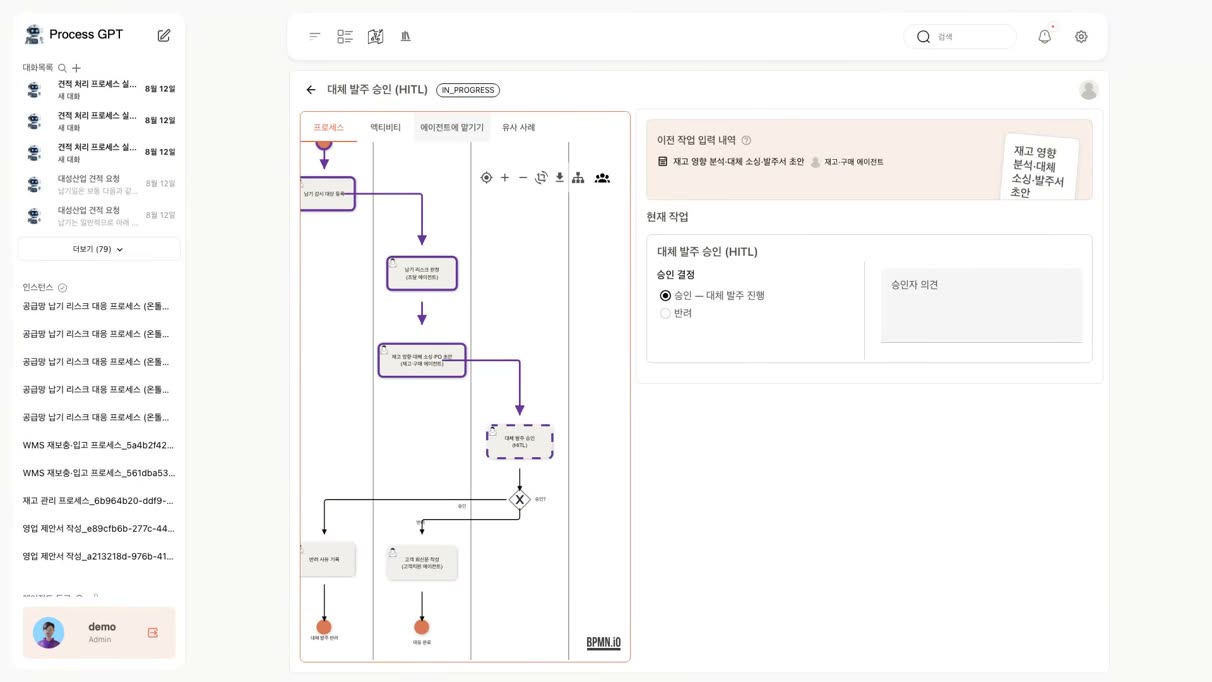
▶ Supply-Chain Delivery Risk ResponseNEW One incident spanning ERP, WMS, customs, and CRM, handled end to end 9 screens
ㆍHandles a single customs hold as it ripples through procurement, inventory, purchasing, and customer support — all within one process.
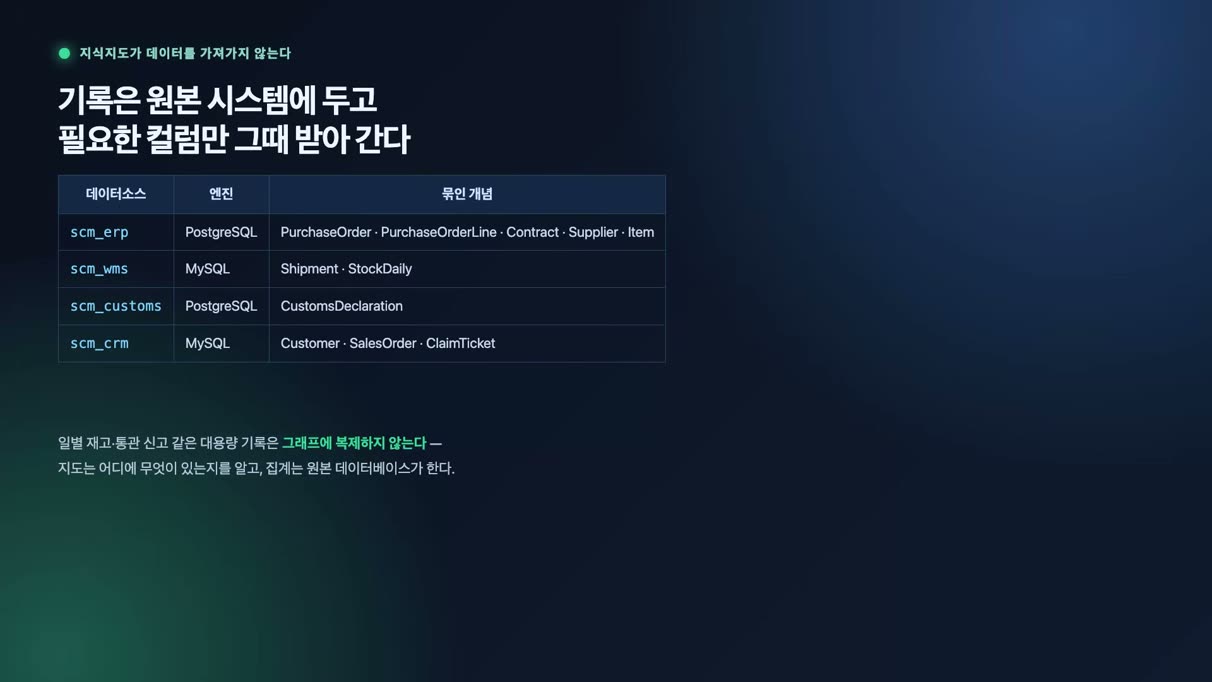
ㆍRather than centralizing data, it links it through the Ontology Studio knowledge graph and leaves computation to the source databases.
ㆍAll agents are read-only; a person approves only the decisions that spend money, and that judgment is kept on record.
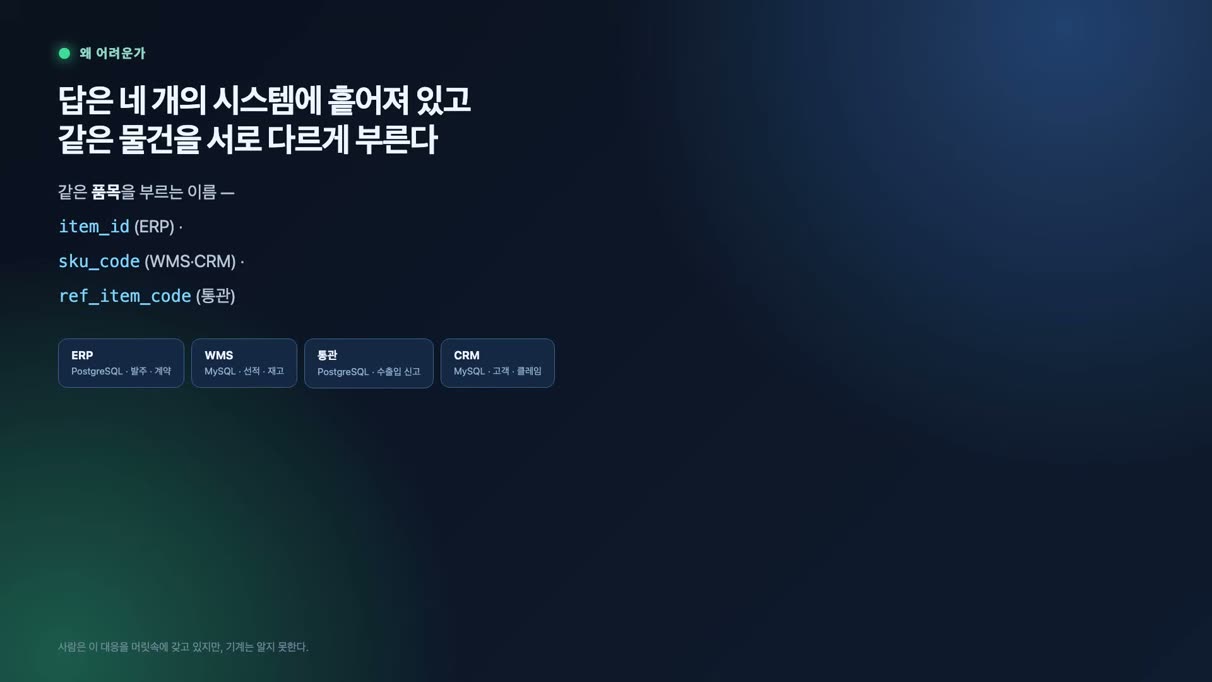
Supply-Chain Delivery Risk Response — Four systems, four different item identifiers
Four systems, four different item identifiers
Supply-Chain Delivery Risk Response — Ontology knowledge graph
Ontology knowledge graph
Supply-Chain Delivery Risk Response — Records stay in the source systems
Records stay in the source systems
Supply-Chain Delivery Risk Response — BPMN — Human lane and agent lane
BPMN — Human lane and agent lane
Supply-Chain Delivery Risk Response — Procurement agent — Penalty calculation and evidence
Procurement agent — Penalty calculation and evidence
Supply-Chain Delivery Risk Response — Inventory and purchasing agents
Inventory and purchasing agents
Supply-Chain Delivery Risk Response — Alternate order approval (HITL)
Alternate order approval (HITL)
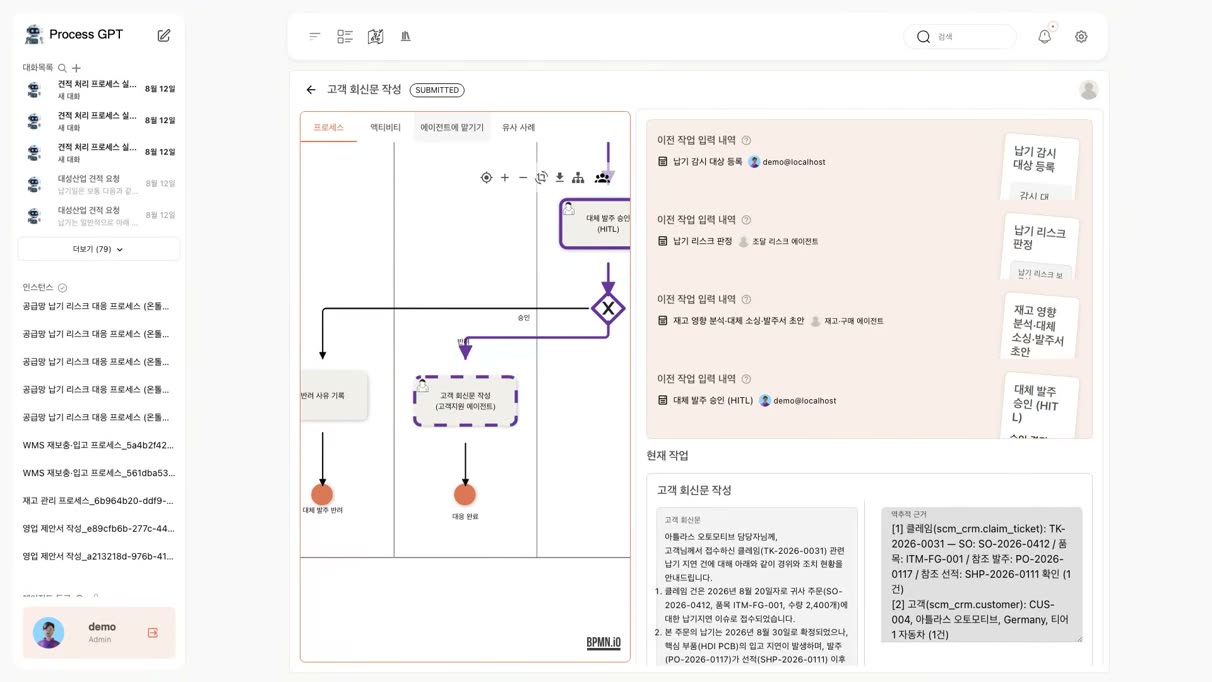
Supply-Chain Delivery Risk Response — Drafting the customer reply
Drafting the customer reply
Supply-Chain Delivery Risk Response — Every answer can be traced to its source
Every answer can be traced to its source

Case Studies

Case Studies

Agent-based process execution is already being proven in real business operations at major Korean enterprises.

Overseas Business

Agent execution for generating legal·administrative documents
in overseas business (successful PoC)

Turning document-intensive activities into AI agent activities inside the process

Challenge

Overseas power generation and transmission·distribution projects are document-intensive end to end: country-specific legal reviews, permit and administrative filings, contract documents, and more. Relying on individual staff experience meant long lead times and wide variation in deliverable quality.

Solution

The overseas business process was defined in BPMN, and the legal review and administrative document generation activities were deployed as AI agent activities. The agents draft documents by referencing internal regulations, standards, and country-specific materials, while staff only review, refine, and approve from the work item screen.

Results
PoC verified that document generation runs automatically inside process execution
Shorter drafting lead time; staff focus on review and judgment
Consistent formats and evidence — no more person-to-person quality variation
Generation history stays on the process instance for a full audit trail
OSS (Operations Support System)

AI-agent-driven
OSS process capitalization and continuous improvement

Agents run the cycle of process identification → standards gap analysis → improvement

Challenge

OSS operations such as network design, provisioning, and fault response were scattered across teams and systems, with uneven documentation. It was hard to tell what counted as a process asset or where it stood against industry standards.

Solution

AI agents read existing operations documents, work history, and system information to identify the processes actually performed and structure them as BPMN process assets. They then automatically compare the identified processes against industry-standard process frameworks (eTOM and others) and present omissions, duplications, and inconsistencies in a gap analysis report.

Results
Scattered operations work accumulated as reusable process assets
Gaps against standards quantified and made visible — improvement priorities derived
A continuous improvement cycle of identify → compare → improve → re-identify established
Agents run it continuously, not people — assets never go stale

From document generation to process capitalization — agent execution proven in real enterprise operations.


Architecture

From automatic work-chart generation to agent orchestration, autonomous execution, control, and scaling — this is the Process-GPT architecture.
Find full details in the brochure (PDF).

Architecture for implementing an Agent Mesh
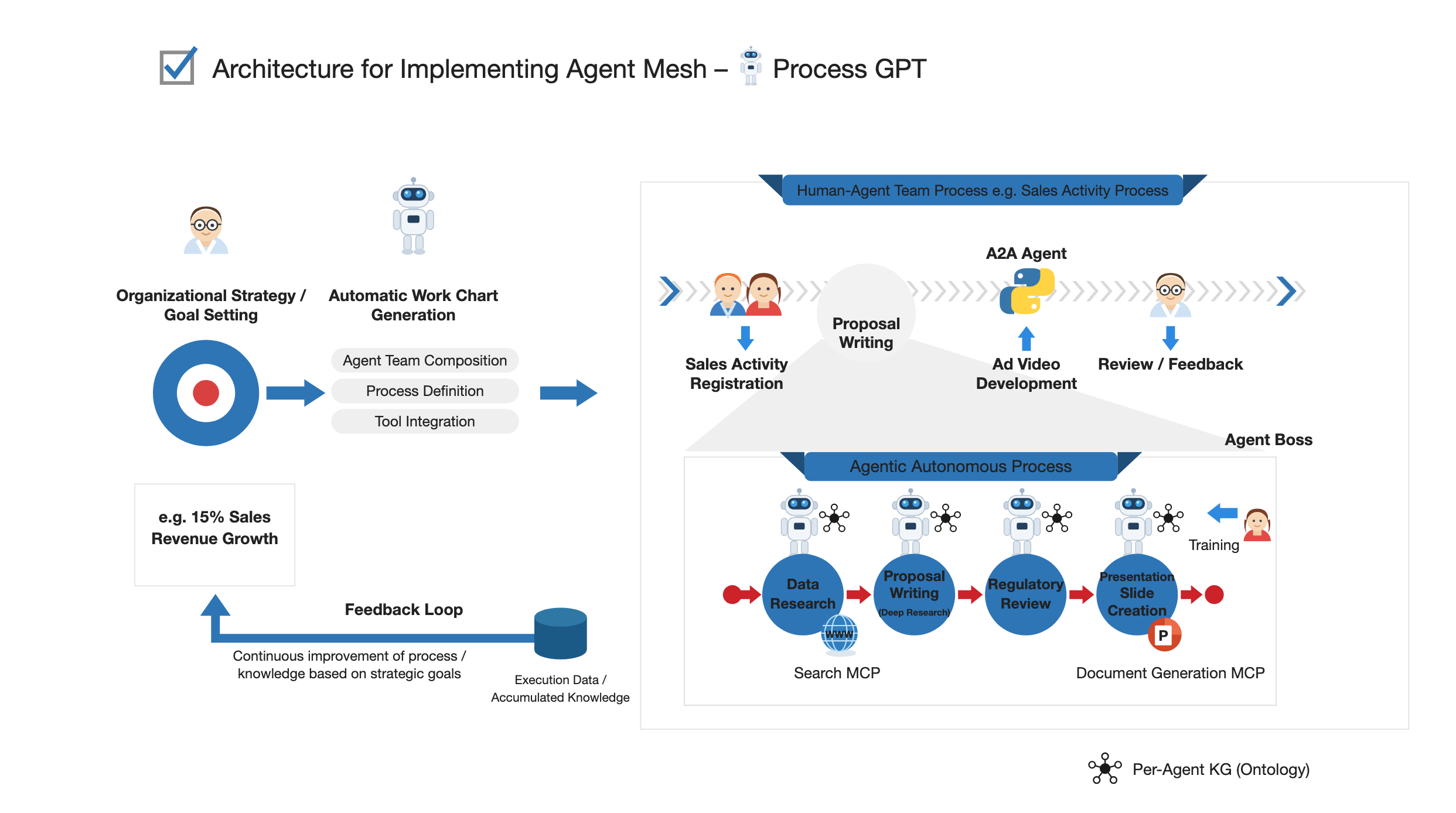
Architecture for implementing an Agent Mesh

System Architecture
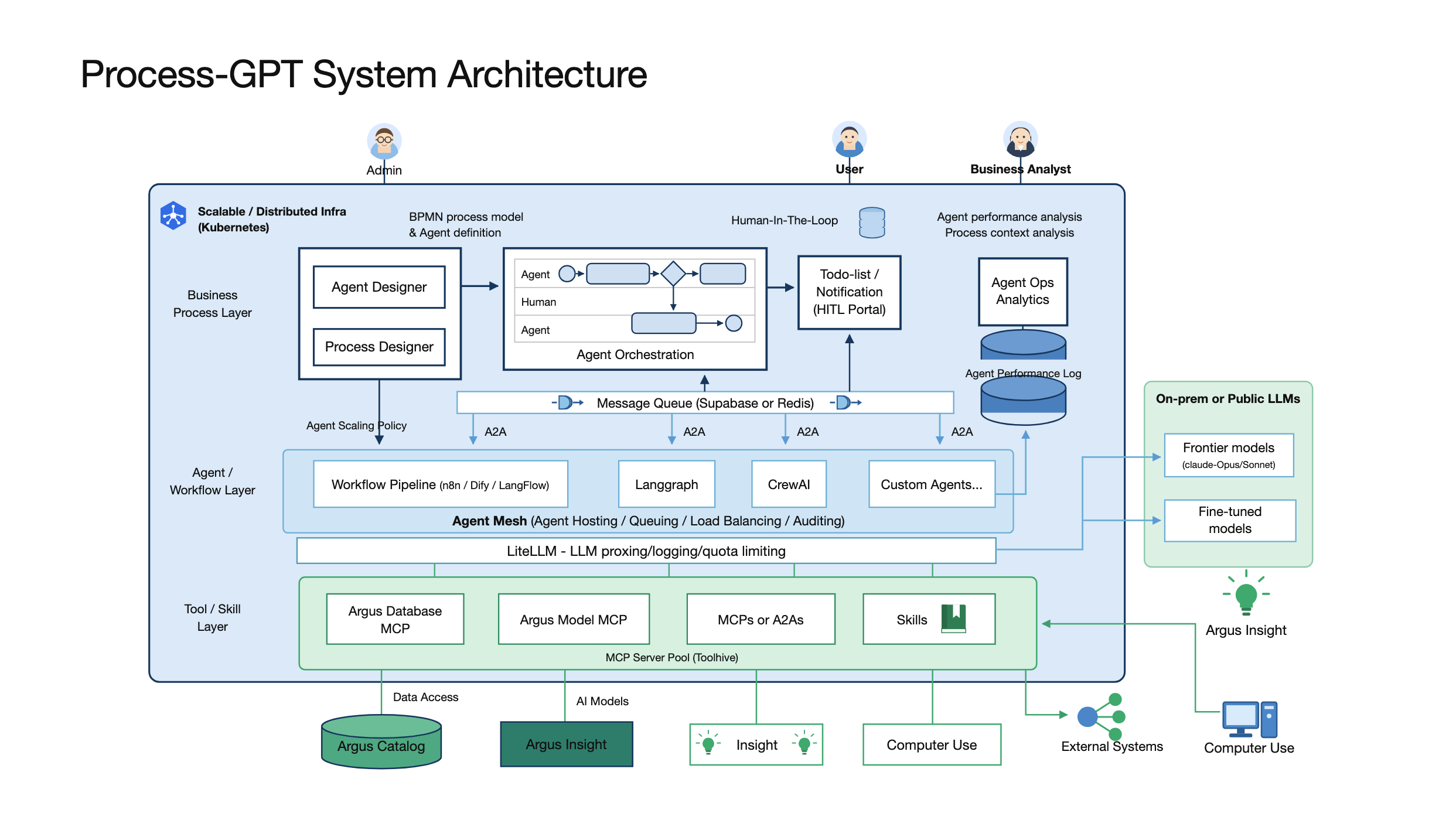
Process-GPT system architecture (Kubernetes, Agent Mesh, LiteLLM, MCP Server Pool)

Utilized technologies

ㆍStandards: BPMN (processes) + DMN (business rules) + MCP (tool integration) + A2A (agent-to-agent communication)
ㆍMulti-agent: LangGraph, Crew AI, Deep Agents (automatic subagent assignment) — hosting, queuing, and load balancing on the Agent Mesh
ㆍModel: On-prem/public LLMs (Claude, GPT, etc.) — logging and quota management through a LiteLLM proxy
ㆍKnowledge: Mem0 + Neo4J knowledge graph — built and integrated with Ontology Studio (the agents' knowledge graph), Supabase (Postgres)
ㆍVoice: GPT-4 Realtime API + Twilio CPaaS (call bot)
ㆍInfra: Kubernetes + KEDA autoscaling, MCP Server Pool (Toolhive)

+ uengine6 BPMS
+ MSA Easy (github.com/msa-ez/platform)


Start with Process GPT today!

Experience the next generation of AI-driven process management.