An AI Business Process for Customs Clearance Delays: From Analysis to Approval
At Busan Customs, clearance of the shipment for purchase order PO-20116-0117 has been put on hold. The certificate of origin was not submitted, and the shipment is now nine days late. This post walks through a demonstration of how to respond to such a delivery delay.
Responding to a customs delay requires multiple departments to act together. Here is what each department needs to check.
- Procurement: Checks the contractual delivery terms and the penalties for delay.
- Inventory: Checks whether current stock will fall below the safety-stock threshold.
- Purchasing: Looks for alternative suppliers and reviews options for placing an additional order.
- Customer Support: Informs the customer of the reason for the delay and the response plan.
The key is connecting information scattered across multiple systems and managing each department's response as a single workflow. Let's look at the roles Ontology Studio and Process GPT each play.
1. Start by connecting information scattered across systems
Purchase order and contract information lives in the ERP; shipment and inventory data in the warehouse management system (WMS). Customs declarations are handled in the customs system, and customer information and claims in the CRM. To understand the impact of a delivery delay, the person in charge has to check all of this information together.
Even the identifiers for the same item differ from system to system. The ERP uses item_id, the warehouse system uses an SKU code, and the customs system uses its own reference item code. The mapping between these identifiers, which staff know from experience, has to be captured so the systems can use it too.
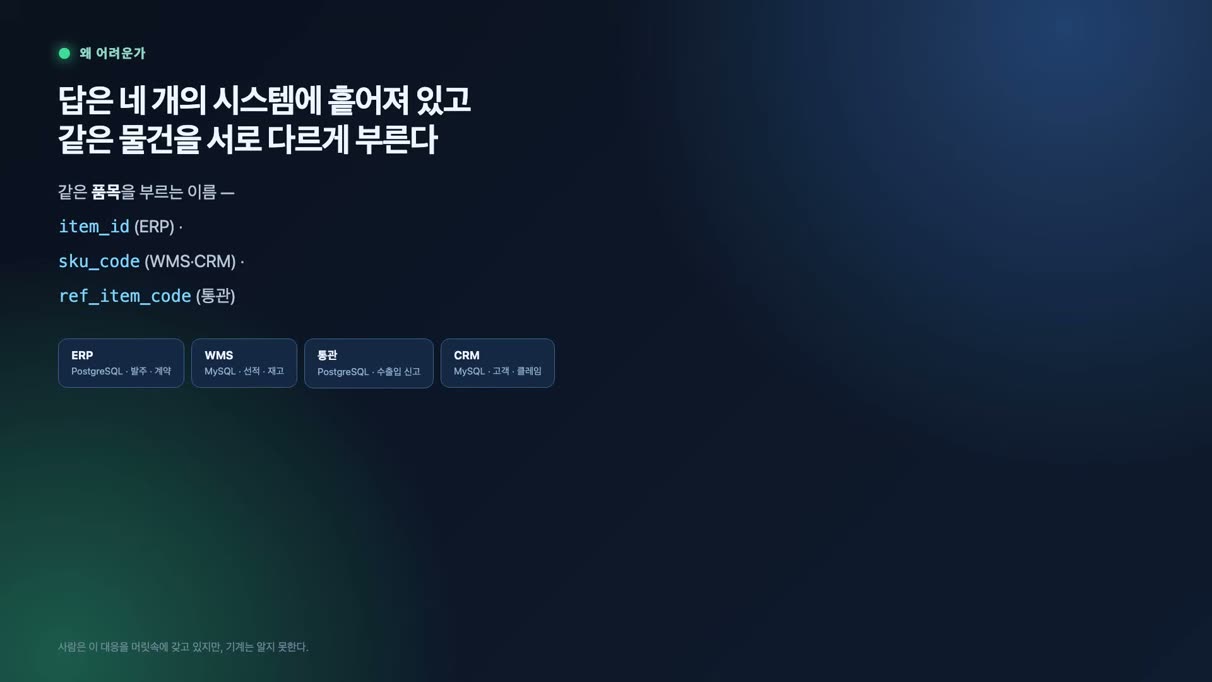
Because each system tracks the same item under a different identifier, querying the data together requires a mapping between those identifiers.
2. Define data relationships and business rules in the ontology
In Ontology Studio, business concepts such as purchase orders, shipments, and inventory, along with their relationships, are expressed as a knowledge graph. Each concept is linked to a table in its source system, and join rules define which columns are used to connect the data.
In this setup the data stays in the source systems, and the information you need is linked and queried on demand. Ontology Studio is a desktop app installed on your own computer.
Two kinds of concepts defined in the knowledge graph
- Record concepts: business information such as purchase orders, shipments, inventory, and claims that maps to tables in the source systems.
- Rule-based concepts: information that requires calculation or a conditional judgment, such as delivery-delay risk, whether a penalty applies, whether stock is below the safety level, and inventory coverage.
For example, you define as business rules how many days of delay trigger a penalty, or how many days of demand the current inventory can cover. When a rule changes, you update that definition in the ontology and the criteria the agents refer to are refreshed.
Keeping business rules in the ontology makes it easy for business users to review and adjust the decision criteria. It also helps ensure that multiple agents all work from the same criteria.
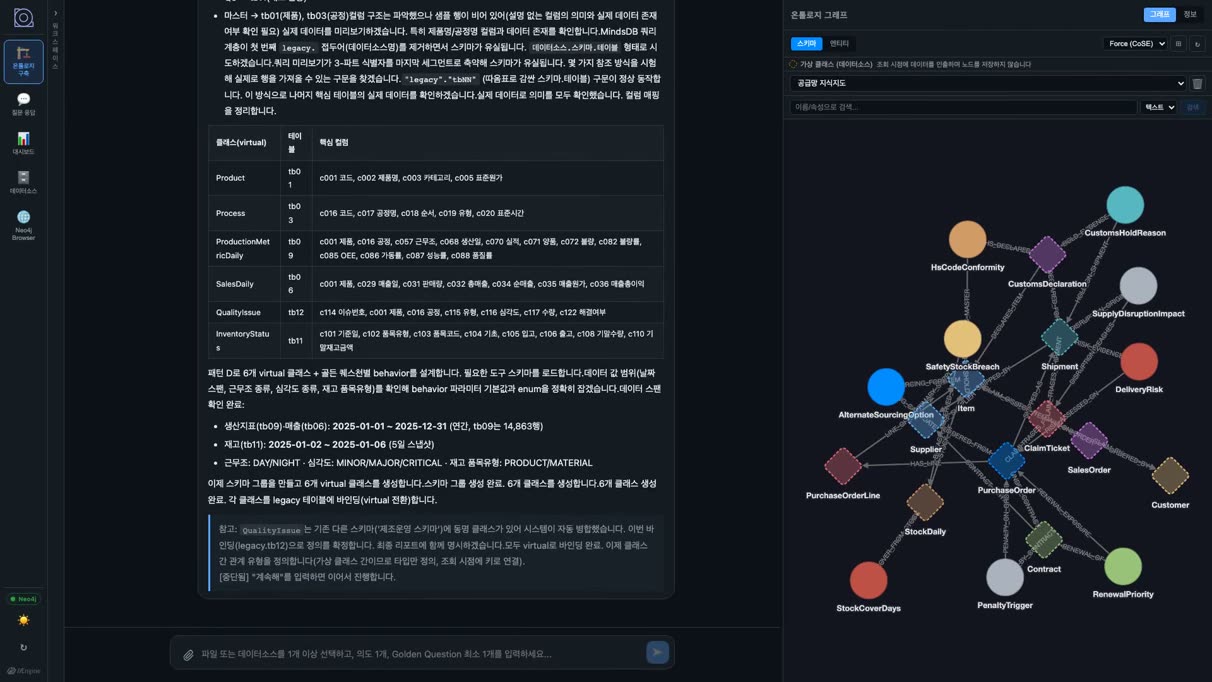
In Ontology Studio, business concepts are connected and the join rules needed for cross-system queries are defined.
3. High-volume records are queried from the source systems
High-volume records such as daily inventory and customs declarations stay in their source systems. The setup retrieves only the columns a query needs.
Replicating every time-series record into the graph would drive up storage and processing load. The ontology defines where the data lives and how it relates, while queries and calculations run in the source databases, a clear division of roles.
Purchase orders, contracts
item_id
Shipments, inventory
SKU code
Customs declarations
reference_item_code
Customers, claims
The ontology manages data relationships and query rules, while the actual records stay in each source system.
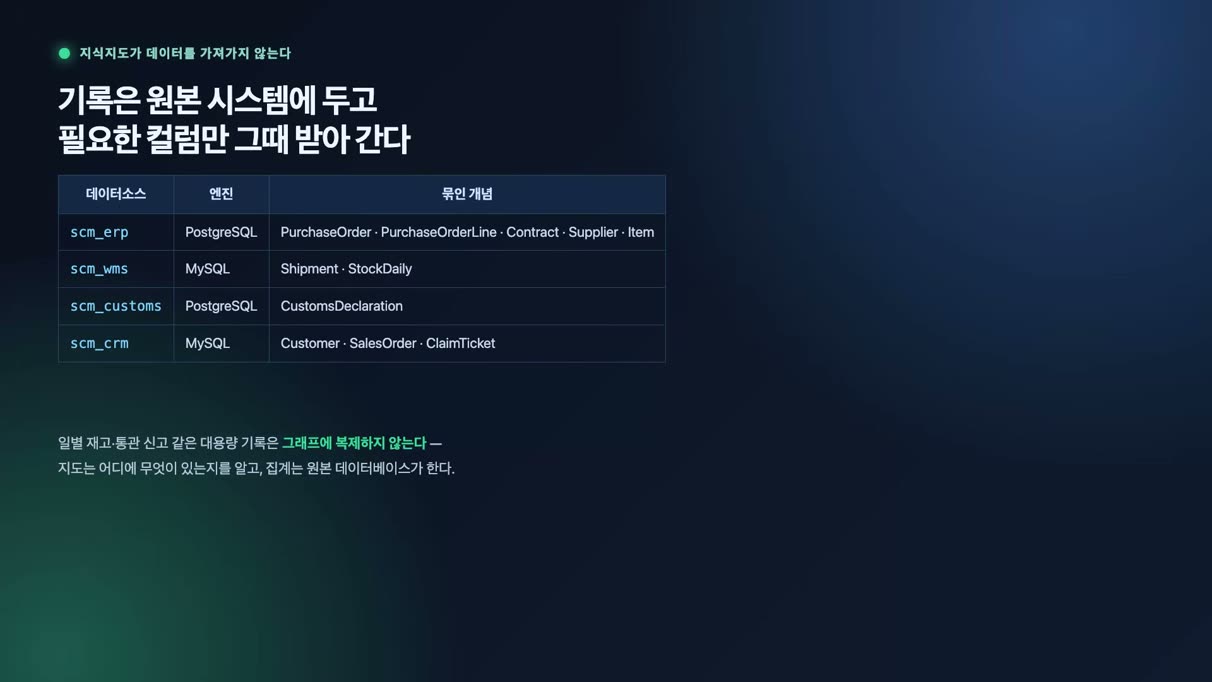
Large volumes of inventory and customs records are not replicated; only the data needed is queried from the source systems.
4. Design roles and approval steps in BPMN
Once the information is connected, you need to decide the order of work, who is responsible, and which steps require human approval. In Process GPT, this is designed as a BPMN diagram. In the demo, human tasks are placed in the left lane and agent tasks in the right lane to separate the roles.
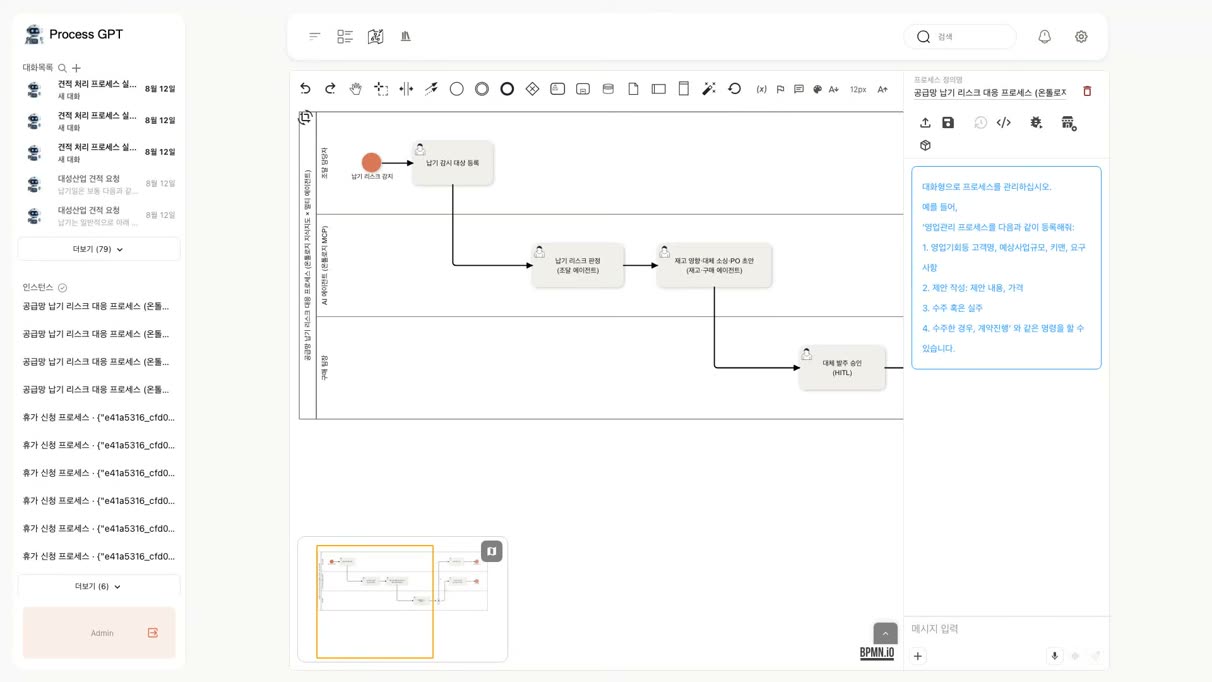
The BPMN diagram defines the tasks assigned to people and agents, the execution order, and the approval points in one place.
5. Agents analyze the impact of the delay and draft a response plan
The analysis starts when a procurement officer enters a purchase order number and customer details to register it for monitoring. From there, agents carry out the work in the order defined in the process, passing each step's results on to the next. The officer reviews the response plan at the approval step described below.
① Procurement agent
The demo does not spell out the query sequence step by step. The agent checks the knowledge graph for how business concepts map to the source data, then generates and runs the queries needed to retrieve the data.
The query revealed that the shipment had been held at customs for 9 days because the certificate of origin was missing. Under the demo's contract terms, a delivery delay incurs a penalty of 2% of the purchase order amount. With an order value of $81,307, the expected penalty rounds to about $1,626.
The analysis result also includes the business rules applied and the query evidence. You can see which tables in which data sources were queried and how many records were returned.
Purchase orders live in the ERP and shipments in the warehouse system, yet they can be queried together based on the relationships defined in the ontology. The rule linking the purchase order number to the shipment's referenced order number is the basis for the cross-system query.
② Inventory and purchasing agent
The inventory and purchasing agent receives the procurement agent's report, checks whether stock has fallen below the safety level, and compares alternative suppliers. The workflow is built so that each step's output becomes the next step's input.
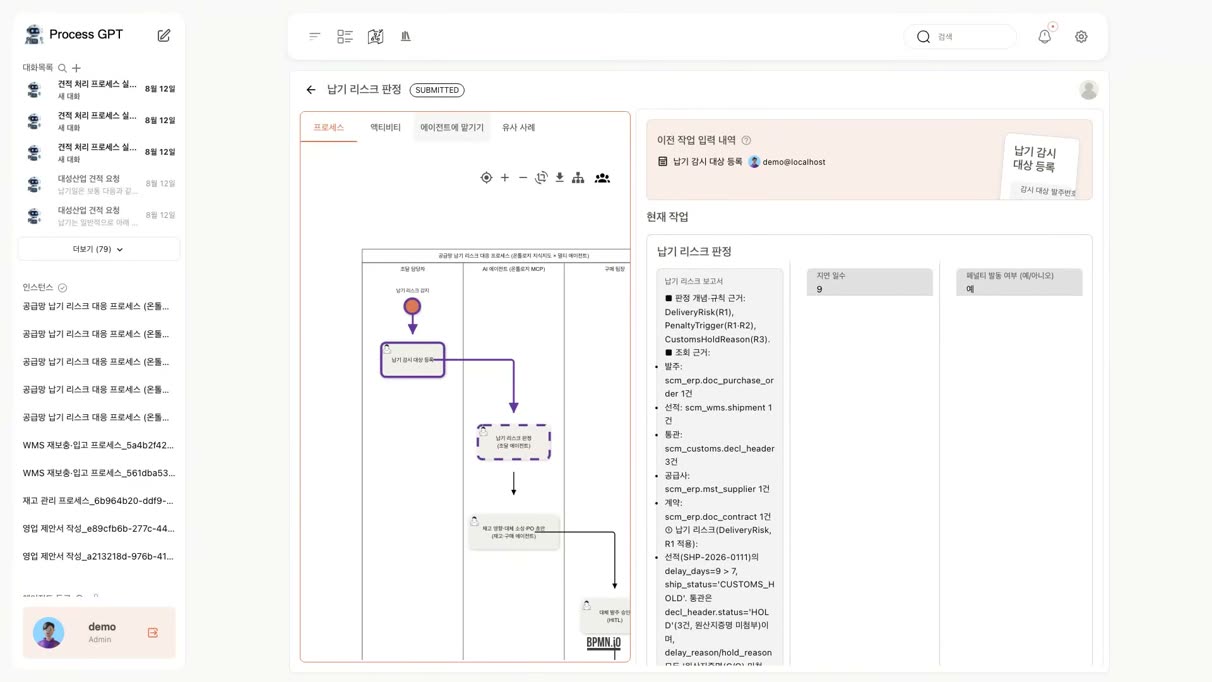
The procurement analysis shows the duration and cause of the customs delay, the expected penalty, and the data query evidence together.
▶ Follow-up analysis by the inventory and purchasing agent
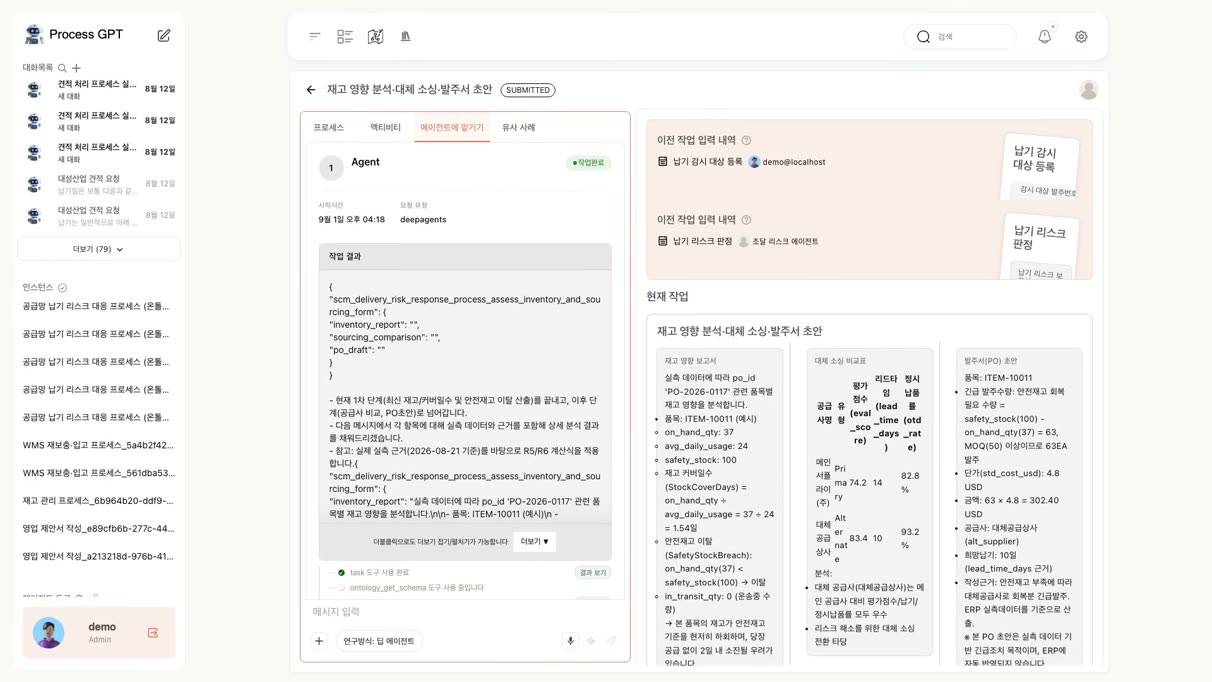
Based on the previous step's report, the inventory and purchasing agent assesses the likelihood of a stockout and reviews alternative suppliers.
6. Alternative purchase orders go through human approval
An alternative purchase order is a decision that incurs cost, so the response plan drafted by the agent is set up for human review.
- Agent query permissions: in the demo they are read-only, and purchase orders are prepared only as drafts.
- Human approval: the team lead must approve the response plan before the process moves to the next step.
- Branching on the approval outcome: a BPMN gateway routes the work down the selected path, and the decision is kept in the history.
Once approved, the customer support agent drafts a reply. Starting from the claim in the CRM, it checks the customer, order, purchase order, and shipment information in turn and incorporates the query results from the ERP and warehouse system. The body of the reply is filled into the input form, and the systems and tables referenced and the number of records queried are recorded alongside it.
In this way, everything from analyzing the impact of the customs delay to reviewing an alternative order, approving it, and drafting the customer reply flows through a single process.
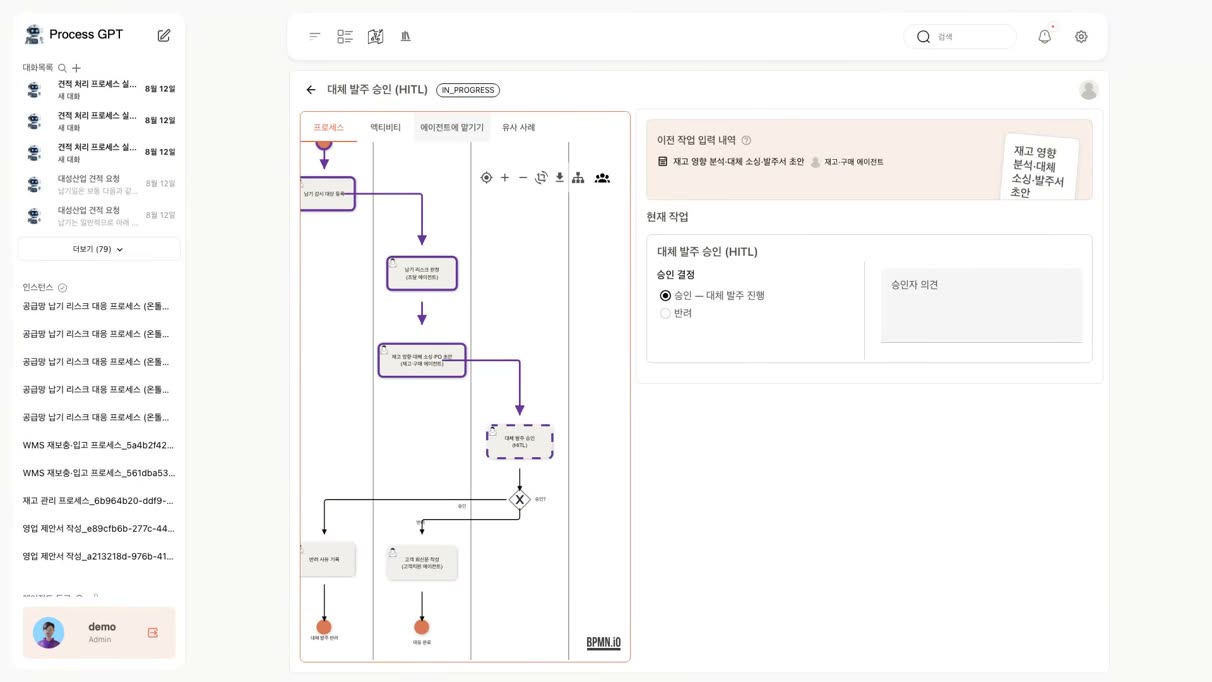
The alternative order proposal is passed to the next step after the team lead's approval.
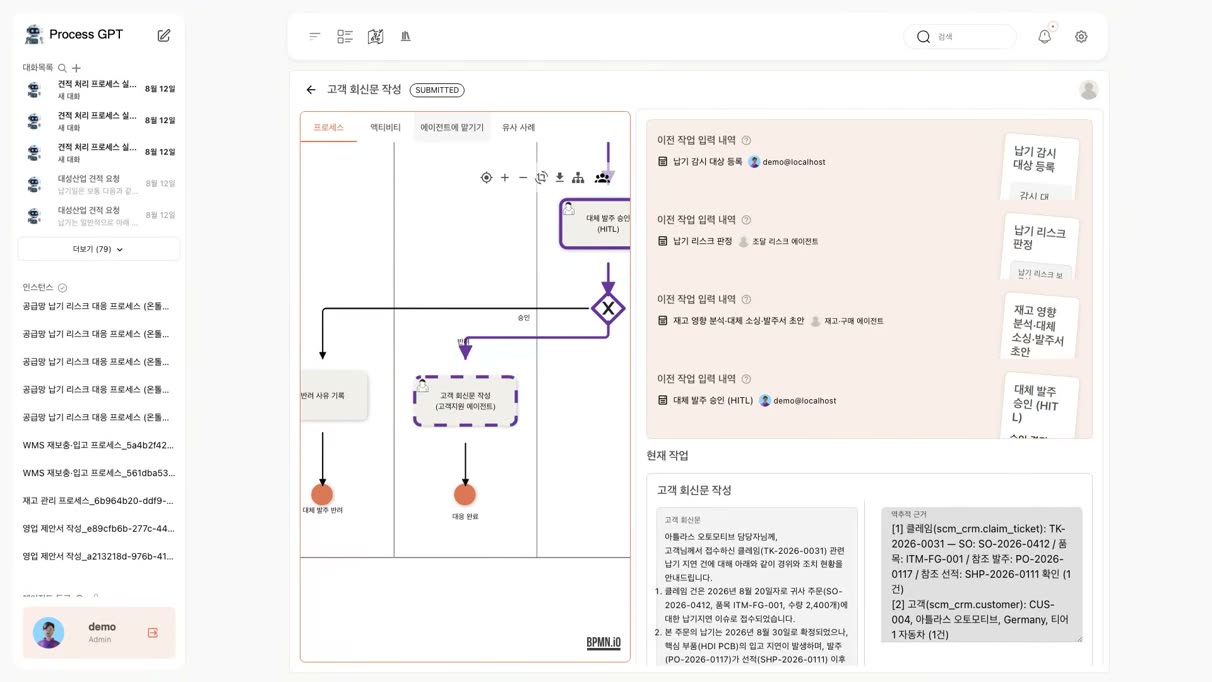
The customer support agent re-verifies the relevant information and drafts a reply along with the query evidence.
7. Review the analysis and response through the execution record
Each step records the tools called, the inputs, and the results returned. Through this record, staff can see which information the agent used and review the analysis results.
| What is managed | Where it is managed |
|---|---|
| 🗺️ Knowledge (concepts, join rules, business rules) | Knowledge graph ↗ Ontology Studio |
| Work order and accountability: owners, execution timing, approval steps | Workflow (BPMN) ↗ See the product page |
| Analysis evidence: tools, inputs, responses | Execution record ↗ See the product page |
| Mapping between business concepts and source data | Ontology connection ↗ See the product page |
The key to this case is managing data relationships, business procedures, and execution evidence clearly and separately. By building on the connections to existing systems, the ontology and processes can be extended to new business scenarios.
Learn more on the Process GPT and Ontology Studio product pages, or try it yourself at process-gpt.io.

The tool call history and process execution status let you verify the evidence behind the analysis and how it was processed.