Why AI Pilots Stall in Real Work — and Why the Process GPT Approach Matters
1. Applause at the demo, overtime a month later
Imagine your company spent hundreds of thousands of dollars on the latest AI. At the demo, the AI summarizes a document hundreds of pages long in 3 seconds and the room applauds. A month later, you walk through the operating teams: people are still working late, approvals are piling up, and work gets done no faster than before.
Many companies go through this. When AI summarizes documents and drafts emails, it is easy to assume the work is done. But that is like sprinting one 100 m stretch of a marathon. However fast the prep cook chops the onions, if no one cooks and serves the food, the customers keep waiting.
A demo and real work are different environments to begin with. A demo is an experiment with one neatly prepared document. In real work, every department uses its own forms, and documents arrive with required fields missing. Above all, when one person finishes their part, the work still has to move on to the next person and the next system.
2. What a 3-second summary saves, and what it doesn't
Let's follow the handling of a single invoice, using hypothetical numbers.
| Stage | Area | Before AI | With personal AI |
|---|---|---|---|
| Read the invoice; note vendor, amount and date | Processing | 20 min | 3 sec |
| Copy the notes and paste them into an approval form in the groupware | Handoff | 5 min | 5 min |
| Set the approval line and submit | Handoff | 5 min | 5 min |
| Wait for the team lead's approval | Decision wait | 1 day | 1 day |
| Re-enter and check it in the accounting system | Handoff | 10 min | 10 min |
| Time to finish one invoice | 1 day 40 min | 1 day 20 min |
Hypothetical numbers for illustration. The categories follow the lead-time breakdown on the Process GPT product page.
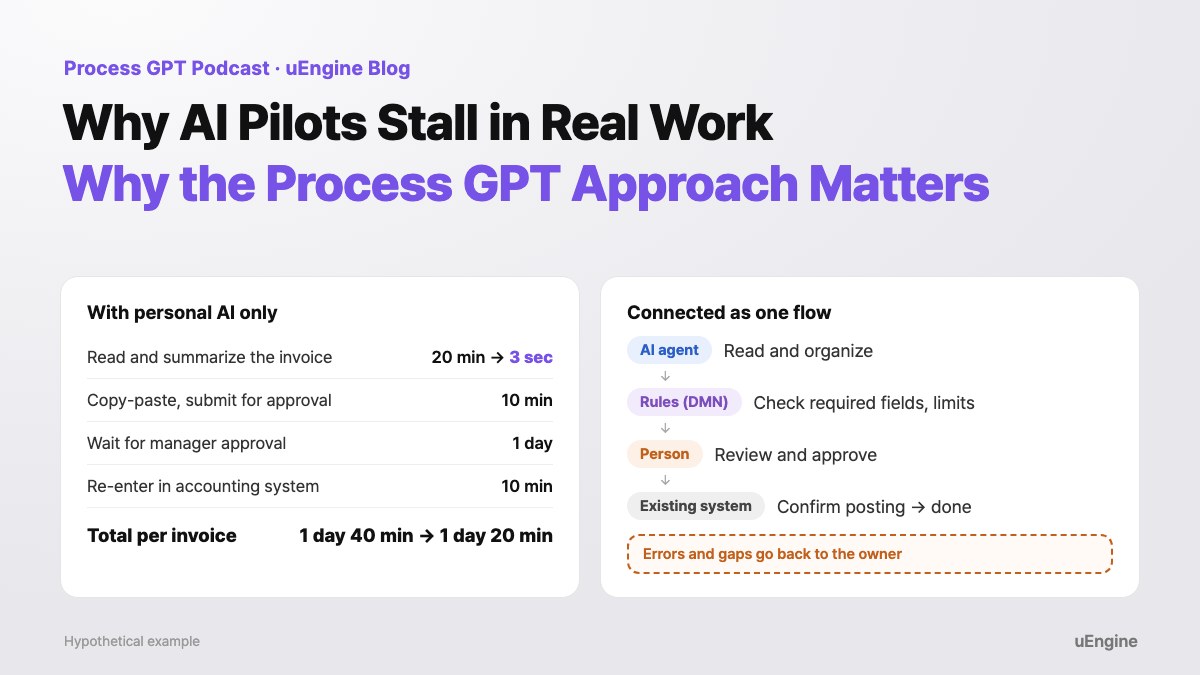
AI does in 3 seconds what used to take 20 minutes. Yet the time to finish one invoice only drops from 1 day 40 min to 1 day 20 min. The rest goes to people copying and pasting, waiting for approval, and re-entering data into another system. And if a system goes down, everything waits a few more hours.
These gaps where the flow between people and systems breaks can be called the copy-paste swamp. As long as the swamp remains, no matter how much faster individuals work, the lead time of the organization as a whole (the time from when work starts until it is done) will not shrink.
Personal AI only shortened the first row of the table: the processing step. Handoffs and waits decide how long one case takes.
3. What should you measure?
That is why how many times a day AI was used, or how many people used it, makes a poor measure of results. Process GPT targets time to completion, output quality, rework rate and operating cost. Improving them means letting go of the hope that AI will do everything on its own, and placing people, AI and existing systems on a single workflow. In restaurant terms, it is not about speeding up the prep cook's knife work but about designing the whole kitchen layout and recipe.
The first step is to draw a map of the workflow. In Process GPT, you describe it in plain words, such as "Create a flow where a purchase request goes to the team lead for approval and then purchasing places the order," and you get a map showing who does what, in what order. The map is drawn in BPMN, the international standard notation for workflows, so people can read it and edit it directly.
That said, it is not magic.
- What you draw in words is the logical flow. In-house systems you have used for over 10 years do not connect themselves. The systems you need must be connected through APIs or integration tools, and systems without an API need a separate review.
- A map drawn by AI still needs a careful human review.
4. Give people, AI and rules the work each does best
With the map drawn, you decide who takes each step. Handing everything to a smart AI may seem convenient, but it can lead to serious accidents. The flexibility that makes generative AI strong becomes a weakness in the face of strict business rules.
Suppose there is a rule: "Any corporate card spending of KRW 500,000 or more requires the team lead's approval." The AI must not read the context and decide, "This business trip was exhausting, so let's just approve it." Rules like this go to a rules tool, not to AI. Process GPT manages rules as decision tables in DMN (an international standard for organizing decision criteria in tables). The same input always gives the same result.
| Required fields (vendor, amount, date) | Amount | Result |
|---|---|---|
| Any missing | Any | Ask the owner to fill in the gap |
| All present | Under KRW 500,000 | Process after the owner checks |
| All present | KRW 500,000 or more | Team lead approval required |
The invoice criteria as a decision table. Each row is one rule.
Here is how the roles divide.
- AI agent: work that requires reading context, such as organizing documents in all kinds of formats or writing drafts
- Rules (DMN): clear-cut decisions such as checking required fields or amount limits
- People: final approval, judgment on ambiguous exceptions, and accountability for the outcome
- Existing systems: recording the confirmed result
Coordinating the work of people, AI, rules and systems as one flow like this is called business orchestration. There is no need to use generative AI for simple calculations, and no reason to leave fixed rules to an AI's judgment.
5. The same invoice, as a flow that runs to the end
Redesigning the invoice handling above in Process GPT looks like this. It is a hypothetical design example to show the structure, not a real customer's data.
If the accounting system returns an error at step 4, the work goes back to the owner. AI does not roll anything back on its own.
The three gaps people used to bridge by hand in the earlier table (pasting, setting the approval line, re-entering) are now part of one flow.
Compare it with the earlier table. Copying and pasting, setting the approval line and re-entering data into the accounting system are now connected inside the flow. The team lead receives an approval request with all the needed information already organized. Time spent on human judgment, such as waiting for approval, remains, but you can see in the records where it occurs and how long it takes.
Exception handling has to be designed too. If the amount is missing or the accounting system throws an error, will Process GPT fix it on its own? We make no such promise. If AI arbitrarily reverses something already posted to an external system, it can turn into a financial incident. Good flow design does not promise zero errors; it lays out in advance the path by which work returns to the owner when an error occurs.
6. Company context in a knowledge graph, experience in skills
How does AI know your company's budget rules or terminology? Retraining the model every time is inefficient. Process GPT uses an ontology: a knowledge graph that connects the organization's entities, relationships and rules. Agents look up this knowledge graph for evidence as they process documents. When users give feedback on results, it is organized into skills and rules and used in the next run.
That still does not bring errors to zero. The grounding gets stronger, but human review and control remain necessary. Knowledge becomes the basis for judgment, and process carries that judgment through to execution.
7. Four questions to ask before adopting
| Question | What to check | In the invoice example |
|---|---|---|
| 1. Which outcome will we change? | Time to completion, cost and rework rate, not response speed | Time from receipt to posting in accounting; share of cases sent back for missing information |
| 2. Is the whole flow connected? | Steps where people copy and paste or re-enter data | Pasting into the groupware; re-entering into the accounting system |
| 3. Who does what? | What people, AI and rules each take on at every step | Reading goes to AI, limit checks to the decision table, approval to the team lead |
| 4. Are we ready to operate? | Where errors and exceptions go | Who gets the work back when the amount is missing or the accounting system errors out? |
Implementation time, cost and savings depend on how complex the work is and on the existing environment, so they cannot be promised as numbers up front. The most realistic path is to pick one representative workflow, start small, and expand while measuring how much it improves in your own environment. Process GPT's execution analytics break elapsed time into human judgment, agent work and waiting, so you can compare before and after on the same basis.
8. How Process GPT does it
Here is which Process GPT feature each idea in this post corresponds to. The links take you to the relevant part of the product page or the tutorial.
| In this post | Process GPT feature |
|---|---|
| A workflow map drawn in words | Describe the work in a sentence or two and it creates a BPMN process with people and agents in separate lanes, plus an input form for each step. ↗ See it on the product page · ↗ Tutorial: Create a process through chat |
| Starting from a policy document | Reads a policy PDF and shows a draft with steps, owners, and approval and rejection paths by amount, together with the page numbers in the source document. It moves on only after a person approves. ↗ See it on the product page · ↗ Tutorial: Creating a process from a document |
| Rules as decision tables | Manages business rules as DMN decision tables, so an agent's branching decisions are governed by explicit rules. ↗ See it on the product page · ↗ Tutorial: Business rules (DMN) |
| Human approval and rejection | Adds approval steps on the critical path where a person must make the final call. You can also add a gateway that sends a rejected case back to an earlier step. ↗ See it on the product page · ↗ Tutorial: Approve and reject |
| Steps handled by AI | The agent works through its assigned steps in order and enters the results into each step's form. It does not make up figures that are not in the source material; it states that they are missing. ↗ See it on the product page · ↗ Tutorial: Steps handled by agents (Korean) |
| Connecting existing systems | In the MCP Hub, a connection is tested live before it is saved, permissions are granted per tool, and irreversible tools alone can be blocked. Systems with no API, only a screen, are connected with uEngine RPA. ↗ See it on the product page · ↗ Tutorial: Connect external tools with MCP |
| The company knowledge graph | While running, deep agents explore a knowledge graph built with Ontology Studio and cite the supporting clauses. ↗ See it on the product page · ↗ Tutorial: Knowledge Base |
| Turning feedback into skills | As feedback on the same task builds up, it drafts a skill improvement, gets a person's approval, then applies it. ↗ See it on the product page · ↗ Tutorial: Teach ways of working with skills |
| Measuring lead time | Breaks total elapsed time into human judgment, agent work and waiting to show where to improve. ↗ See it on the product page · ↗ Tutorial: Execution analytics |
9. Closing: from testing AI to running work with it
Process GPT is not aiming for a dazzling demo. It aims for a structure in which people take responsibility and run the work through to the end: a shift from an organization that only tests AI to one that runs its work together with AI.
Once workflows are mapped and AI and rules take over repetitive tasks and reading context, the final decisions and accountability that only people can carry become heavier and more valuable than they are today, when people spend their time copying and pasting spreadsheets.
At your next team meeting, lay out one of your team's workflows and ask the four questions. You can practice dividing work between people and agents in the Agent Storming Workshop, and plan the transformation of the whole organization with us in AX Transformation Consulting Training. If you want to start with a diagnosis together, take a look at the AX Transformation Program, which runs all the way to change management.
If you would rather try it yourself first, start with the Process GPT tutorial and the Process GPT product page.
References